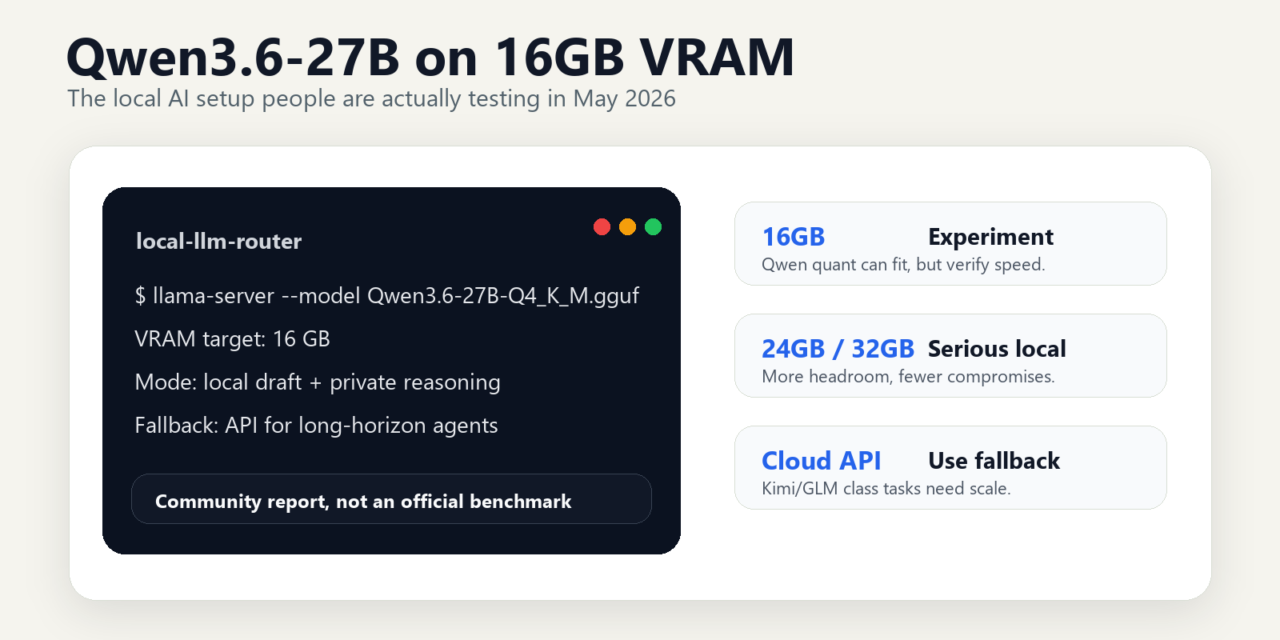
Short answer: Qwen on 16GB VRAM is worth testing if you want local AI without a workstation budget. The decision comes down to memory fit, quantization quality, speed, and whether the model performs well enough on your actual coding, writing, or agent tasks.
Updated: May 26, 2026
Blunt answer: yes, but do not buy the fantasy version
Qwen3.6-27B is worth trying locally if you already have a 16GB GPU, understand GGUF tradeoffs, and want a strong open-weight model for private drafting, coding help, tool experiments, and local agent workflows. The interesting part is not that a 27B model exists. The interesting part is that the local AI community is now trying to squeeze a serious open-weight model into consumer VRAM and still get usable generation speed.
But the practical recommendation is narrow:
- Run Qwen3.6-27B locally on 16GB VRAM if you are comfortable testing aggressive GGUF quants, reducing context length, watching memory, and accepting quality/speed tradeoffs.
- Use 24GB or 32GB+ VRAM if you want Qwen3.6-27B as a dependable daily local model rather than a weekend tuning project.
- Use Kimi K2.6 through an API or serious self-hosting stack if you want a larger model route, native INT4 support, and OpenAI/Anthropic-compatible API access without forcing everything onto one consumer GPU.
- Use GLM-5.1 through a cloud/API route if the job is long-horizon agent work where sustained execution matters more than local ownership.
- Use smaller local models if you have 12GB VRAM, need battery-friendly laptop use, or want a fast local assistant more than a heavyweight reasoning model.
The concrete recommendation: 16GB Qwen3.6-27B is a valid experiment, not the default setup for everyone. For most serious local users, the better target is 24GB VRAM or more. For production-grade agent work, pair local Qwen with a cloud/API fallback instead of pretending one quant solves every task.
For related buying and routing decisions, see Tovren’s guides to the best AI subscriptions in 2026 and the best AI coding agents in 2026.
What changed: local AI is now about usable hardware, not benchmark theater
The old local LLM question was simple: “Which model has the best benchmark?” That is no longer enough. For people actually running models at home or in small engineering teams, the real questions are more practical:
- Can the model fit in the GPU I already own?
- Can it generate fast enough to feel useful?
- How much context can I afford before memory breaks?
- Does the quant ruin the reason I wanted the larger model in the first place?
- When should I stop tuning and call a cloud model instead?
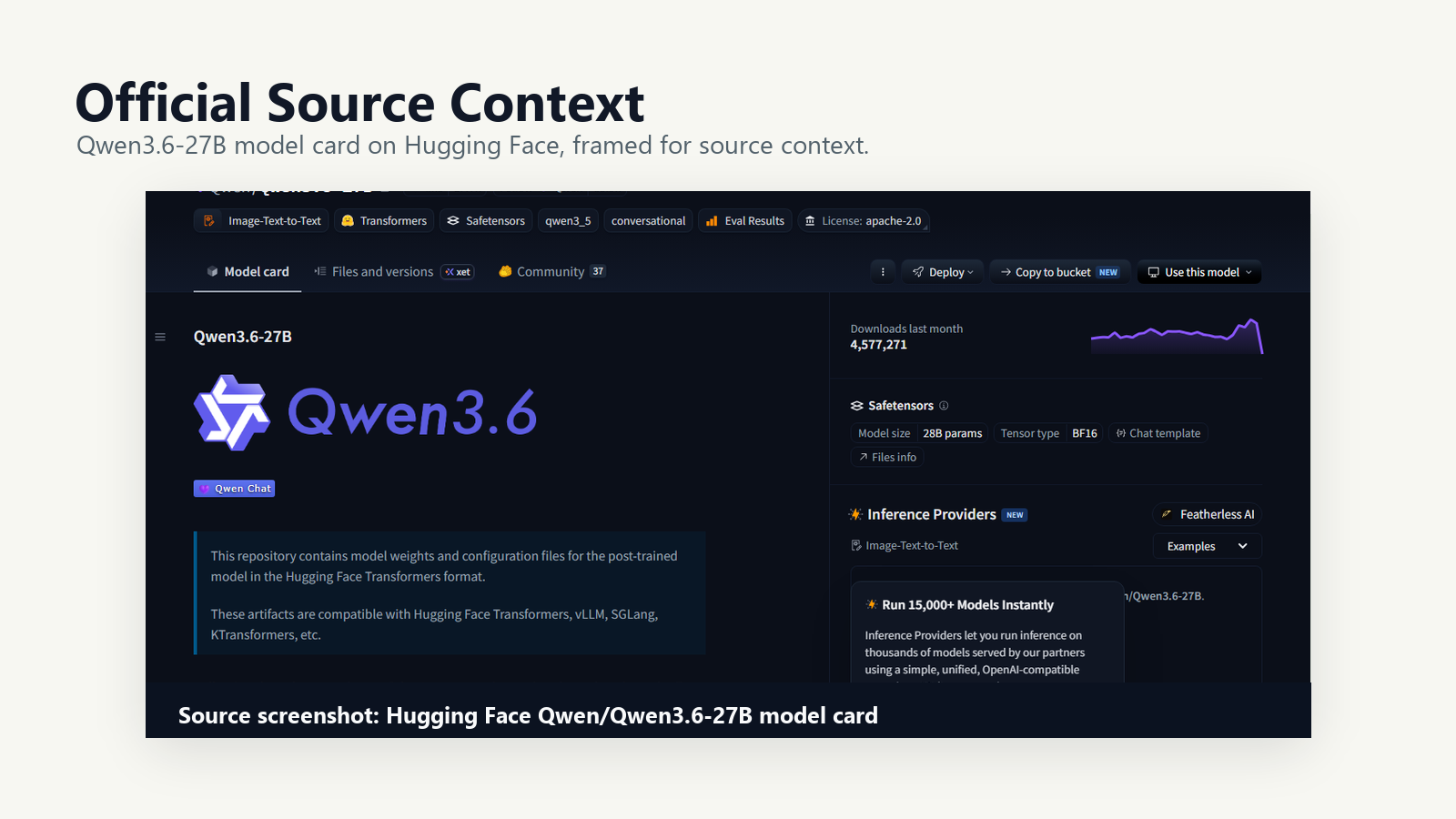
Qwen3.6-27B lands directly in that debate. The official Qwen Hugging Face model card describes Qwen3.6-27B as a post-trained model provided in Hugging Face Transformers format and compatible with Transformers, vLLM, SGLang, KTransformers, and related tooling. It also lists the model as a 27B-parameter language model with a vision encoder and gives official SGLang and vLLM serving examples, including 262,144-token context settings and tool-call parser options.
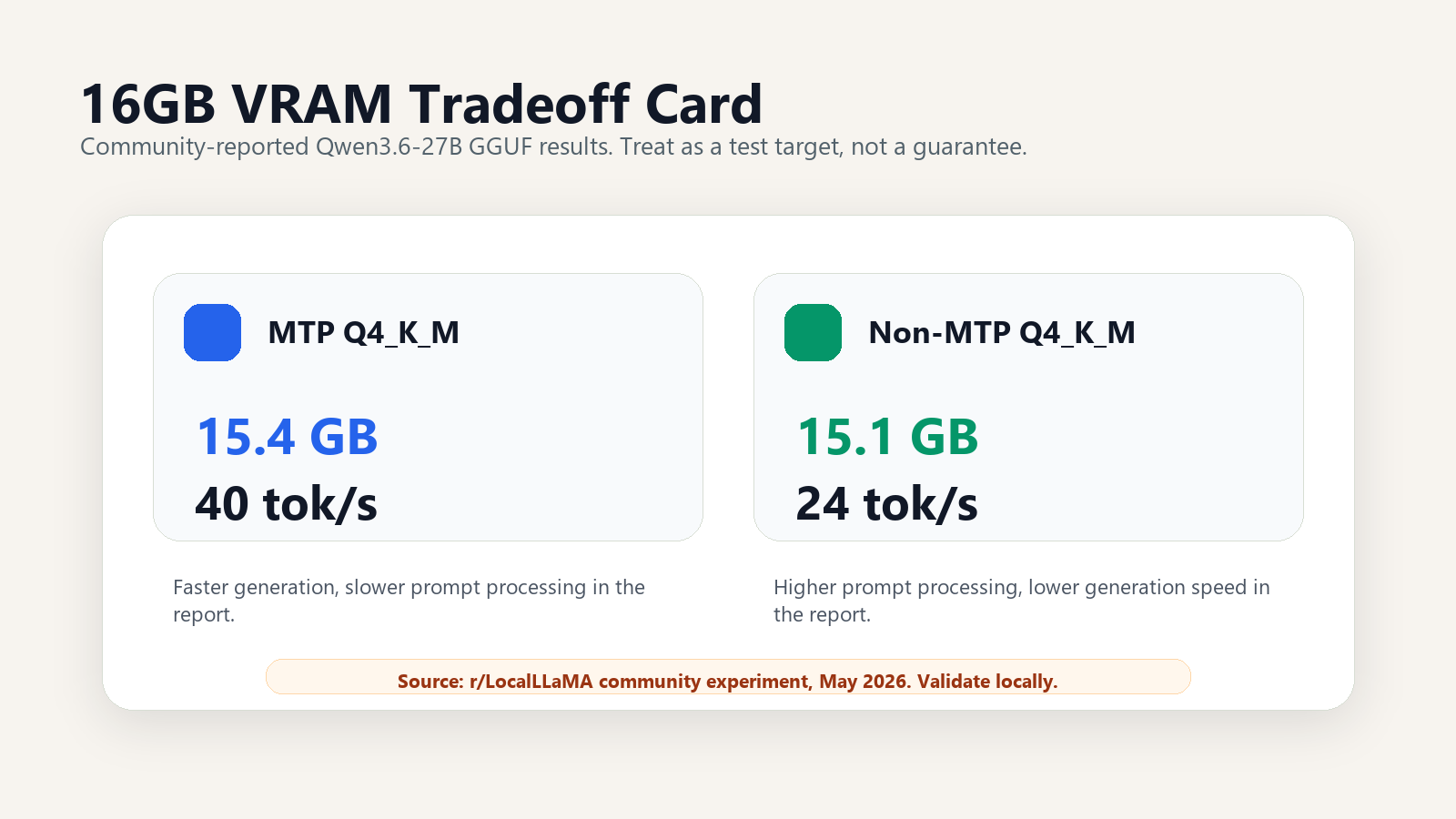
That official card does not prove that every 16GB GPU can run every Qwen3.6-27B quant smoothly. The 16GB claim comes from a separate community experiment on r/LocalLLaMA, where a user reported a Qwen3.6-27B Q4_K_M “pure” GGUF fitting into 16GB VRAM on an RTX 5060 Ti 16GB. The same post reported a 15.4GB MTP version, a 15.1GB non-MTP version, token generation of 40 tok/s for MTP, and 24 tok/s for non-MTP, with different prompt-processing tradeoffs.
That matters, but treat it correctly: it is a community experiment, not an official Qwen benchmark.
The practical decision table
| Route | Best for | What you gain | What you give up | Tovren recommendation |
|---|---|---|---|---|
| 16GB local Qwen3.6-27B quant | Local AI enthusiasts, privacy-focused users, developers testing GGUF and llama.cpp | A serious 27B open-weight model on consumer VRAM if the quant, context, and backend cooperate | Headroom. Long context, quality, prompt processing, and stability can all become tradeoffs | Try it if you already own 16GB VRAM. Do not buy 16GB solely for this. |
| 24GB/32GB local Qwen3.6-27B | Daily local LLM users, coding assistants, private document workflows, local agent experiments | More room for less aggressive quants, larger context, fewer out-of-memory failures, and more practical serving | Higher hardware cost and still not the same as a managed frontier API | The better local target for serious Qwen3.6-27B use. |
| Kimi K2.6 API/self-host route | Users who want a larger model path, API compatibility, and deployment options beyond a single gaming GPU | Kimi K2.6’s official card says it supports native INT4 quantization, API access through platform.moonshot.ai, and OpenAI/Anthropic-compatible API usage | Not the same local ownership story as a small GGUF on your desktop; self-hosting still needs serious deployment planning | Use when model capability and API reliability matter more than running everything on one PC. |
| GLM-5.1 long-horizon/cloud route | Long-running agent tasks, engineering workflows, planning/execution loops, multi-step coding work | Z.AI frames GLM-5.1 as a flagship model for long-horizon tasks and says it can work continuously and autonomously on a single task for up to 8 hours | It is not the simple “download one GGUF and run it locally on 16GB VRAM” route | Use for long-horizon work where sustained agent behavior beats local convenience. |
| Small local models | 12GB GPUs, laptops, quick chat, offline drafts, simple coding help, private notes | Fast startup, simpler setup, less VRAM pressure, easier daily use | Less capability on hard reasoning, large codebases, and long-context tasks | Use when responsiveness matters more than squeezing in a 27B model. |
Why Qwen3.6-27B is the local model people are watching
Qwen3.6-27B has three properties that make it unusually relevant to the local AI crowd.
1. It is open-weight and broadly supported by current inference tooling
The official model card says the repository contains weights and configuration files for the post-trained model in Hugging Face Transformers format. It also says the artifacts are compatible with Hugging Face Transformers, vLLM, SGLang, KTransformers, and other tooling. That matters because local AI users do not want a model that only works in a narrow demo environment.
For desktop users, the model card also points to quantizations for llama.cpp, Ollama, LM Studio, and compatible apps. That is where the 16GB discussion becomes practical: most consumer-GPU users are not loading full-precision weights. They are testing GGUF builds, quantized variants, and runtime flags.
2. The official deployment story is bigger than one desktop GPU
Qwen’s own SGLang and vLLM examples are not written as “single 16GB GPU” recipes. They show OpenAI-compatible serving patterns, reasoning parser options, tool-call parser options, MTP settings, and large context configurations. The official examples include max context length of 262,144 tokens in SGLang/vLLM examples, with notes about reducing context length if out-of-memory errors occur.
This is the key distinction: Qwen3.6-27B is officially positioned as a serious deployable model. The 16GB GGUF story is the community pushing that model into a much tighter box.
3. The community is optimizing for “fits and feels usable”
The LocalLLaMA experiment is useful because it focuses on the practical pain point: can a Q4_K_M-style GGUF fit into 16GB VRAM and still generate fast enough to use? The post reports:
- Qwen3.6-27B Q4_K_M pure GGUF fitting completely in 16GB VRAM.
- MTP version: 15.4GB model size and 40 tok/s token generation in the reported setup.
- Non-MTP version: 15.1GB model size and 24 tok/s token generation in the reported setup.
- Tradeoff: the MTP version had faster token generation but slower prompt processing; the non-MTP version had higher prompt-processing speed but lower token generation.
That is exactly the kind of tradeoff local users care about. If you are chatting interactively, token generation matters. If you are feeding large prompts, prompt processing matters. If you are building agents, both matter because the model may repeatedly read files, tool outputs, and prior steps.
The 16GB VRAM reality check
A 16GB GPU is now an interesting local AI floor, not a comfortable ceiling. The LocalLLaMA post is exciting because it shows a path to run Qwen3.6-27B inside that limit. But the margin is thin. When a quantized model is around 15.1GB or 15.4GB, the remaining space has to cover runtime overhead, KV cache, context, backend behavior, and whatever else your system is doing.
That means the correct 16GB setup is conservative:
- Do not start with maximum context.
- Do not assume every Q4_K_M file has the same memory behavior.
- Do not compare token speed without checking prompt length and context settings.
- Do not treat “fits once” as the same thing as “stable daily driver.”
- Do not run local coding agents with broad file access before you have tested them on disposable projects.
The practical 16GB user should think in profiles:
| 16GB use case | Recommended behavior | Why |
|---|---|---|
| Private chat and drafting | Use a GGUF quant, keep context moderate, test MTP and non-MTP | This is the easiest case to make usable |
| Coding help on small files | Use local Qwen for explanations, refactors, and small patches; use a coding agent only with a clean repo copy | Local privacy helps, but file changes need guardrails |
| Large repository agent work | Prefer API fallback or bigger local hardware | Context, tool calls, and repeated file reads will stress the setup |
| Long document analysis | Chunk documents and summarize progressively instead of pushing huge context | Qwen supports long context officially, but your 16GB quant may not |
| Production workflows | Use local Qwen as a private pre-pass, not the only model in the chain | You need fallbacks, logs, and repeatable behavior |
Hardware recommendations by VRAM
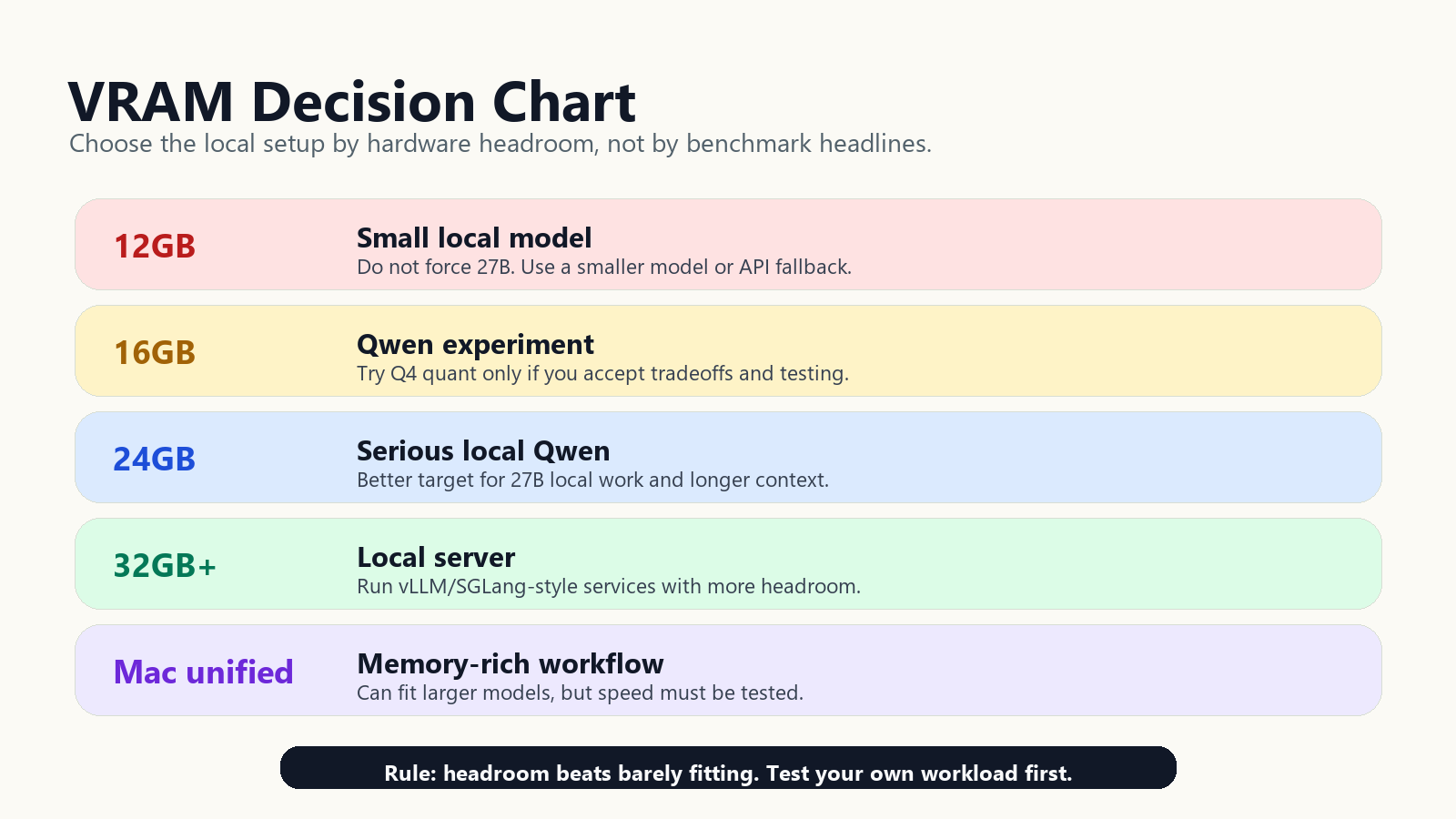
12GB VRAM
Recommendation: do not target Qwen3.6-27B as your main local model.
With 12GB VRAM, choose smaller local models or use a hybrid workflow: local model for quick private tasks, API model for hard reasoning and long context. You may see community experiments around larger models on constrained memory, but this is not the hardware tier to recommend for a dependable 27B local setup.
Best fit:
- Fast local chat
- Private notes and drafts
- Small coding explanations
- Offline fallback
- Learning llama.cpp, Ollama, LM Studio, and GGUF basics
Avoid:
- Large local coding agents
- Huge context windows
- Assuming a 27B quant will be comfortable
16GB VRAM
Recommendation: Qwen3.6-27B is worth testing, but only with realistic expectations.
This is the hot tier because the community report shows Qwen3.6-27B Q4_K_M pure GGUF fitting into 16GB VRAM, with separate MTP and non-MTP tradeoffs. That makes 16GB viable for experimenters. It does not make it the cleanest recommendation for everyone.
Best fit:
- Users who already own a 16GB GPU
- GGUF testing
- Private writing and coding assistance
- Local-first workflows with API fallback
- People willing to tune context and runtime flags
Avoid:
- Buying a new 16GB card only for Qwen3.6-27B
- Expecting full long-context behavior
- Running broad autonomous agents on important files
- Comparing your results to one Reddit post without matching setup details
24GB VRAM
Recommendation: this is the practical starting point for serious local Qwen3.6-27B use.
At 24GB, you have more room to avoid the most aggressive memory squeeze. That does not mean every setup is effortless, but it gives you a better shot at a local daily driver: more context, less panic around small overhead changes, and more flexibility to compare quant variants.
Best fit:
- Daily local LLM users
- Coding assistant workflows
- Private document analysis with chunking
- Local API endpoint experiments
- Users comparing Qwen against smaller local models
Avoid:
- Assuming 262,144-token context is automatically practical on one card
- Skipping evaluation because the model “fits”
- Letting coding agents write files without review
32GB+ VRAM
Recommendation: use this tier if you want local Qwen3.6-27B to feel like infrastructure, not a hobby setup.
With 32GB or more, Qwen3.6-27B becomes much more attractive for local API serving, coding tools, and repeatable team workflows. This is also where vLLM and SGLang become more relevant, especially if you are building an OpenAI-compatible local endpoint instead of using a desktop chat app.
Best fit:
- Local model servers
- Developer teams testing open-weight workflows
- Agent frameworks with controlled tool access
- Longer context experiments
- Comparisons against Kimi K2.6 and GLM-5.1 API routes
Avoid:
- Assuming local automatically beats API models
- Running production workloads without monitoring
- Using huge context when retrieval or chunking would work better
Mac unified memory
Recommendation: treat Mac unified memory as a good local AI environment, but not a direct VRAM-to-VRAM comparison.
Mac users should think in terms of total usable unified memory, backend support, thermal behavior, and acceptable speed. The local experience can be pleasant for private writing, research, and development assistance, but it is not the same as a high-VRAM NVIDIA setup running CUDA-oriented inference stacks.
Best fit:
- Quiet local drafting
- Research workflows
- Private document processing
- Developer assistance without cloud upload
- GGUF-based desktop tools where supported
Avoid:
- Assuming Reddit GPU speed claims apply to your Mac
- Buying memory solely around one quant
- Using a local Mac setup as the only route for long-horizon coding agents
Practical setup: three routes that make sense
Route 1: llama.cpp / GGUF for 16GB local testing
This is the route behind the current 16GB excitement. Use it when your goal is local ownership, direct desktop experimentation, and the lowest-friction way to test a quantized model.
The workflow:
- Install a current llama.cpp build.
- Choose a Qwen3.6-27B GGUF quant that explicitly targets your memory tier.
- Start with a moderate context length instead of the largest number you see in an official model card.
- Test MTP and non-MTP variants separately.
- Measure both prompt processing and token generation on your own tasks.
- Keep a smaller local model or API model ready as fallback.
A trimmed conceptual command looks like this:
llama-server \
  -m /path/to/qwen3.6-27b-quant.gguf \
  -c 32768 \
  -ngl 99 \
  --host 127.0.0.1 \
  --port 8080
Do not treat that as a magic universal command. The LocalLLaMA post used more specific flags for its reported result, including MTP-related options and context settings. The point is the operating pattern: use a GGUF file, offload layers to GPU, choose a context that fits, and test the model with your actual prompts.
For a 16GB GPU, run this test sequence:
| Test | What to check | Pass condition |
|---|---|---|
| Cold start | Does the model load without OOM? | Server starts reliably twice in a row |
| Short chat | Does token generation feel usable? | Answers stream smoothly enough for interactive use |
| Long prompt | Does prompt processing become painful? | Large prompts do not stall your workflow |
| Code task | Does it follow instructions and preserve constraints? | Output is reviewable and does not invent file context |
| Fallback trigger | When do you move to API? | You define a threshold before using it on real work |
Route 2: vLLM or SGLang for server-style Qwen3.6 deployment
Use vLLM or SGLang when you are not just chatting locally, but trying to serve Qwen3.6-27B behind an API. This is the route for developers who want OpenAI-compatible endpoints, tool calls, multi-user access, or integration with coding agents and internal apps.
Qwen’s official model card provides SGLang and vLLM examples with reasoning parser settings, tool-call parser settings, MTP-related settings, and maximum context length examples at 262,144 tokens. The official examples also warn that inference efficiency and throughput vary across frameworks and recommend current framework versions.
The practical guidance:
- Use SGLang or vLLM when serving an endpoint matters more than desktop simplicity.
- Use the tool-call parser options when you are building agent workflows that need structured tool calls.
- Use MTP settings carefully and test prompt-processing tradeoffs, not just token generation.
- Reduce context length when memory fails instead of assuming the official maximum is practical on your hardware.
- Use text-only serving when vision support is not needed and memory is tight.
This is not the right first route for a casual 16GB desktop user. It is the right route for a workstation or server user who wants Qwen3.6-27B to behave like local infrastructure.
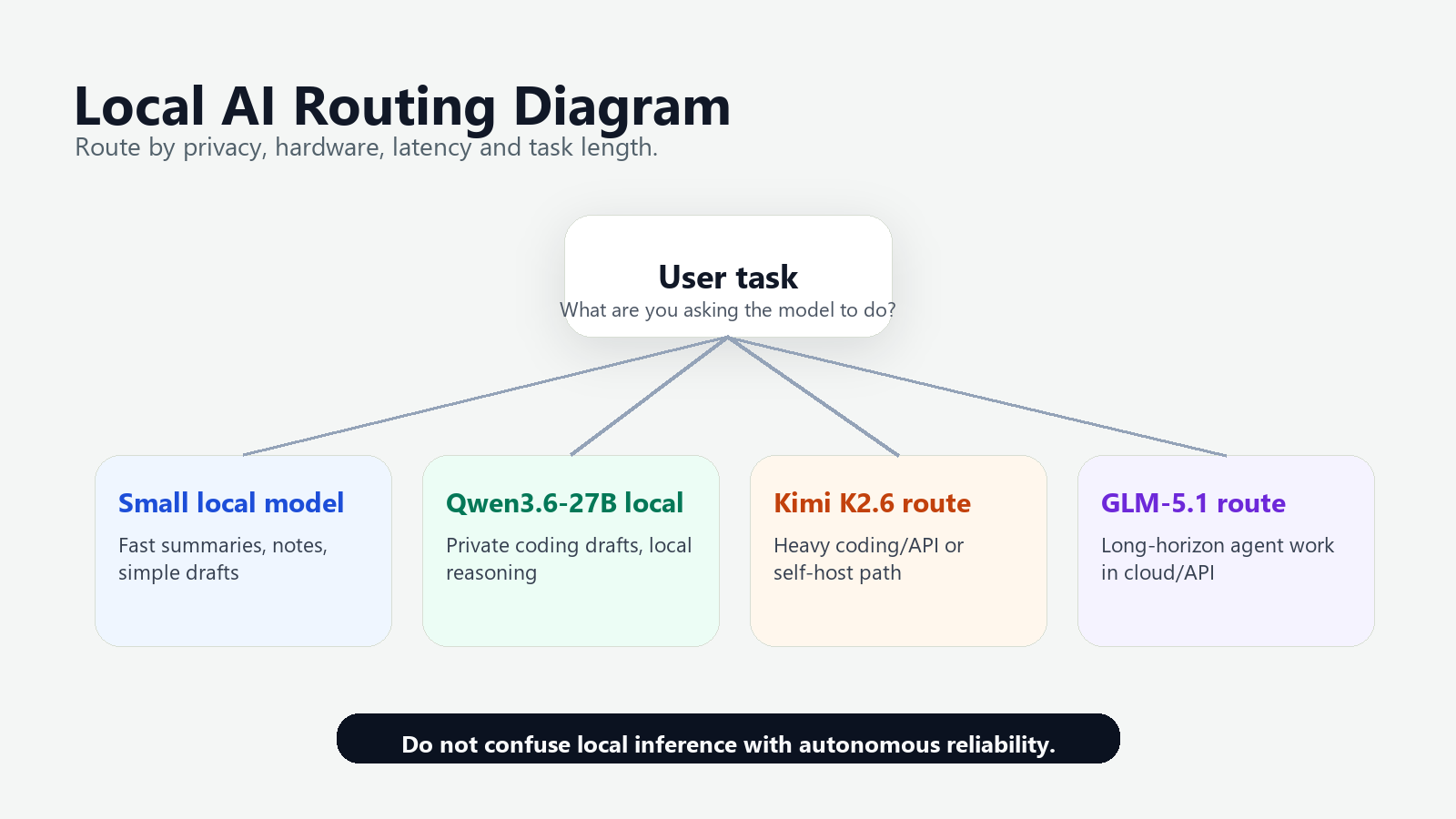
Route 3: API fallback for Kimi K2.6, GLM-5.1, and frontier models
A good local AI setup should not be religious. It should route tasks to the model that makes sense.
Kimi K2.6 is relevant here because its official Hugging Face model card says it supports native INT4 quantization, recommends vLLM, SGLang, and KTransformers for deployment, and offers API access through platform.moonshot.ai with OpenAI/Anthropic-compatible API support. That makes it a serious option when you want a more managed model route without rewriting your entire client stack.
GLM-5.1 is relevant for a different reason: Z.AI frames it as its latest flagship model for long-horizon tasks and says it can work continuously and autonomously on a single task for up to 8 hours. That is the kind of claim you should evaluate carefully, but it points to a different product category: long-running agent work rather than “what can I squeeze into my GPU?”
A practical routing setup looks like this:
| Task | First choice | Fallback | Reason |
|---|---|---|---|
| Private draft, note, or local rewrite | Local Qwen3.6-27B quant or smaller local model | Cloud/API model only if quality fails | Privacy and low marginal cost matter |
| Small coding explanation | Local Qwen3.6-27B | Kimi K2.6 API or coding agent | Local is enough when the context is small |
| Large codebase change | Coding agent with guardrails | Kimi K2.6 or GLM-5.1 route | Tool use, context, and reliability matter more than local purity |
| Long-horizon autonomous task | GLM-5.1-style long-horizon route | Human-supervised agent loop | Sustained planning and execution are the core requirement |
| Subscription-sensitive everyday use | Local model plus one paid API/subscription | Rotate based on task | One model rarely wins every workload |
For agent prompt design and safer browser-style workflows, see Tovren’s AI browser agent prompt pack. For coding-agent routing and credit considerations, see the Claude Agent SDK, credits, and OpenClaw guide.
Qwen3.6-27B vs Kimi K2.6 vs GLM-5.1: what to use now
Use Qwen3.6-27B when local control is the point
Qwen3.6-27B is the best fit when you want an open-weight model that can live inside your own setup. It is especially interesting for developers who want to test local coding workflows, private document tasks, and tool experiments without sending every prompt to a cloud service.
Choose Qwen3.6-27B if:
- You want a local open-weight model.
- You already have 16GB+ VRAM and enjoy tuning.
- You want GGUF, llama.cpp, Ollama, LM Studio, vLLM, SGLang, or KTransformers options.
- You are willing to test quant quality instead of trusting the filename.
- You need local privacy for drafts, notes, code, or documents.
Do not choose Qwen3.6-27B as your only model if:
- You need guaranteed speed on every task.
- You expect massive context on a 16GB card.
- You are running high-stakes production agents.
- You do not want to debug local inference issues.
Use Kimi K2.6 when API compatibility and larger deployment routes matter
Kimi K2.6 is not the “16GB desktop quant” answer in this article. It is the route to consider when you want a larger model ecosystem with native INT4 support, recommended deployment engines, and official API access that can work with OpenAI/Anthropic-compatible patterns.
Choose Kimi K2.6 if:
- You want an API route instead of local-only inference.
- You need compatibility with existing OpenAI-style or Anthropic-style clients.
- You are evaluating vLLM, SGLang, or KTransformers deployment.
- You want a stronger fallback for tasks your local quant handles poorly.
Do not choose Kimi K2.6 if your only goal is to run a model comfortably on one 16GB consumer GPU. That is not the practical comparison. The practical comparison is: local Qwen for private and routine work, Kimi route for heavier API-backed tasks.
Use GLM-5.1 when the job is long-horizon work
GLM-5.1 should be evaluated around sustained execution. Z.AI describes it as a flagship model designed for long-horizon tasks and says it can work continuously and autonomously on one task for up to 8 hours. That is a different promise from “fast local chat.”
Choose GLM-5.1 if:
- Your task requires planning, execution, testing, fixing, and iteration.
- You are building long-running coding or engineering agents.
- You care about sustained task progress more than local ownership.
- You have monitoring and guardrails for autonomous work.
Do not choose GLM-5.1 just because it sounds more powerful. Use it when your workflow actually needs long-horizon execution.
The setup Tovren would actually recommend
For a serious reader, the best setup is not one model. It is a routing stack:
| Layer | Recommended choice | Purpose |
|---|---|---|
| Local fast model | Small local quant | Instant chat, drafts, small rewrites, offline help |
| Local strong model | Qwen3.6-27B GGUF or server deployment | Private coding help, deeper reasoning, local document workflows |
| API fallback | Kimi K2.6 or another compatible cloud/API model | Harder reasoning, larger tasks, cases where local quant quality fails |
| Long-horizon route | GLM-5.1-style agent workflow | Multi-step tasks that require sustained execution and iteration |
| Safety layer | Repo copy, file allowlist, command review, logs | Prevent local or cloud agents from damaging real projects |
For a 16GB GPU owner, the recommended stack is:
- Install llama.cpp or a desktop wrapper that can run GGUF files.
- Test Qwen3.6-27B Q4-class GGUF variants, including MTP and non-MTP if available.
- Start with moderate context and increase only after stability is proven.
- Keep a smaller local model for fast routine tasks.
- Add an API fallback for coding, long-context, and long-horizon work.
For a new buyer, the recommendation is different: do not build a new local AI machine around the bare minimum. If Qwen3.6-27B is the target, buy for headroom.
Risk notes: where people will overread the 16GB result
Community quant speed claims are not official benchmarks
The LocalLLaMA result is useful because it is practical, specific, and reproducible enough for other enthusiasts to try. But it is not an official Qwen benchmark. It reflects one reported setup, one quantization approach, and specific runtime choices. Treat the numbers as a lead to test, not a universal guarantee.
Long context costs memory
Qwen’s official card discusses very large context settings in SGLang and vLLM examples, and it explicitly notes that users should reduce context length when they encounter out-of-memory errors. On a 16GB local quant, context length is one of the first knobs to turn down.
Local models still need good prompts
A local model is not automatically more reliable because it runs on your hardware. You still need clear task framing, constraints, examples, and verification. This is especially true when using a heavily quantized larger model: the model may feel strong in one task and brittle in another.
Coding agents need file-system guardrails
Do not let any model, local or cloud, freely edit important files without controls. Use a disposable repo copy, commit before running, limit file access, review diffs, and block destructive shell commands. Local execution reduces data exposure; it does not remove operational risk.
Quant names do not equal quality
The Reddit discussion itself highlights a key issue: a “pure” quantization approach can differ from what users expect from standard mixed-precision quant behavior. A file can fit into memory and still make quality tradeoffs that matter. Test with your real prompts before deciding.
Five reader actions to take now
- If you have 12GB VRAM: skip Qwen3.6-27B as your main local target. Use smaller local models plus an API fallback.
- If you have 16GB VRAM: test Qwen3.6-27B GGUF as an experiment. Compare MTP and non-MTP. Keep context moderate. Do not assume one Reddit speed number will match your machine.
- If you are buying hardware: aim for 24GB or 32GB+ if Qwen3.6-27B is a serious daily requirement. Headroom matters more than winning the “barely fits” game.
- If you run coding workflows: use local Qwen for private reasoning and drafts, but route large repo changes to a guarded coding-agent workflow with API fallback.
- If you need long-horizon work: evaluate GLM-5.1-style cloud/API workflows separately. Do not confuse local inference success with sustained autonomous task reliability.
Bottom line
Qwen3.6-27B on 16GB VRAM is real enough to test and risky enough to frame correctly. The community experiment shows why local AI is getting interesting again: users are not waiting for perfect official desktop recipes. They are compressing, measuring, and finding practical setups that fit the hardware people actually own.
But the best recommendation is not “everyone should run Qwen3.6-27B on 16GB.” The better recommendation is:
Use 16GB Qwen3.6-27B as a local experiment, 24GB/32GB+ Qwen3.6-27B as a serious local target, Kimi K2.6 as a heavier API/self-host route, GLM-5.1 for long-horizon agent work, and smaller local models for fast everyday tasks.
That is the local AI setup people are actually moving toward: not one model to rule them all, but a practical stack where local models, open weights, GGUF quants, and API fallbacks each do the job they are best suited for.
Sources
- Qwen/Qwen3.6-27B official Hugging Face model card — used for model format, framework compatibility, official deployment examples, context length notes, tool-call parser references, and Qwen3.6 positioning.
- r/LocalLLaMA community experiment: “Qwen3.6 27B Pure Quant: 40 tok/s on 16 GB VRAM” — used only as a community-reported experiment for the 16GB GGUF fit, MTP/non-MTP file sizes, and reported token-speed tradeoffs.
- moonshotai/Kimi-K2.6 official Hugging Face model card — used for native INT4 quantization, API access through platform.moonshot.ai, OpenAI/Anthropic-compatible API support, and recommended deployment engines.
- Z.AI GLM-5.1 official documentation — used for GLM-5.1 positioning as a flagship long-horizon model and the stated up-to-8-hour autonomous task capability.
FAQ
Can Qwen run on 16GB VRAM?
It can be practical with the right quantization and serving setup, but performance depends on context length, batch size, and workload.
Who should test a local Qwen setup?
Developers, privacy-sensitive teams, local AI hobbyists, and businesses evaluating cloud cost or data-control tradeoffs should test it.
What should be measured first?
Measure tokens per second, memory use, answer quality, tool compatibility, and whether the local model beats a cheaper hosted option for the task.