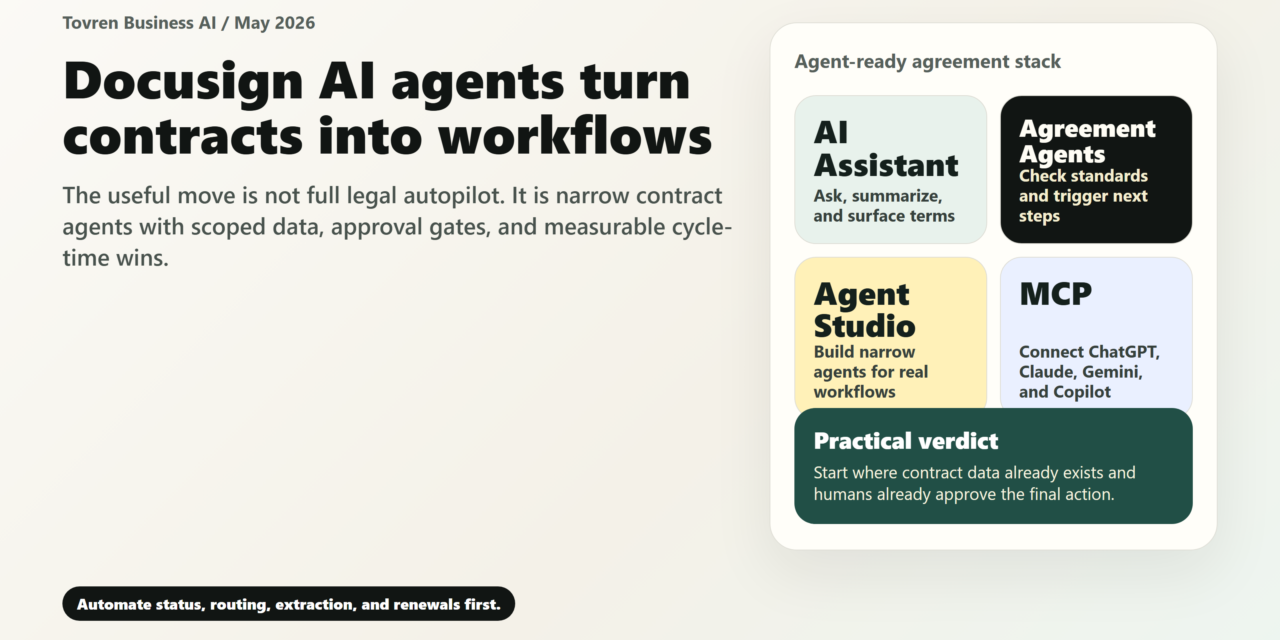
Short answer: Docusign AI agents are most useful when they reduce contract bottlenecks without removing legal review. Start with intake, clause lookup, routing, and status tracking before letting agents influence negotiated language.
Verdict: Docusign’s May 2026 AI push is worth paying attention to because contract work has the right ingredients for useful enterprise agents: structured documents, repeatable workflows, clear approval paths, and measurable bottlenecks. But the practical move is not to “AI automate contracts.” It is to automate narrow, low-to-medium-risk agreement tasks first: status checks, clause extraction, intake routing, renewal alerts, standard-template generation, approval preparation, and post-signature handoffs. Keep humans in control of high-risk actions such as redline acceptance, non-standard terms, signature routing, legal conclusions, and anything that changes system state. Docusign’s MCP support could make agreement data accessible from tools such as Claude, Gemini, ChatGPT, Microsoft Copilot, and legal AI platforms, but the safest rollout starts with one agreement type, one workflow, and one approval gate.
What changed
Docusign announced new AI-powered capabilities at Momentum on May 21, 2026, centered on Iris, its agreement AI engine. The announcement covered an AI Assistant, Agreement Agents, Agent Studio, and broader Model Context Protocol support for connecting agreement work to AI and business systems.
Confirmed facts from Docusign’s own materials:
- Iris is Docusign’s AI engine for agreements. Docusign positions Iris as the layer for agreement insights, agents, alerts, risk flagging, obligations, renewals, and connected agentic tools.
- Agents are designed to act on contract workflows, not just summarize documents. Docusign says agents can check agreements against company standards, suggest edits, request approvals, monitor contracts, flag risks, track obligations, and trigger next steps.
- Agent Studio is for custom agreement agents. The pitch is that teams can build agents for their own workflows, including deals, renewals, approvals, and other agreement processes.
- Docusign MCP connects agreement work to external AI surfaces. Docusign names Anthropic Claude, Gemini, and OpenAI ChatGPT as frontier-model surfaces connected through MCP.
- Docusign also names business and legal integrations. The announcement mentions Coupa, Microsoft Copilot, Salesforce, SAP, Slack, Harvey, Legora, and CoCounsel by Thomson Reuters.
- Availability is limited by product and region. Docusign says the AI Assistant, agents, and Agent Studio are in early access in the U.S. and will roll out in the U.S. starting in July. Docusign MCP is globally available in beta in English.
- MCP can query agreement data and trigger workflows. Docusign’s developer materials describe tools such as
getAllAgreements,getAgreementDetails,getWorkflowTriggerRequirements, andtriggerWorkflow. - High-impact actions are supposed to stay approval-aware. Docusign says actions that change system state, such as triggering workflows or creating envelopes, are annotated so supported LLM platforms can prompt for user confirmation. Admins still need to test the exact approval experience in their chosen integration.
Interpretation: The important shift is from “AI reads the contract” to “AI reads the contract, checks context, prepares an action, and routes that action through a governed workflow.” That matters because many contract AI pilots fail when the tool is document-only: it can summarize a clause, but it does not know the matter context, approval matrix, playbook, CRM opportunity, vendor record, renewal owner, or final workflow step.
What this actually replaces
The best use of agreement agents is not replacing lawyers, sales reps, procurement managers, HR operations, or finance reviewers. The first replacement target is the repetitive coordination work around contracts.
Start with tasks like these:
- Searching for the latest signed agreement with a customer, employee, supplier, or partner.
- Extracting payment terms, renewal dates, termination rights, governing law, indemnity language, assignment restrictions, or data-processing obligations.
- Checking whether a draft uses the approved template and playbook positions.
- Preparing an approval request when a contract deviates from standard terms.
- Generating a standard NDA, offer letter, order form, amendment, renewal notice, or vendor onboarding packet from approved inputs.
- Routing an agreement for signature after required approvals are complete.
- Alerting the contract owner before renewal, notice, price increase, audit, or termination deadlines.
- Updating CRM, procurement, HRIS, finance, or storage systems after signature.
- Answering status questions such as “Which agreements are pending signature for more than a week?”
- Creating a first-pass risk summary for human review.
The agent should become the contract operations coordinator. It should not become the final legal decision-maker.
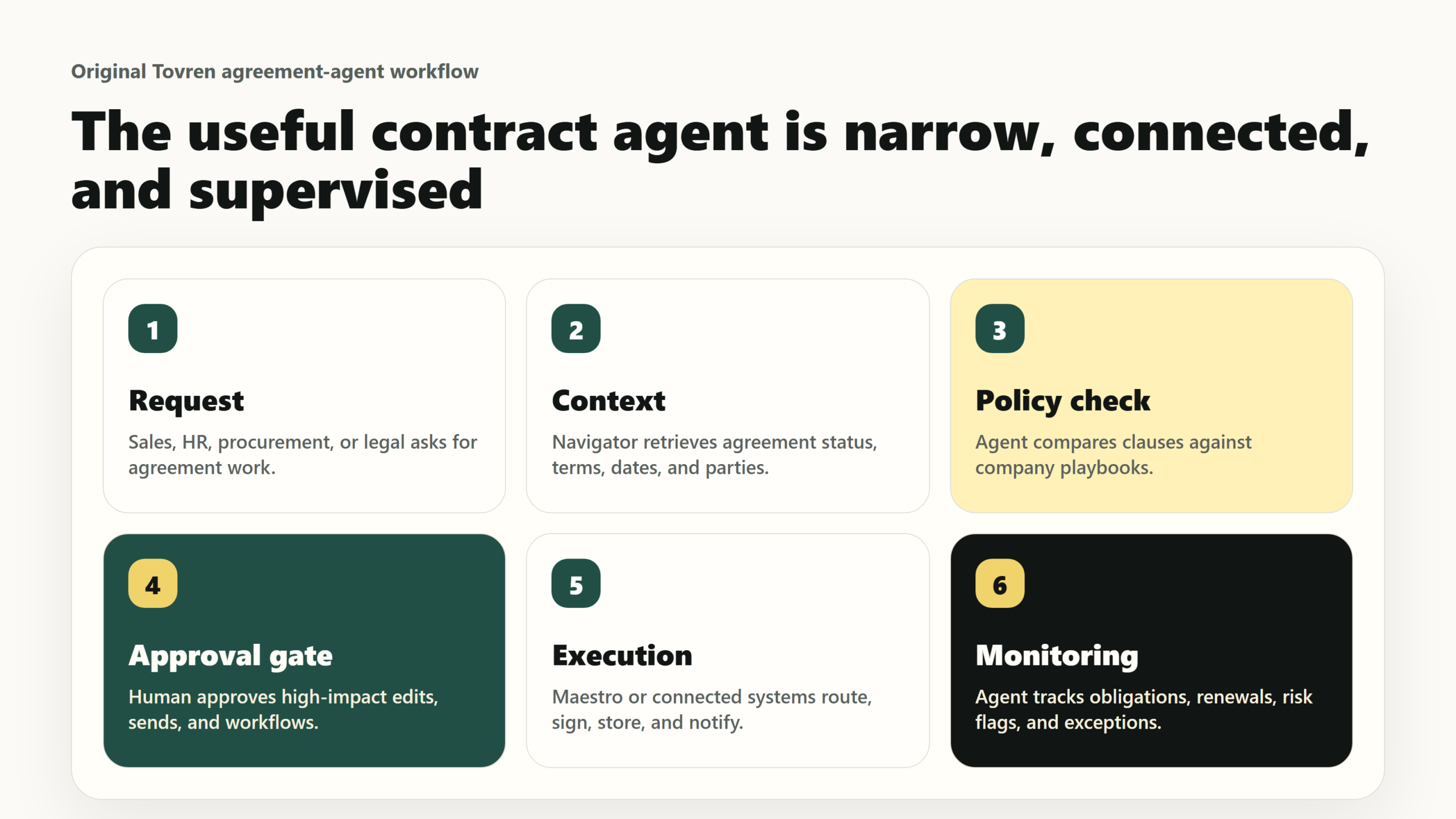
Best first automations
The safest first builds have five traits: a repeatable trigger, a known owner, limited data access, a visible approval gate, and a metric that proves whether the workflow improved. Use this table as the starting backlog.
| Workflow | Owner | Trigger | Data needed | Approval gate | Success metric |
|---|---|---|---|---|---|
| Contract status assistant | Sales ops or legal ops | A seller, manager, or executive asks for status on an agreement. | Agreement ID, counterparty, envelope status, recipient progress, timestamps, CRM opportunity ID. | No approval needed for read-only status, but access must follow user permissions. | Reduction in “where is this contract?” messages and average response time. |
| NDA generation from approved template | Sales ops or legal ops | A rep requests a standard mutual or one-way NDA. | Template, legal entity, counterparty name, signer details, jurisdiction, CRM account record. | Human approval if template, governing law, confidentiality term, or counterparty type is non-standard. | Median time from request to sent NDA. |
| Third-party paper intake triage | Legal ops | A customer or vendor sends its own contract form. | Document, counterparty, deal value, agreement type, business owner, playbook, prior agreements. | Legal review before redlines are sent externally or accepted. | Percentage of incoming contracts categorized and routed within one business day. |
| Clause deviation summary | Legal | A draft contains terms outside the company playbook. | Company standards, fallback positions, clause library, agreement metadata, counterparty history. | Lawyer approval before any suggested edit becomes an official redline. | Reviewer time saved per contract and number of missed deviations caught. |
| Renewal and notice-date monitoring | Finance, customer success, or procurement | A renewal, price change, termination notice, or auto-renewal window is approaching. | Signed agreement, renewal clause, notice period, owner, spend or revenue value, account health. | Business owner approval before sending a notice, renewal offer, cancellation, or price-change communication. | Missed renewal deadlines, renewal leakage, and on-time notice rate. |
| Vendor contract risk flagging | Procurement or legal | A new supplier agreement enters review. | Vendor record, contract type, spend tier, data access level, security requirements, standard clauses. | Legal, security, or procurement approval for non-standard liability, data, audit, assignment, or payment terms. | Cycle time for vendor review and number of escalations routed correctly. |
| Offer letter and employment agreement routing | HR ops | A recruiter or HR partner requests an offer package. | Approved template, candidate details, role, location, compensation inputs, approver list, HRIS record. | HR and compensation approval before sending; legal approval for non-standard clauses or jurisdictions. | Time from approved requisition to sent offer package. |
| Post-signature system update | IT, RevOps, procurement ops, or finance ops | An agreement is fully executed. | Signed document, metadata, counterparty, effective date, renewal date, obligations, system-of-record mapping. | Human review for extracted financial, legal, or compliance obligations before they become operational records. | Percentage of signed agreements stored, tagged, and synced within 24 hours. |
| Approval packet preparation | Legal ops or sales ops | A contract requires finance, security, legal, or executive approval. | Deal value, risk summary, non-standard terms, approver matrix, prior precedent, customer or vendor context. | Approver must explicitly accept, reject, or request changes. | Approval cycle time and percentage of approval requests returned for missing context. |
| Obligation tracker | Finance, procurement, legal ops, or customer success | A signed contract includes follow-up obligations. | Obligation clauses, owner, due date, evidence required, customer or vendor record, workflow owner. | Owner confirmation before tasks are assigned or deadlines are committed in another system. | Obligations captured, assigned, and completed on time. |
Decision table: where each team should start
Different teams should not use the same first automation. Choose the use case where the agreement data is available, the workflow is already repeatable, and the downside of a wrong recommendation is contained by an approval gate.
| Team | Best first use case | Why it is a good starting point | Risk level | Keep human approval on |
|---|---|---|---|---|
| Sales | NDA generation, contract status, quote/order-form routing | High volume, clear templates, obvious cycle-time benefit. | Low to medium | Non-standard terms, discount-linked clauses, customer paper, signature send. |
| Legal | Third-party paper triage and clause deviation summaries | Agents can reduce search and first-pass review work while lawyers keep judgment. | Medium to high | Redline acceptance, legal advice, external negotiation position, escalations. |
| Procurement | Vendor intake, supplier agreement risk flags, renewal notices | Supplier agreements usually have repeatable risk categories and approval paths. | Medium | Liability caps, data-processing terms, security exceptions, payment changes. |
| HR | Offer letter and employment agreement preparation | Templates are structured, but location and compensation rules require controls. | Medium | Compensation, job location, employment classification, non-standard terms. |
| Finance | Payment-term extraction, renewal tracking, obligation handoff | Finance benefits when signed agreements become structured operational data. | Medium | Revenue recognition inputs, payment commitments, credits, refunds, renewal actions. |
| IT | Permission-aware search, audit trails, system integration, post-signature sync | IT can turn agents into governed workflows instead of unmanaged AI access. | Medium to high | Production deployment, data scope, external connectors, workflow triggers, access changes. |
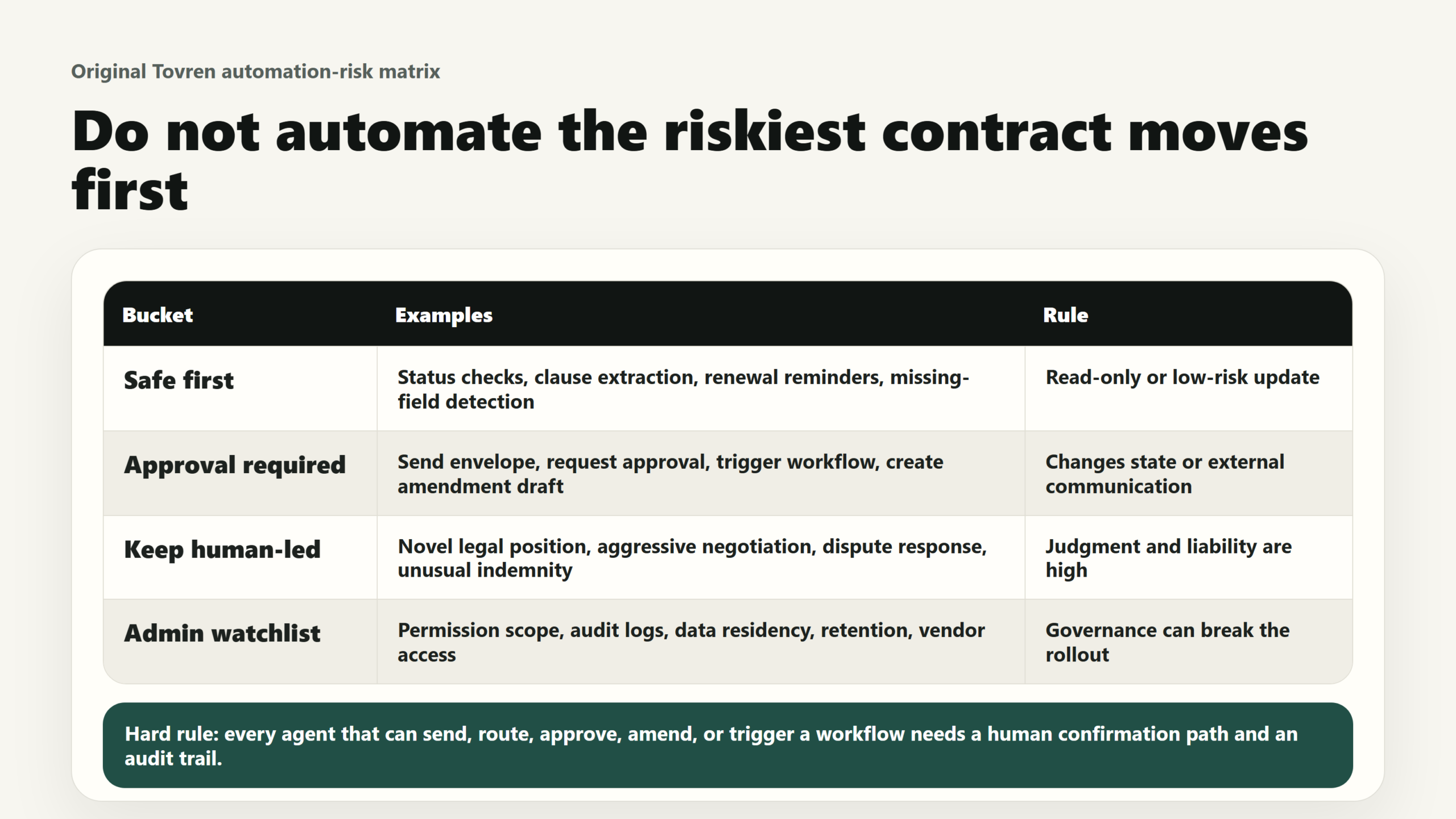
Do not automate this yet
Set hard boundaries before any pilot. The goal is not maximum autonomy. The goal is faster contract work with fewer hidden mistakes.
- Do not let an agent accept redlines without a human reviewer. Suggested edits are useful. Final negotiation positions need legal ownership.
- Do not let an agent send high-value agreements for signature without confirmation. Signature routing changes system state and can create business commitments.
- Do not let an agent decide legal risk tolerance. It can summarize deviations from the playbook; it should not decide that a risky clause is acceptable.
- Do not start with all contract types. Start with one agreement family, such as NDAs, vendor MSAs, offer letters, order forms, or renewals.
- Do not connect broad repository search on day one. Use targeted, user-scoped queries rather than broad pulls across the whole agreement repository.
- Do not use agents to bypass approval policy. If the current workflow requires legal, finance, security, HR, or executive approval, the agent should prepare the packet and route it, not skip it.
- Do not rely on a chatbot transcript as the audit trail. Keep workflow events, approvals, source documents, extracted fields, and final decisions in the systems of record.
- Do not assume every MCP surface behaves the same way. Docusign says high-impact actions can be annotated for confirmation, but the approval experience depends on the calling platform’s implementation. Test each environment.
- Do not automate regulated, cross-border, employment, privacy, or security-sensitive contracts without specialist review. These can depend on jurisdiction, industry, data category, and business context.
A practical 7-day rollout plan
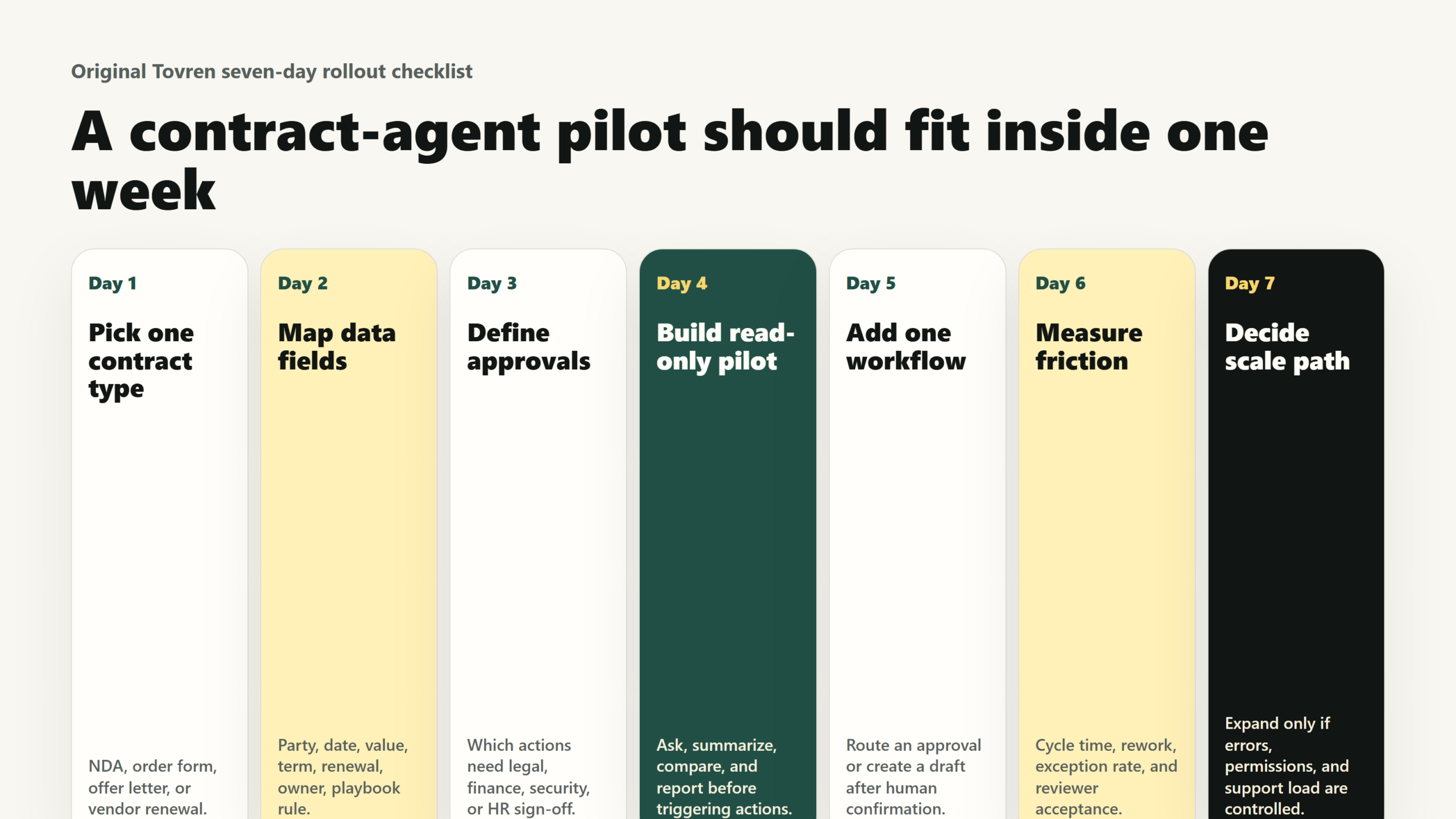
Day 1: Pick one workflow
Choose one narrow workflow with clear volume and low ambiguity. Good candidates are NDA generation, agreement status lookup, vendor intake triage, or renewal alerting. Write the pilot in one sentence: “When X happens, the agent should gather Y, prepare Z, and route it to A for approval.”
Day 2: Define the contract playbook
List the approved template, required fields, fallback positions, escalation rules, and blocked actions. This is where most agent pilots succeed or fail. If the team cannot write the rule, the agent should not improvise it.
Day 3: Map the data
Identify the exact data the agent needs: agreement type, counterparty, signer, value, renewal date, governing law, approval matrix, CRM record, vendor record, HR record, or finance owner. Remove anything not needed for the pilot.
Day 4: Build the approval gate
Decide which actions are read-only, which actions prepare a draft, and which actions require explicit confirmation. At minimum, require human approval for workflow triggers, envelope creation, external sends, redline acceptance, obligation assignment, and updates to systems of record.
Day 5: Test with real edge cases
Use a small set of representative agreements. Include one clean example, one missing-data example, one non-standard clause, one wrong counterparty, and one agreement the user should not be able to access. The pilot is not ready if it only works on perfect documents.
Day 6: Run a shadow pilot
Let the agent prepare outputs while humans continue the old process. Compare agent summaries, extracted fields, routing suggestions, and approval packets against the human result. Track false positives, false negatives, missing context, and time saved.
Day 7: Launch with controls
Move the workflow into limited production for a small user group. Publish the boundary rules, escalation path, owner, metrics, and rollback process. Review the first week’s outputs before adding another agreement type or workflow trigger.
Buyer and admin checklist
Before buying, expanding, or enabling Docusign AI agents, the practical question is not “Does it have AI?” The question is whether your agreement environment is ready for agentic workflows.
- Availability: Confirm whether AI Assistant, Agreement Agents, Agent Studio, MCP, and any connector you need are available in your region, language, edition, and environment.
- Permissions: Verify that agreement data access follows existing Docusign permissions and that test users cannot retrieve agreements they should not see.
- Approval behavior: Test how your chosen AI surface handles confirmation for workflow triggers, envelope creation, and other state-changing actions.
- Workflow Builder readiness: Confirm that the target workflow already exists, has defined trigger requirements, and includes the right approvers.
- Template hygiene: Clean up duplicate templates, outdated forms, confusing names, and missing metadata before exposing templates to an agent.
- Playbook quality: Document standard terms, fallback language, escalation rules, and blocked clauses in a form the agent can use consistently.
- System integrations: Identify which systems need to read from or write to the workflow, such as Salesforce, Microsoft Copilot, SAP, Coupa, Slack, HRIS, finance, or document storage.
- Audit trail: Make sure the system records what the agent retrieved, recommended, generated, routed, and triggered, plus who approved it.
- Data minimization: Start with the smallest useful agreement population and avoid broad repository-level pulls.
- Exception handling: Define what happens when the agent sees missing fields, conflicting records, non-standard language, unsupported jurisdictions, or low-confidence outputs.
- Metrics: Pick two operating metrics and one risk metric before launch. Examples: cycle time, approval turnaround, missed renewal notices, incorrect routing, and human override rate.
- Rollback: Keep a simple way to disable the agent workflow without breaking the underlying agreement process.
Admin prompt template for the first workflow
Use a simple control prompt or agent instruction like this as a starting point. Adapt it to your actual Docusign environment, policies, and approval matrix.
Agent instruction:
You help users prepare and route standard [agreement type] requests. You may retrieve agreement status, extract metadata, compare the draft against the approved playbook, and prepare an approval packet. You must not accept redlines, send an agreement externally, trigger a workflow, create an envelope, update a system of record, or assign obligations unless the user confirms the action and the workflow rules allow it. If required data is missing, if the agreement uses non-standard language, if the counterparty or template is ambiguous, or if the user lacks permission to view the agreement, stop and escalate to [owner/team]. Always show the source agreement, extracted fields, confidence level, and reason for escalation.
FAQ
Are Docusign AI agents generally available now?
Not fully. Docusign says the AI Assistant, agents, and Agent Studio are in early access in the U.S. and will roll out in the U.S. starting in July. Docusign MCP is globally available in beta in English. Teams should confirm availability for their account, region, language, and integration surface before planning production work.
What is the difference between Docusign AI Assistant, Agreement Agents, Agent Studio, and MCP?
The AI Assistant is the natural-language interface. Agreement Agents are purpose-built agents for agreement tasks. Agent Studio is the environment for creating custom agents. MCP is the protocol-based connection that lets external AI platforms and tools query Docusign agreement data or trigger Docusign workflows, subject to permissions and approvals.
Should legal teams worry that agents will replace contract review?
The immediate use case is not replacing legal judgment. The useful near-term role is first-pass review support: finding agreements, extracting terms, comparing drafts to playbooks, preparing approval packets, and routing workflow steps. Legal should keep control over redlines, negotiation positions, risk acceptance, and unusual fact patterns.
What should a small company automate first?
Start with status lookup, NDA generation, or renewal reminders. These workflows are easier to constrain than full MSA review, and the value is visible quickly. Avoid starting with complex customer paper, regulated employment agreements, privacy-heavy vendor contracts, or high-value non-standard deals.
Does MCP mean employees can use any chatbot to access all contract data?
No. Docusign’s developer materials say users must sign in and that agreement data is scoped to the permissions tied to the user’s account. Admins still need to test the specific integration, restrict data access, and confirm how the chosen AI platform handles approval prompts and audit trails.
Source Log
- Docusign press release, May 21, 2026: https://www.docusign.com/company/news-center/docusign-unveils-ai-assistant-and-agents-to-power-the-next-era-of-agreement-work — Primary source for the AI Assistant, agents, Agent Studio, MCP integrations, named partners, and availability claims.
- Docusign developer blog on MCP legal AI integration patterns: https://www.docusign.com/blog/developers/docusign-mcp-server-legal-ai-integration — Primary source for MCP patterns, Agreement Manager and Workflow Builder roles, tool examples, approval constraints, permission scoping, and narrow-build guidance.
- Docusign developer blog on Microsoft Copilot Studio: https://www.docusign.com/blog/developers/build-docusign-agreement-agents-microsoft-copilot-studio — Primary source for no-code Copilot Studio agent examples, permission-aware access, demo-environment status, and production-availability caution.
- Docusign Iris product page: https://www.docusign.com/products/platform/ai — Primary source for Docusign’s Iris positioning around agreement AI, insights, alerts, risk flagging, obligations, renewals, and agentic tools.
- Legaltech community signal: Community discussions across legaltech channels frequently warn that document-only contract AI is weak when disconnected from matter context, approvals, redlines, and workflows. This article uses that as editorial framing only, not as a quantified claim.
Editorial takeaway
Docusign’s agent strategy is credible because contracts are not just documents; they are workflows with owners, data, approvals, deadlines, and business consequences. The winning implementation will be boring on purpose: narrow workflow, permission-scoped data, clear playbook, explicit approval gate, measurable cycle-time gain. Automate the coordination first. Keep judgment, negotiation, and high-risk execution in human hands.