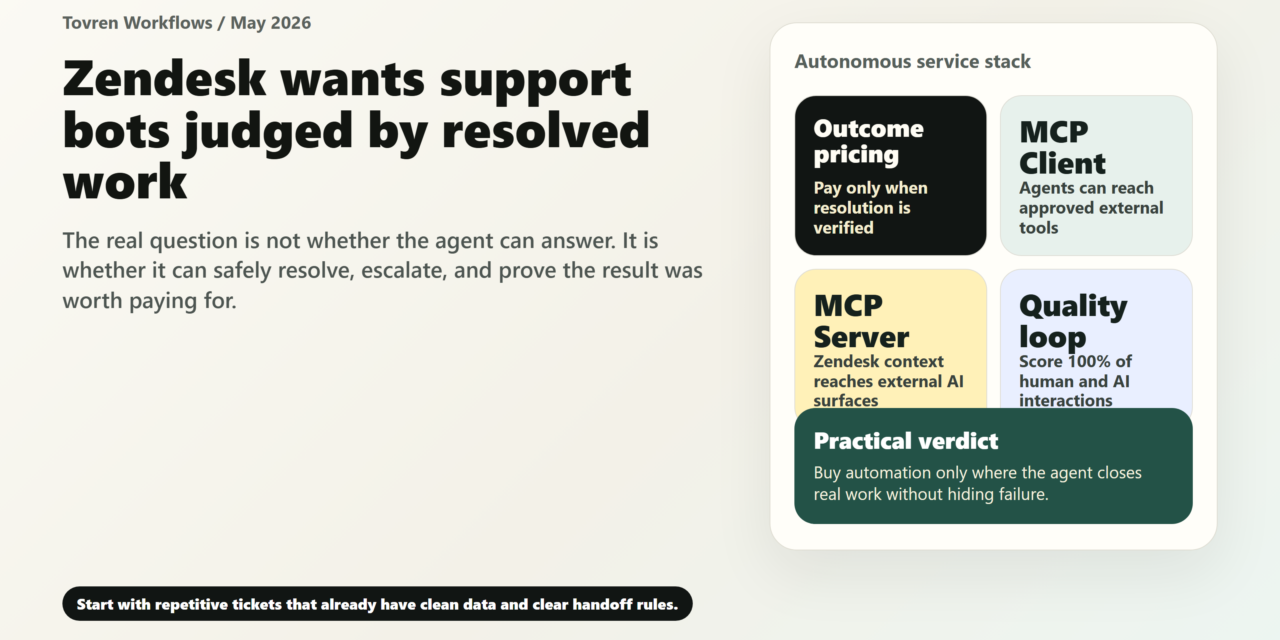
Short answer: Support teams should automate narrow service workflows first: triage, suggested replies, knowledge lookup, and routing. Do not give Zendesk agents broad customer-impacting authority until escalation, logging, and pricing are understood.
Verdict: Zendesk’s Relate 2026 announcement is a buying trigger, not a mandate to automate everything. The practical move is to automate narrow, repeatable workflows where the AI can identify intent, retrieve trusted data, take a bounded action, and escalate cleanly when confidence or policy fails. Start with order status, password resets, subscription changes, knowledge-backed FAQs, returns eligibility, appointment changes, IT access requests, and ticket triage. Do not start with refunds, regulated advice, emotionally sensitive complaints, fraud disputes, contract exceptions, or anything that requires judgment without a clear approval rule. Outcome-based pricing can be rational if verified resolutions cost less than your true human cost per resolution after recontacts and QA failures. Test that before signing a broad commitment.
What Zendesk actually announced
At Relate 2026 on May 19, 2026, Zendesk announced what it calls the Autonomous Service Workforce: a service operating model built around specialized AI agents, copilots, connected knowledge, workflow actions, governance, analytics, and outcome-based pricing.
Confirmed facts from Zendesk’s official announcements:
- Zendesk Resolution Platform: Zendesk says the platform is trained on roughly 20 billion ticket interactions and uses a Resolution Learning Loop to improve knowledge, workflows, and automated responses over time.
- Omnichannel AI agents: Zendesk says its AI agents operate across messaging, email, voice, backend systems, and external AI platforms such as ChatGPT and Gemini.
- Agent Builder and Custom Agents: Agent Builder is in early access and is designed to let teams build, test, deploy, and optimize custom AI agents using natural language.
- Action Flows: Zendesk announced Action Flows for AI Agents, with 40 prebuilt workflow connectors and more than 100 additional apps planned by year end. Its Relate blog says Action Flows are in early access and generally available this summer.
- MCP support: Zendesk announced MCP Client and MCP Server capabilities. MCP Server is intended to connect Zendesk tickets, knowledge, and customer data to external AI systems in a governed way.
- Copilots: Zendesk announced updates for Agent Copilot, Admin Copilot, Knowledge Copilot, and Analyst Copilot. Zendesk says Agent Copilot can generate procedures and take action on at least 30% of tickets from day one. Admin Copilot is generally available and Zendesk says it includes 70+ proactive recommendations.
- Knowledge connectors: Zendesk says Knowledge Connectors are generally available and can connect knowledge sources such as Notion, SharePoint, and Google Drive, with PDF ingestion for SharePoint and Google Drive.
- Quality Score: Zendesk announced Quality Score to analyze 100% of human and AI interactions. It is coming soon in early access.
- Outcome-based pricing: Zendesk says it is expanding outcome-based pricing. The company says every charged resolution is verified by the AI agent completing the interaction end to end and independently confirmed by an AI evaluation model. Zendesk also says spam and routine exchanges are excluded.
- Availability: Agent Builder is in early access now. Voice AI Agents are planned for general availability later this quarter. Employee Service AI agents and MCP Server are planned for early access this summer. Admin Copilot and Knowledge Graph connectors are generally available now. Quality Score is coming soon in early access.
The migration clock matters
Separately, Zendesk announced expanded access to advanced AI agent capabilities across Suite and Support plans. The rollout runs from May 11 to June 12, 2026. For existing customers who have never created an AI agent, or who use basic messaging responses, Essential AI agents, or legacy AI agent functionality, Zendesk says the new experience rolls out between May 25 and June 12, 2026.
The deadline is sharper for legacy users: Zendesk says technical development for AI Agents Essential and legacy functionality stops on August 31, 2026, except for critical bug fixes and breaking-change support. Full service shutoff is scheduled for December 10, 2026. Zendesk recommends completing migration by August 31.
ChatGPT is one channel, not the whole story
Zendesk’s April 30, 2026 Help Center announcement introduced an early access program for providing customer support inside OpenAI’s ChatGPT. The EAP uses OpenAI’s Apps SDK and Zendesk’s MCP server. Zendesk says businesses can use Help Center content, authenticated personalized support, Action Flows, human escalation, ticket creation, and unified context/reporting in Zendesk. The EAP is free during early access, with pricing and packaging to come at general availability.
That matters, but it should not dominate the buying decision. The larger shift is that support work is moving into many AI surfaces and channels. Zendesk’s bet is that companies will need governed support actions wherever customers ask for help.
Why this matters now
Zendesk is not just renaming chatbots. It is tying three changes together: outcome-based pricing, agentic workflows, and external AI assistant channels.
1. Pricing moves from seats and deflection toward verified outcomes
Traditional bot ROI often depended on deflection: fewer tickets reaching humans. That metric is easy to game. A customer who gives up, repeats the question later, or opens a second ticket is not a success.
Zendesk’s current direction puts more weight on verified resolutions. In Zendesk’s AI agent reporting update, the company distinguishes between contained resolutions and verified resolutions. It says customers continue to be billed only for verified resolutions, while contained resolutions do not consume automated resolutions.
That is healthier than paying for every bot interaction. It still requires procurement discipline. A verified resolution is only worth paying for if it is cheaper than your true cost of solving the same issue with humans, including recontacts, QA, refunds caused by mistakes, engineering escalations, compliance review, and customer churn risk.
2. MCP turns support data into an AI-accessible service layer
MCP is important because it changes where support happens. Instead of assuming every customer starts in your help center or widget, Zendesk is preparing for customers to ask questions inside AI assistants and other external platforms.
The upside is obvious: customers can get answers closer to where they already are. The risk is also obvious: if external AI systems can reach ticket, knowledge, or customer data, access control, permission boundaries, audit logs, and action limits become board-level support operations issues.
Treat MCP as a controlled service doorway, not a convenience integration. Every exposed tool should have a named owner, permitted actions, data scope, authentication rule, logging requirement, and rollback path.
3. The hard part is not drafting replies
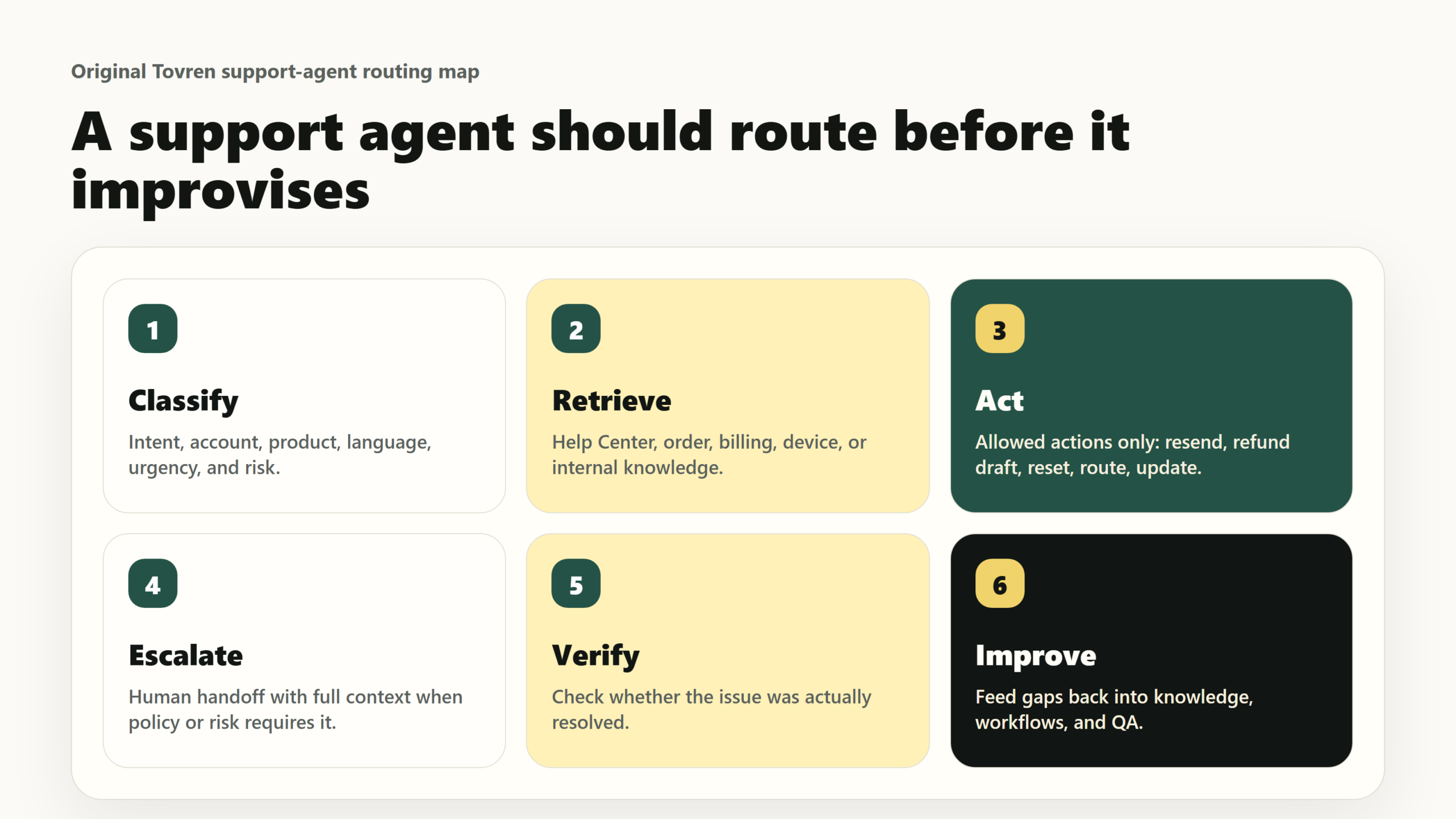
Most support teams already know AI can draft a polite reply. That is not the bottleneck. The bottleneck is deciding when the AI should act, when it should ask for more information, when it should escalate, and what counts as a safe resolution.
This is why the first automation candidates should be boring. Boring workflows have clearer rules, cleaner data, lower risk, and easier ROI measurement. Do not start with the loudest executive demo. Start with the workflows where a mistaken action is reversible and the escalation path is unambiguous.
What to automate first
The best first workflows have six traits: high volume, low ambiguity, trusted source data, a clear allowed action, a clear escalation rule, and a measurable success metric. The table below is the practical starting map.
| Workflow | Owner | Trigger | Data needed | Action allowed | Escalation rule | Success metric |
|---|---|---|---|---|---|---|
| Order status and delivery rescheduling | Support ops plus fulfillment or logistics | “Where is my order?”, delayed delivery, missed delivery window | Order ID, carrier tracking, delivery address, SLA, reschedule policy | Provide status, explain delay, reschedule delivery when policy allows, create a logistics follow-up ticket | Escalate if tracking is missing, address mismatches, the order is high value, the customer reports fraud, or sentiment is severe | Verified resolution with no repeat contact inside the chosen recontact window; delivery-reschedule accuracy |
| Returns eligibility and RMA creation | Ecommerce CX plus returns operations | Return, exchange, wrong size, damaged item, “how do I send this back?” | Order history, SKU rules, return window, region, item condition policy, photo requirements | Confirm eligibility, create RMA, generate a return label, explain next steps | Escalate damage claims, fraud signals, hygiene or restricted items, policy exceptions, and high-value refunds | Correct RMA rate, low agent correction rate, reduced return-status tickets |
| Subscription changes, pauses, and basic cancellations | SaaS support plus revenue operations | Cancel, pause, downgrade, upgrade, change billing cycle | Plan, renewal date, contract type, billing status, entitlement rules, approved retention offers | Explain options, collect cancellation reason, execute plan change when terms allow, send confirmation | Escalate enterprise contracts, annual commitments, disputed invoices, refund demands, and legal threats | Completed change without billing error; no repeat contact; clean cancellation-reason capture |
| Password reset, MFA lockout, and account unlock | IT service desk or product security support | Cannot log in, lost MFA device, account locked | User identity, SSO status, device risk, access policy, recent login signals | Guide self-service reset, trigger approved reset flow, collect verification details | Escalate admin accounts, failed verification, suspicious login activity, privileged access, or possible account takeover | Time to access restored; failed verification rate; zero security policy breaches |
| Ticket triage, summarization, and routing | Support operations | New ticket from email, messaging, voice transcript, web form, or AI assistant channel | Intent, sentiment, customer tier, product area, language, SLA, historical tags | Classify, summarize, set priority, route to the right queue, request missing information | Escalate VIP customers, legal or regulatory language, safety terms, severe sentiment, or unclear intent | Routing accuracy, fewer reassignments, faster first human response |
| Knowledge-backed FAQ and policy answers | Knowledge manager plus CX operations | Policy question, how-to request, opening hours, plan limits, basic troubleshooting | Help Center articles, product docs, Notion, SharePoint, Google Drive, effective dates, regional rules | Answer with source-backed steps, ask clarifying questions, link the relevant policy | Escalate when sources conflict, the article is stale, the answer requires personalized advice, or no trusted source exists | Answer accuracy, article gap closure, lower FAQ volume, no follow-up on same issue |
| Invoice copies and simple billing status | Billing operations plus support | Need invoice, receipt request, payment failed, “what is this charge?” | Invoice ledger, payment status, customer account, tax invoice rules, plan history | Resend invoices, explain payment status, send payment update link, collect missing billing details | Escalate disputed charges, chargebacks, tax/legal questions, large balances, and refund requests outside policy | Invoice self-serve completion, fewer billing recontacts, low billing-error rate |
| Appointment, booking, and delivery-slot changes | Operations, field service, or customer support | Reschedule appointment, cancel booking, change delivery window | Calendar availability, booking ID, service region, cancellation window, technician or resource availability | Show approved slots, reschedule, cancel inside policy, send confirmation | Escalate no available slots, regulated appointments, high-value services, repeated no-shows, and customer distress | Successful reschedules, lower inbound scheduling volume, fewer missed appointments |
| Basic product troubleshooting and onboarding steps | Product support plus documentation | Known error, setup question, “how do I configure this?”, onboarding blocker | Product version, device/browser, error code, known issues, docs, status page, logs if available | Run a checklist, collect diagnostics, suggest documented fixes, create a bug ticket with structured details | Escalate outages, data loss, security concerns, repeated failure after two guided steps, or undocumented errors | Issue solved without agent; useful diagnostic capture; lower average handle time for escalated cases |
| Internal IT access requests | IT service desk plus identity/access management | Request access to app, group, drive, project, or internal tool | Employee identity, role, manager, source permissions, approval policy, app catalog | Verify eligibility, submit approval, provision low-risk access if pre-approved by policy | Escalate privileged access, failed permission checks, exception requests, termination/onboarding mismatches | Time to access, audit pass rate, reduced manual service-desk touches |
Decision table: where different teams should start
| Team type | Automate first | Keep human-led | ROI test | Recommendation |
|---|---|---|---|---|
| SaaS support | Password resets, plan changes, onboarding FAQs, ticket triage, known-error troubleshooting | Enterprise renewals, security incidents, complex billing disputes, account cancellation exceptions | Compare verified AI resolutions against human cost per same-intent resolution plus recontact rate | Good fit if the help center is strong and product events are accessible; weak fit if support depends on undocumented tribal knowledge |
| Ecommerce | Order status, delivery rescheduling, returns eligibility, RMA creation, invoice copies | High-value refunds, fraud claims, damaged-item disputes, chargebacks, emotionally heated complaints | Measure cost per “where is my order” and returns contact before and after automation | Usually one of the best first categories because triggers and data are structured |
| Fintech | Status checks, document collection, routing, knowledge-backed process explanations | Financial advice, fraud disputes, account freezes, chargeback decisions, suspicious activity, regulatory complaints | Include compliance review, false-positive escalations, and audit cost in automation TCO | Use AI for intake and guided workflows first; require human approval for sensitive outcomes |
| Marketplace | Order status, booking changes, policy explanations, seller onboarding, structured dispute intake | Buyer-seller disputes, trust and safety enforcement, payout exceptions, harassment or abuse reports | Track whether automation reduces duplicate contacts across both sides of the marketplace | Automate symmetric, policy-backed workflows; keep adversarial or multi-party judgment human-led |
| Internal IT | Password resets, MFA recovery, app access requests, device troubleshooting, software how-to questions | Privileged access, incident response, insider-risk signals, executive device compromise | Compare time-to-access restored and manual ticket touches against AI and integration cost | Strong fit if identity, asset, and permission systems are clean; risky if access policy is informal |
| Healthcare or regulated support | Appointment scheduling, benefits-process explanations, document intake, routing, non-clinical FAQs | Medical advice, diagnosis, medication guidance, coverage determinations, privacy rights without verification | Add compliance review, audit logging, consent, and identity verification to the ROI model | Use AI as an intake, routing, and admin workflow layer; keep professional judgment human-led |
| Small businesses | FAQs, order status, appointment changes, simple triage, after-hours intake | Anything low-volume but high-risk, refunds without policy, bespoke customer exceptions | First check whether monthly volume is high enough for verified-resolution pricing to beat manual handling | Do not buy heavy automation because it is fashionable. Start only where volume and repetition are obvious |
Do not automate this yet
Do not start here. These categories create hidden cost because one bad automated action can trigger refunds, legal review, regulatory exposure, social escalation, or customer churn.
- Refund exceptions and high-value credits: The AI can collect facts and check policy. A human should approve exceptions.
- Fraud, chargebacks, abuse, and trust-and-safety disputes: The AI can route and summarize. Do not let it decide adversarial cases without review.
- Medical, legal, financial, insurance, or regulated advice: The AI can explain process steps from approved content. It should not provide professional judgment.
- Security incidents and account takeover: The AI can guide safe intake. Privileged recovery, suspicious activity, and admin access should escalate.
- Enterprise contract exceptions: Cancellation rights, renewal terms, SLAs, and negotiated commitments should stay human-led.
- Emotionally sensitive complaints: Complaints involving harm, discrimination, harassment, bereavement, vulnerable customers, or severe anger require human judgment.
- Privacy rights and data deletion: The AI can collect request type and verification details. Identity confirmation and final action need strict controls.
- Outages and major incidents: The AI can link a status page and collect examples, but incident communications should remain controlled by humans.
- Workflows with stale or conflicting knowledge: If your agents disagree today, your AI agent will scale that disagreement tomorrow.
ROI test: when verified-resolution pricing makes sense
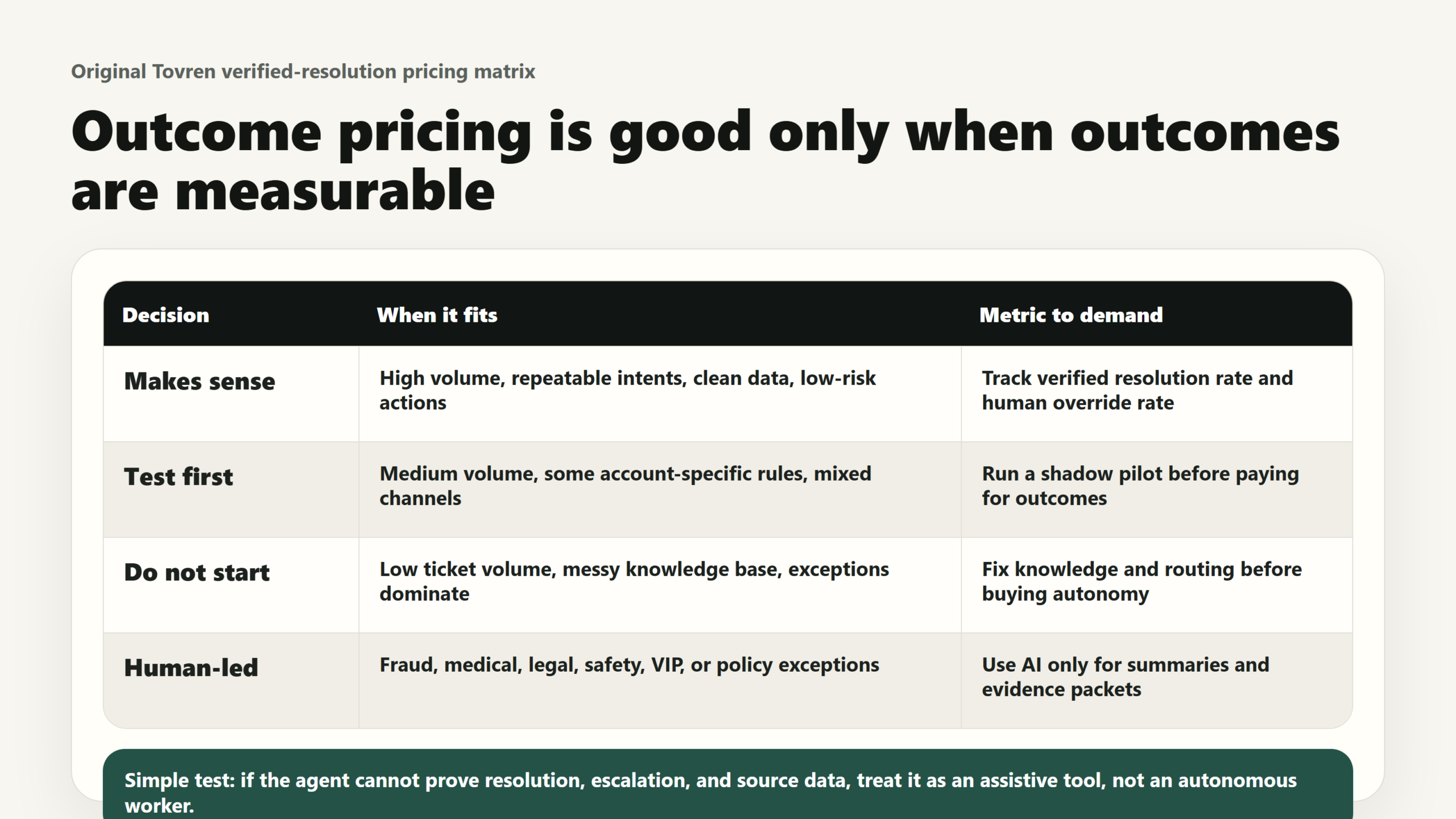
Before committing to outcome-based pricing, calculate your own baseline. Do not use a vendor demo average. Do not use cost per ticket. Use cost per durable resolution.
Step 1: Calculate manual cost per real resolution
Manual cost per resolution = total support cost for the period ÷ verified human resolutions in the same period
Total support cost should include direct labor, team leads, QA, support ops, software, telephony, knowledge maintenance, training, overhead, and failure demand from reopens or repeat contacts.
Step 2: Calculate AI effective cost per durable resolution
AI effective cost per durable resolution = total AI program cost ÷ durable AI resolutions
Total AI program cost should include verified-resolution fees, implementation, admin time, integrations, knowledge cleanup, QA review, monitoring, security review, compliance work, human escalations, and failed automation cleanup.
Durable AI resolutions should exclude spam, routine non-requests, abandoned conversations, unresolved contacts, escalations, duplicate contacts, and issues that reopen inside your chosen recontact window.
Step 3: Apply the decision rule
Buy or expand only when:
AI effective cost per durable resolution < manual cost per equivalent resolution
and quality does not deteriorate across CSAT, recontact rate, escalation rate, QA score, refund error rate, security exceptions, or compliance review findings.
| Scenario | Verified-resolution pricing likely makes sense when… | It likely does not make sense when… |
|---|---|---|
| High-volume repetitive issues | The same intents appear daily, source data is clean, and the allowed action is rule-based | Volume is too low to recover setup, governance, and monitoring cost |
| Structured customer data | The AI can safely retrieve order, billing, account, or booking data with clear permissions | Agents currently rely on manual investigation across unconnected tools |
| Reversible actions | Errors can be reversed cheaply, such as rescheduling, sending an invoice, or creating an RMA | Errors create irreversible loss, legal exposure, security risk, or customer harm |
| Strong knowledge base | Articles have owners, review dates, source systems, and clear regional rules | Knowledge is stale, contradictory, or hidden in agent notes and Slack threads |
| Good escalation design | The AI knows when to stop, ask for more data, or hand off with context | Escalations are vague, late, or counted as success because the customer stopped replying |
| Procurement controls | You can cap usage, monitor verified resolutions, avoid overages, and audit billing events | You cannot explain what is billable, what is excluded, or how overages are handled |
7-day rollout plan
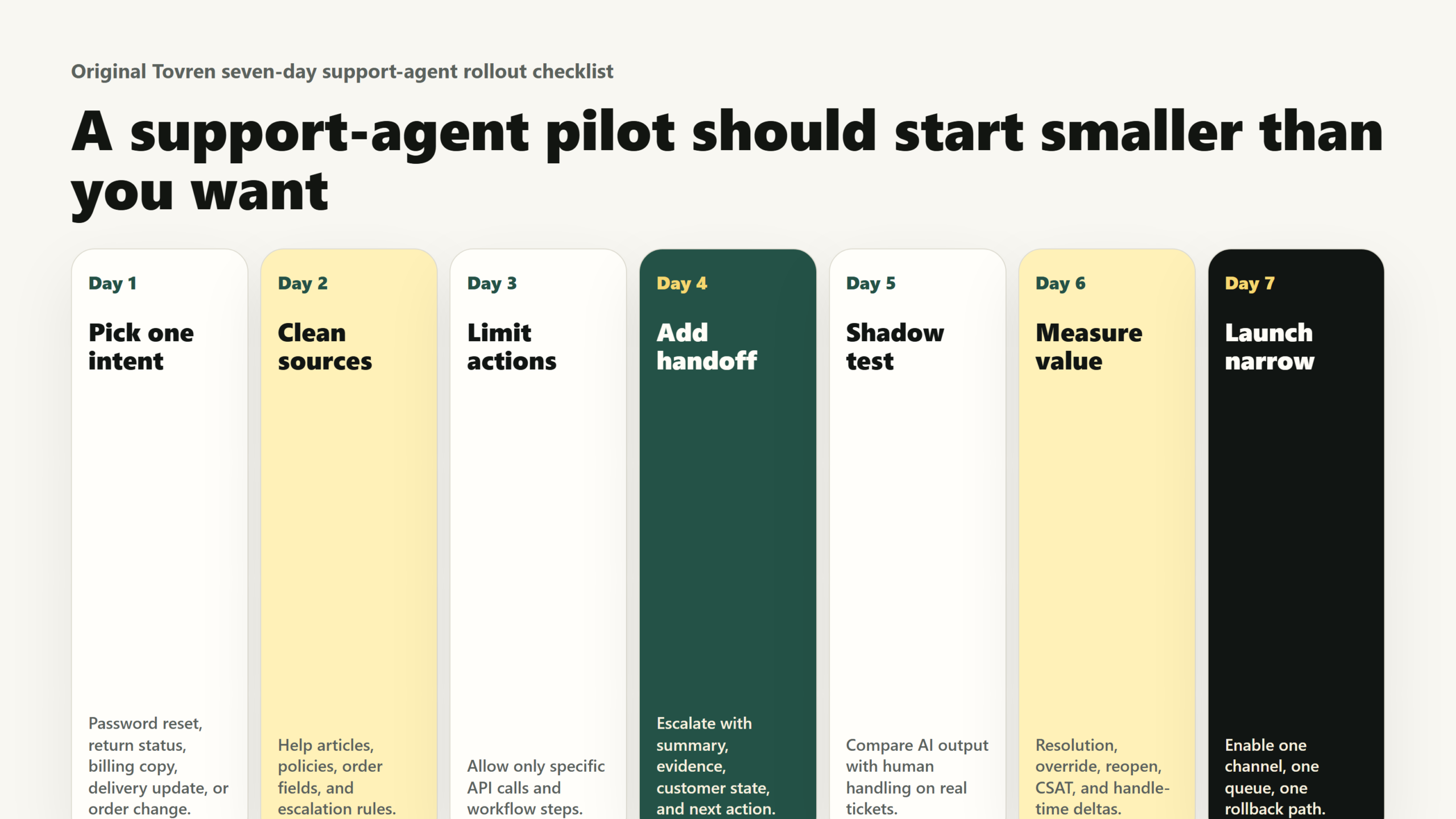
Day 1: Pick three boring workflows
Export your top intents by ticket volume, repeat contact, handle time, and escalation reason. Choose three workflows with high volume, low ambiguity, and clear source data. If available in your account, use Zendesk’s automation potential report as an input, not as the final decision.
Day 2: Define what counts as resolved
For each workflow, write the resolution standard in plain English. Example: “A delivery-reschedule case is resolved only when the customer receives the new slot confirmation and does not contact support again about the same delivery within seven days.” Pick your own recontact window based on the workflow.
Day 3: Clean knowledge and permissions
Assign an owner to every knowledge source the AI will use. Remove outdated articles, mark regional differences, and check permission boundaries. If using connected knowledge sources such as Notion, SharePoint, or Google Drive, verify that the AI can access only the content it should use.
Day 4: Build the first bounded actions
Create the AI workflow with one approved action per intent. Good first actions include checking order status, creating an RMA, rescheduling a booking, sending an invoice, collecting missing details, or routing to the right queue. Write the escalation rule before the response copy.
Day 5: Shadow-test with real historical tickets
Run the workflow against recent tickets and compare the AI’s proposed action with the human outcome. Flag hallucinated answers, unnecessary escalations, missing data, and overconfident actions. Fix knowledge and action rules before live traffic.
Day 6: Pilot with a tight cap
Send a small slice of eligible traffic to the AI agent. Cap usage, exclude high-risk customer segments, and require daily review. Monitor verified resolutions, contained resolutions, assisted escalations, unresolved cases, CSAT, repeat contact, and agent corrections.
Day 7: Make the procurement decision
Compare AI effective cost per durable resolution with manual cost for the same workflow. Expand only if the AI is cheaper, safer, and at least as good for the customer. If the economics work for one workflow but not another, expand selectively. Outcome pricing rewards precision, not ambition.
Admin and procurement checklist
Ask Zendesk or your implementation partner
- What exactly counts as a verified resolution in our contract?
- How are contained resolutions, assisted escalations, spam, routine exchanges, abandoned conversations, and duplicate contacts treated?
- Which channels are included: messaging, email, voice, web form, ChatGPT, Gemini, or other AI assistant surfaces?
- What are the counting windows for each channel?
- Which allocations are included in our Suite or Support plan?
- What happens when we exceed included or committed usage?
- Can we cap monthly automated resolutions or pause AI agent functionality to avoid overage?
- Does sandbox testing consume automated resolutions?
- Are committed resolutions cheaper than overage billing?
- How will pricing and packaging change when the ChatGPT support EAP reaches general availability?
- Which actions are available through Action Flows now, and which connectors are planned but not yet available?
- What data can MCP Server expose to external AI platforms, and how are permissions enforced?
- What logs show who or what took an action, which source was used, and why escalation did or did not occur?
- What security review, data retention, regional hosting, and compliance documentation is available?
- What is the migration path if we use Essential AI agents, legacy bot builder, or legacy AI functionality?
Configure internally before launch
- Name a business owner for every automated workflow.
- Name a knowledge owner for every source connected to AI agents.
- Define the allowed action, blocked action, and escalation rule for each intent.
- Set customer-tier exclusions for VIP, enterprise, regulated, or high-risk accounts.
- Tag AI-handled, AI-escalated, contained, and verified outcomes consistently.
- Measure recontact rate by intent, not only aggregate automation rate.
- Review failed resolutions weekly and turn them into knowledge fixes or workflow changes.
- Keep a manual override path visible to agents and customers.
- Give finance access to usage, billing, and outcome reports before renewal.
FAQ
Is Zendesk replacing human support agents?
No. Zendesk is positioning AI agents as part of an autonomous service workforce that works alongside human experts. In practice, humans still need to handle exceptions, sensitive issues, complex judgment, regulated decisions, and relationship-heavy conversations.
What should teams automate first?
Start with repeatable workflows where the AI can identify intent, use trusted data, take a safe action, and escalate cleanly. Good first candidates include order status, delivery rescheduling, returns eligibility, password resets, ticket routing, invoice copies, booking changes, and knowledge-backed FAQs.
What is a verified resolution?
Zendesk describes verified resolutions as meaningful requests handled by the AI agent with additional signals confirming that the outcome was complete and satisfactory. Zendesk’s reporting update says customers are billed only for verified resolutions, while contained resolutions do not consume automated resolutions.
Should small teams pay for AI agents?
Only if the volume and repetition justify it. A small team with low ticket volume may get better ROI from cleaning its help center, improving macros, using AI summaries, and automating triage before paying for a broad autonomous-agent deployment.
What deadlines matter for existing Zendesk customers?
The expanded AI agent access rollout runs from May 11 to June 12, 2026. Existing customers using basic messaging responses, Essential AI agents, or legacy AI agent functionality are scheduled to receive the new experience between May 25 and June 12. Zendesk says technical development for AI Agents Essential and legacy functionality stops on August 31, 2026, and full service shutoff is scheduled for December 10, 2026.
Source Log
- Zendesk newsroom, May 19, 2026: https://www.zendesk.com/newsroom/articles/relate-2026/ — Official announcement for Autonomous Service Workforce, Resolution Platform, omnichannel AI agents, MCP, copilots, Action Flows, availability, and outcome-based pricing.
- Zendesk Relate blog, last updated May 19, 2026: https://www.zendesk.co.uk/blog/zendesk-insights/innovation/relate-2026–evolving-the-resolution-platform-for-the-autonomous/ — Product detail on Agent Builder, Action Flows, MCP Client/Server, Knowledge Connectors, Admin Copilot, and Zendesk’s autonomous workforce framing.
- Zendesk Help Center ChatGPT EAP, April 30, 2026: https://support.zendesk.com/hc/en-us/articles/10622210192154-Announcement-Allowing-businesses-to-provide-customer-support-over-OpenAI-s-ChatGPT-EAP — Source for ChatGPT support EAP, OpenAI Apps SDK, MCP server, authenticated support, Action Flows, escalation, reporting, and EAP pricing status.
- Zendesk Help Center AI agent access announcement, March 30, 2026: https://support.zendesk.com/hc/en-us/articles/10487730059034-Announcing-expanded-access-to-AI-agent-capabilities-for-all-Zendesk-customers — Source for expanded AI agent access, rollout dates, Suite and Support plan changes, agentic capabilities, and legacy migration deadlines.
- Zendesk release notes through May 1, 2026: https://support.zendesk.com/hc/en-us/articles/10654623185690-Release-notes-through-2026-05-01 — Source for automation potential report, OAuth token TTL enforcement, Voice AI multilingual EAP support, Copilot AI ticket summaries, and Sentinel app mention.
- Zendesk Help Center automated resolutions: https://support.zendesk.com/hc/en-us/articles/5352026794010-About-automated-resolutions-for-AI-agents — Source for how automated resolutions are measured, channel treatment, escalation effects, allocations, overage controls, and sandbox exclusion.
- Zendesk Help Center AI agent reporting update, May 14, 2026: https://support.zendesk.com/hc/en-us/articles/10677925692698-Announcing-changes-to-AI-agent-reporting — Source for contained vs verified resolution definitions, billing only verified resolutions, and updated automated-resolution reporting.
- Zendesk cost per resolution guide, last updated May 13, 2026: https://www.zendesk.com/dk/blog/ai/productivity/cost-per-resolution/ — Supporting source for cost-per-resolution framing and the need to include labor, tools, overhead, training, and failure demand when modeling ROI.
Editorial takeaway
Zendesk’s AI workforce announcement is useful because it forces a better question. The question is no longer “Can a bot answer this?” The question is “Can an AI agent safely complete this workflow, prove the customer’s issue was resolved, and do it for less than our real cost of resolution?” Automate the workflows that pass that test. Keep the rest human-led until your data, policies, and escalation rules are good enough.