Short answer: MCP server sprawl increases agent risk because every new tool expands what the agent can see or change. Add servers only after assigning an owner, permission scope, logging rule, and removal process.
Blunt verdict: if your agent has every MCP server loaded by default, you do not have a smarter agent. You have a faster way to make a confident mistake across more systems.
MCP is not the problem. Uncontrolled MCP server sprawl is the problem. Every new server gives an agent more reach: databases, customer records, cloud consoles, messaging APIs, analytics systems, ticketing workflows, data streams, and developer tooling. That reach is useful only when the agent knows when to load a server, when to stay read-only, when to ask for approval, and when to stop.
The practical fix is a small skill pack. Not another giant connector. Not another auto-approve-everything rule. A skill pack tells the agent how to behave around tools: load the minimum server, inspect before acting, separate read from write, ask for exact permission, and produce an audit after the run.
This guide gives you that pack. Copy it into Claude Code, Cursor, Codex, an internal agent wrapper, a browser agent playbook, or your team runbook. Then tighten the names and risk levels for your actual systems.
What changed in May 2026
May 2026 made the pattern obvious: vendors are not just shipping MCP access. They are pairing access with skills, workflows, and governance language.
- Confluent, May 19, 2026: Confluent announced general availability for three AI developer capabilities: an open-source local MCP server, a managed MCP server hosted by Confluent, and Agent Skills for AI coding tools. Confluent describes MCP as the connection to the environment and Agent Skills as the knowledge layer that packages best practices, guardrails, and workflows. Its local MCP server supports read and write operations, while the managed MCP server is positioned as a read-only entry point for exploration, inspection, and diagnostics. Source: Confluent blog.
- Confluent press release, May 19, 2026: Confluent also announced a fully managed MCP server and Agent Skills that let AI manage streaming operations, alongside automated PII detection and redaction and Azure Private Link support for private connectivity. Source: Confluent press release.
- Salesforce, May 26, 2026: Salesforce announced the Data 360 MCP Server in Developer Preview. The company says MCP clients such as Cursor and Claude Code can work with Data 360 setup, segmentation logic, identity resolution, calculated insights, transforms, semantic models, and data Q&A. Salesforce also said a Data 360 Skills Library is being built to provide scenario-driven capabilities and more predictable experiences. Source: Salesforce blog.
- Twilio, May 7, 2026: Twilio introduced a Twilio MCP Server and Twilio Skills in public beta. Twilio’s argument is blunt: coding agents often lack current product context because new APIs and products may not exist in their training data. Twilio describes MCP as the toolbox and Skills as the architect. Source: Twilio blog.
- Zendesk, May 19, 2026: Zendesk announced MCP support including client and server experiences for its Autonomous Service Workforce. Zendesk’s MCP Client is intended to let AI Agents and Agent Copilot connect to external systems, while Zendesk MCP Server is intended to connect Zendesk tickets, knowledge, and other data to external AI systems in a governed way. Source: Zendesk newsroom.
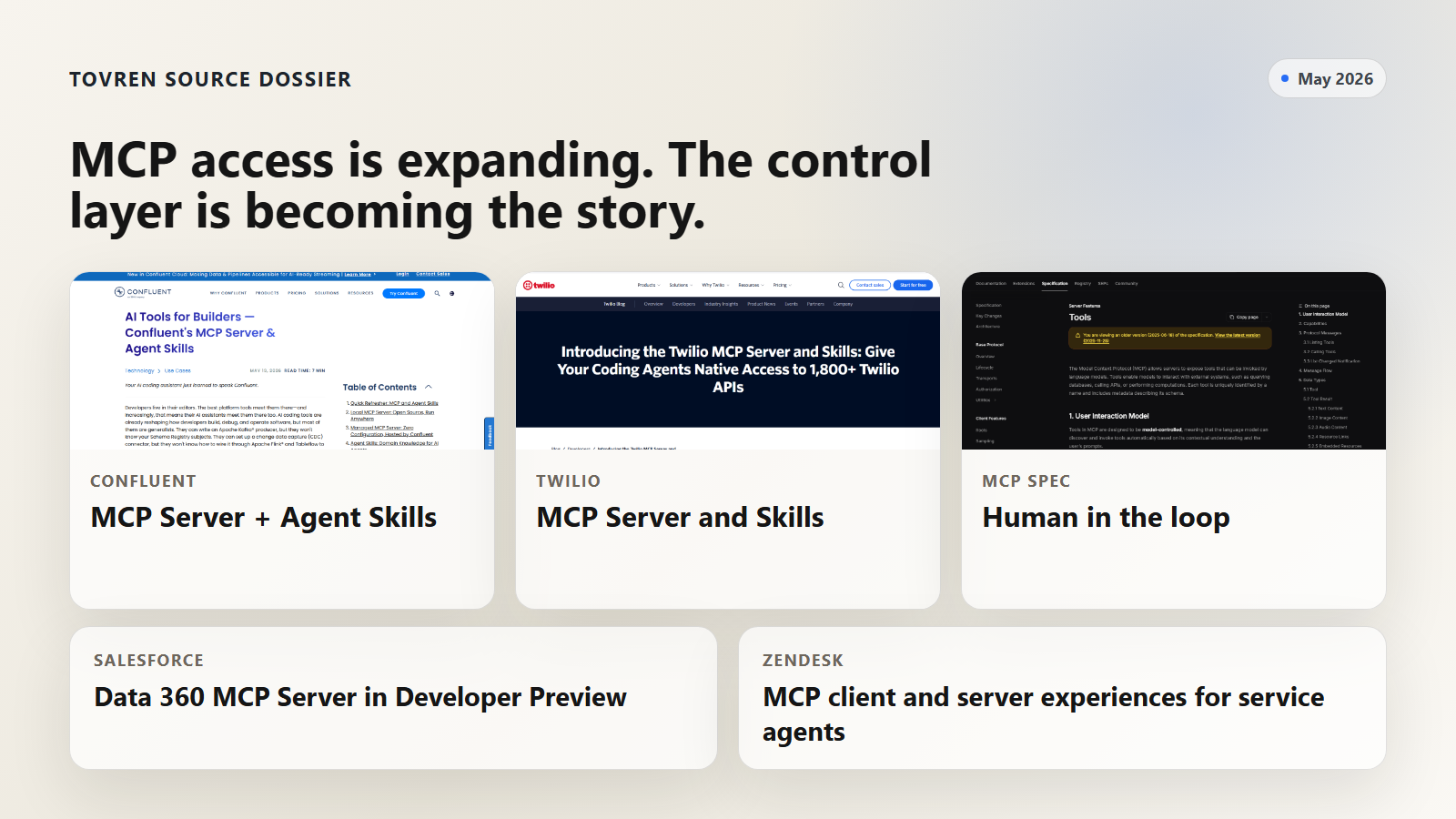
The direction is clear. The AI tooling market is moving from can the agent connect to can the agent connect without making a mess.
That is why this belongs in prompts and templates. The missing layer is often not a new integration. It is a reusable instruction pack that decides when an integration should be used at all.
Why tool sprawl breaks agents
MCP lets servers expose tools that language models can discover and invoke. The official MCP tools specification also says applications should make clear which tools are exposed, show visual indicators when tools are invoked, and present confirmation prompts so a human can deny tool invocations. In other words: MCP assumes the client experience and operator policy matter.
Tool sprawl breaks agents because the agent sees too many possible actions at once. It has to choose between overlapping tools, parse long tool descriptions, infer risk from vague names, and decide whether a user request really authorizes a live system call. The failure mode is not always dramatic. Often it is boring: slower runs, worse routing, unnecessary data exposure, or a write action that was technically allowed but operationally dumb.
| Failure mode | What it looks like | Why it matters | Practical fix |
|---|---|---|---|
| Context pollution | The agent reads long tool schemas for systems that are irrelevant to the task. | More context does not automatically mean better reasoning. It can slow the run and distract the model. | Default to no tools. Load one server only after the agent states why it needs it. |
| Tool collision | Three servers can search, fetch, update, or summarize similar objects. | The agent may choose the wrong surface because the tool name sounds plausible. | Maintain a short which-tool-for-which-job map inside the skill pack. |
| Hidden write surface | A server that looks like a search connector also includes create, update, delete, deploy, publish, or send actions. | Read and write tools in the same visible surface raise the cost of every approval decision. | Separate read-only and write modes. Require explicit approval for writes. |
| Permission fatigue | The user clicks approve repeatedly because the agent keeps asking vague permission questions. | Repeated weak prompts become fake consent. | Use structured approval prompts with target system, exact action, inputs, effect, risk, and rollback. |
| Data overexposure | The agent pulls full records when a count, schema, status, or redacted sample would be enough. | More retrieved data means more privacy, compliance, and leakage risk. | Read metadata first. Retrieve record content only when necessary and approved. |
| No audit trail | The agent says done but does not list tools used or resources touched. | Admins cannot debug, reproduce, or verify the run. | Require a post-run audit for every tool session. |
For a broader access audit, pair this template with Tovren’s guide to MCP servers, shadow IT, and agent tool access. If you are piloting agents in production workflows, also use the AI agent evaluations and runtime governance pilot. Browser agents need the same discipline; adapt the ladder below to the AI browser agent prompt pack.
MCP vs Skills vs Both
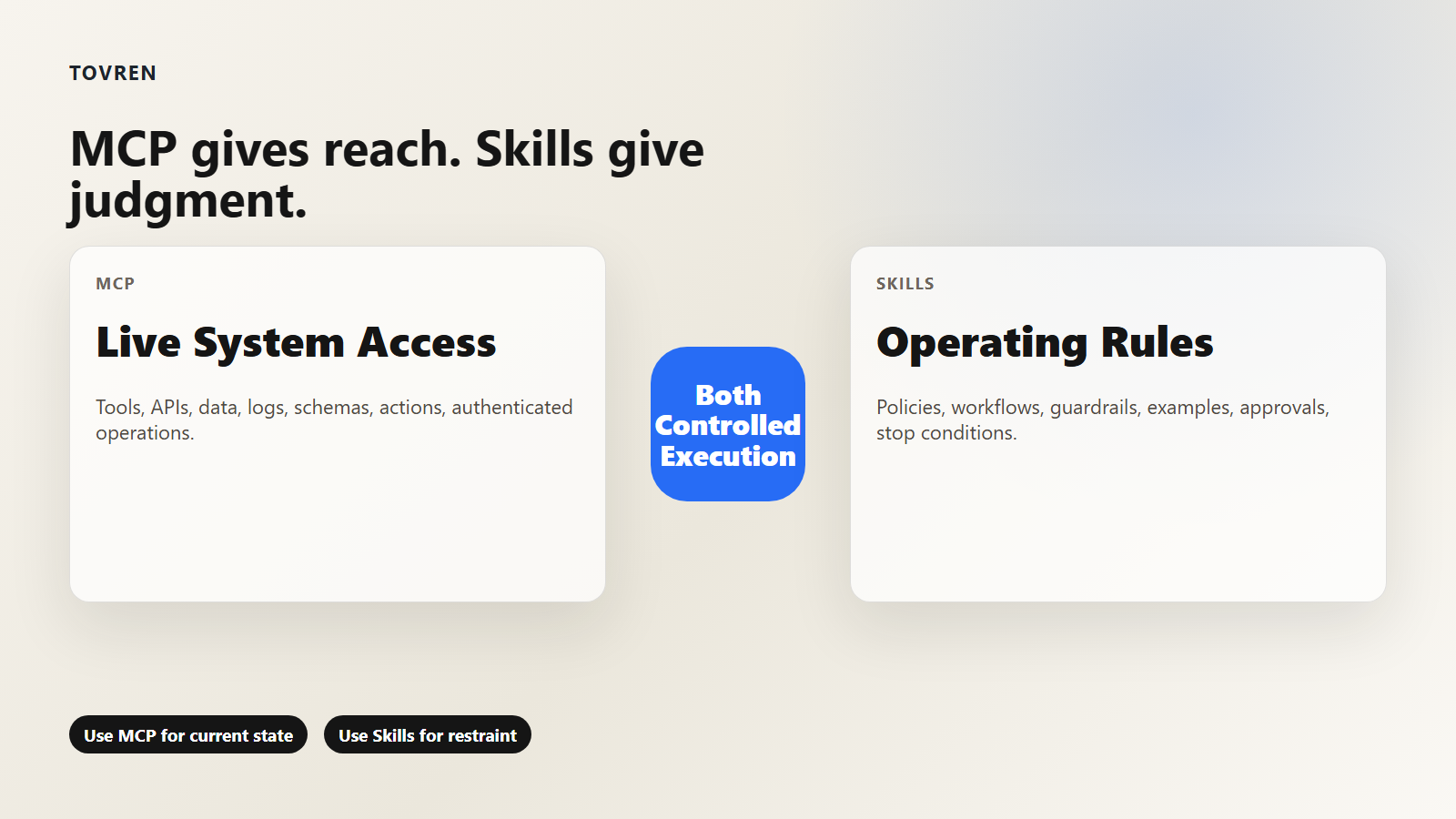
Do not frame this as MCP versus skills. That is the wrong fight. MCP and skills solve different problems.
MCP beats a skill when the agent needs live system access: current records, tool schemas, logs, metrics, tickets, topics, API specs, permissions, or authenticated operations. A skill cannot inspect your current Salesforce data model, query a Kafka consumer group, retrieve today’s Twilio API details, or read the current state of a Zendesk ticket unless it calls a connected system.
A skill beats MCP when the agent needs judgment, sequencing, policy, and restraint. A skill can tell the agent not to load a server yet, to inspect metadata before records, to use Data 360 only for data-foundation questions, to ask before exports, to prefer a managed read-only server for diagnostics, or to stop when it detects the wrong production environment.
Use both when the workflow needs live context and domain-specific behavior. That is the pattern in the May 2026 announcements: Confluent pairs MCP access with Agent Skills, Twilio pairs MCP search and retrieve tools with Skills, and Salesforce is previewing an MCP server while building a Skills Library.
| Choice | Use it when | Avoid it when | Example |
|---|---|---|---|
| MCP only | The agent needs a narrow, current, read-only lookup from a trusted server. | The task needs policy judgment, approval routing, or multi-step workflow design. | Retrieve a current API parameter schema or inspect connector status. |
| Skill only | The task is planning, decision support, code review, prompt design, or runbook generation without live data. | The answer depends on current records, live logs, account state, or exact product APIs. | Choose whether a support workflow should escalate to a human before touching Zendesk. |
| MCP plus skill | The agent needs current system context and must follow rules about scope, privacy, approval, and rollback. | The server is untrusted, unaudited, or exposes broad write tools without gating. | Inspect a Confluent connector in read-only mode, produce a fix plan, then ask before changing configuration. |
| Neither | The user only needs an explanation, checklist, draft, or static template. | The user explicitly asks the agent to verify live system state. | Write a team policy for approving new MCP servers. |
For developer-tool packaging context, see Tovren’s coverage of Anthropic, Stainless, SDKs, and MCP for agent developers and the Claude Agent SDK guide.
Copy-paste prompt pack
Use this as a starter skill pack. Store it as a team skill, project instruction, agent policy file, or wrapper prompt. The goal is not to make the agent timid. The goal is to make tool use intentional.
1. System prompt: MCP tool discipline
SYSTEM PROMPT: MCP TOOL DISCIPLINE

You are an agent with access to optional MCP servers and local skills. Your default mode is no tools.

Follow this order:
1. Understand the user's goal.
2. Decide whether tools are needed.
3. Prefer a skill or written procedure when live system access is not required.
4. Load exactly one MCP server at a time unless the task explicitly needs cross-system work.
5. Start with read-only tools.
6. Do not write, delete, send, deploy, publish, purchase, export, invite, modify permissions, or change configuration until the user approves a concrete plan.
7. Before any write action, show: goal, target system, exact tool, proposed inputs, expected effect, rollback or recovery option, and risk level.
8. If credentials, PII, payment data, production data, legal data, health data, customer records, or secrets may be involved, stop and ask for explicit approval.
9. If tool output conflicts with the user's request, or if the selected environment is ambiguous, stop and ask.
10. After the run, report servers loaded, tools used, records or resources touched, actions taken, unresolved risks, and next checks.

Important:
- More tools are not better. Use the fewest tools that can safely complete the task.
- A user asking a question is not the same as a user approving a write action.
- Repeated approvals do not become blanket approval.
- If you are unsure whether a tool is necessary, do not load it. Explain the tradeoff first.
2. Tool permission policy
TOOL PERMISSION POLICY

Default state: OFF

Allowed without asking:
- Internal reasoning
- Drafting plans
- Creating checklists, prompts, policies, or explanations
- Reading files explicitly provided by the user
- Running non-network local checks on temporary copies, when supported

Ask before:
- Loading a new MCP server
- Querying a live external system
- Reading customer, employee, production, financial, health, legal, or regulated records
- Exporting, copying, joining, or moving data
- Combining data from two or more systems
- Opening a browser, remote shell, remote session, or third-party tool
- Keeping a server loaded after the current task

Require explicit approval before:
- Any create, update, delete, deploy, publish, send, payment, permission, credential, schema, topic, ticket, user, workflow, or production configuration change
- Any action that cannot be easily reverted
- Any action involving PII, secrets, regulated data, production incidents, customer communications, or billing
- Any action whose target environment is not clearly development, staging, or sandbox

Never do:
- Use a tool that is not required by the task
- Load multiple MCP servers just in case
- Convert a read-only approval into write approval
- Retry failed write actions without a new approval
- Hide tool calls, omit audit details, or summarize away uncertainty
3. Server loading checklist
SERVER LOADING CHECKLIST

Before loading MCP server: [server name]

Task:
User goal:
Expected output:

Load this server only if all required checks pass:

[ ] The task cannot be completed with reasoning, a static skill, or a provided file.
[ ] The server owner is known.
[ ] The server purpose matches the task.
[ ] The server's read tools are understood.
[ ] The server's write tools are understood.
[ ] Credentials are least-privilege for this run.
[ ] Production scope is disabled unless the user explicitly requested production.
[ ] PII, secrets, and regulated data exposure are understood.
[ ] Logs or audit records are available.
[ ] The expected first tool call is named.
[ ] The unload condition is defined.

Decision:
- Load server
- Do not load server

Reason:
Maximum permission level for this run:
First read-only action:
Stop condition:
Unload condition:
4. Read-only-first prompt
READ-ONLY-FIRST PROMPT

For this task, use read-only inspection only.

You may:
- List
- Search
- Retrieve metadata
- Inspect schemas
- Check status
- Validate configuration
- Summarize findings
- Produce a plan

You may not:
- Create
- Update
- Delete
- Deploy
- Publish
- Send
- Invite
- Export
- Trigger workflows
- Change permissions
- Change configuration
- Run destructive commands

First return:
1. What you inspected
2. What you found
3. Confidence level
4. Whether a write action is actually necessary
5. The smallest safe next step

If a write action seems necessary, stop and request approval using the approval request template.
5. Approval request prompt
APPROVAL REQUEST PROMPT

I need permission to perform a higher-risk action.

Goal:
Target system:
Environment:
MCP server:
Tool or action:
Inputs:
Expected change:
Records, resources, users, topics, tickets, or objects affected:
Risk level: low / medium / high
Why this cannot be solved in read-only mode:
What I already checked:
Rollback or recovery option:
What I will not do:
Audit record that will be produced after completion:

Approve exactly this action? Reply yes or no.
6. Incident stop prompt
INCIDENT STOP PROMPT

Stop the run immediately if any of these happen:

- The selected workspace, tenant, org, cluster, region, account, repository, or environment is not the one expected.
- Tool output shows unexpected production scope.
- The agent sees secrets, tokens, private keys, full customer records, payment data, health data, or regulated data that was not requested.
- A tool result contradicts the plan.
- A tool asks for broader permission than expected.
- The agent would need a second system that was not listed in the original plan.
- A write action fails, partially succeeds, times out, or returns an unclear status.
- The user request changes mid-run in a way that increases risk.

When stopping:
1. Do not retry.
2. Do not continue with another tool.
3. Report what happened.
4. Report what was touched.
5. Report what remains unchanged.
6. Recommend who should review the run.
7. Ask for a new explicit instruction before continuing.
7. Post-run audit prompt
POST-RUN AUDIT PROMPT

After every tool run, produce this audit:

1. Original user request
2. Final interpreted goal
3. Servers loaded
4. Tools called in order
5. Permission level used
6. Data inspected
7. Records, objects, topics, tickets, files, or resources touched
8. Actions taken
9. Items not changed
10. Errors, refusals, or stop conditions
11. Evidence links or object IDs, if safe to share
12. Follow-up checks
13. Recommended server unloads
14. Recommended permission resets
15. One sentence summary for the team log
Do not bury this in a long policy document nobody reads. Put the system prompt and permission policy where the agent actually sees them. Put the checklist into the workflow where the server is loaded. Put the audit prompt at the end of every agent run.
Permission ladder
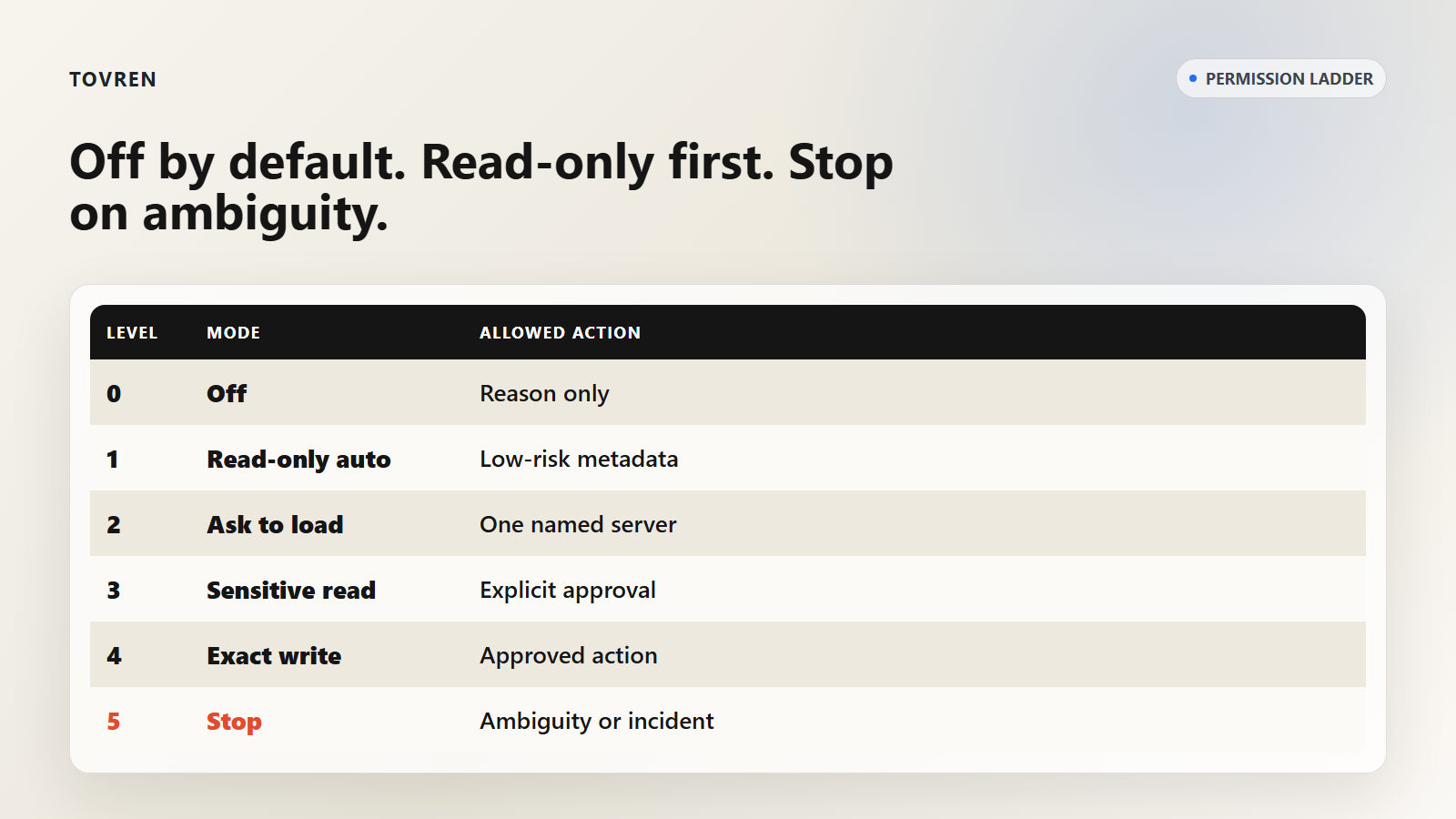
The agent needs a ladder, not a binary switch. Tools on and tools off is too crude for real work.
| Level | Name | Agent can do | Agent must not do | Good default for |
|---|---|---|---|---|
| 0 | Off | Reason, plan, draft, create templates, explain tradeoffs. | Load servers or query live systems. | Most first turns. |
| 1 | Read-only auto | Use preapproved read-only tools for low-risk metadata, status, docs, schemas, or public API references. | Read sensitive records, export data, or combine systems. | Docs lookup, status checks, API parameter retrieval. |
| 2 | Ask to load | Request permission to load one named MCP server for one task. | Load extra servers just in case. | Live system inspection. |
| 3 | Ask before sensitive read | Read scoped customer, employee, production, or regulated data after explicit approval. | Bulk export, broad search, or unrelated record retrieval. | Support triage, Salesforce data checks, production diagnostics. |
| 4 | Approve exact write | Perform one approved create, update, delete, deploy, publish, send, permission, or configuration action. | Expand the action, retry failures, or chain into another system without approval. | Controlled operational changes. |
| 5 | Stop | Freeze the run and report what happened. | Retry, improvise, or fix forward without a new instruction. | Wrong environment, unexpected PII, unclear write result, partial failure. |
Use this simple default: off by default, read-only first, ask before loading, approve exact writes, stop on ambiguity.
For teams, the hardest part is not writing the policy. It is refusing to let convenience silently weaken it. Always allow this server should be rare. Ask before this class of action should be normal.
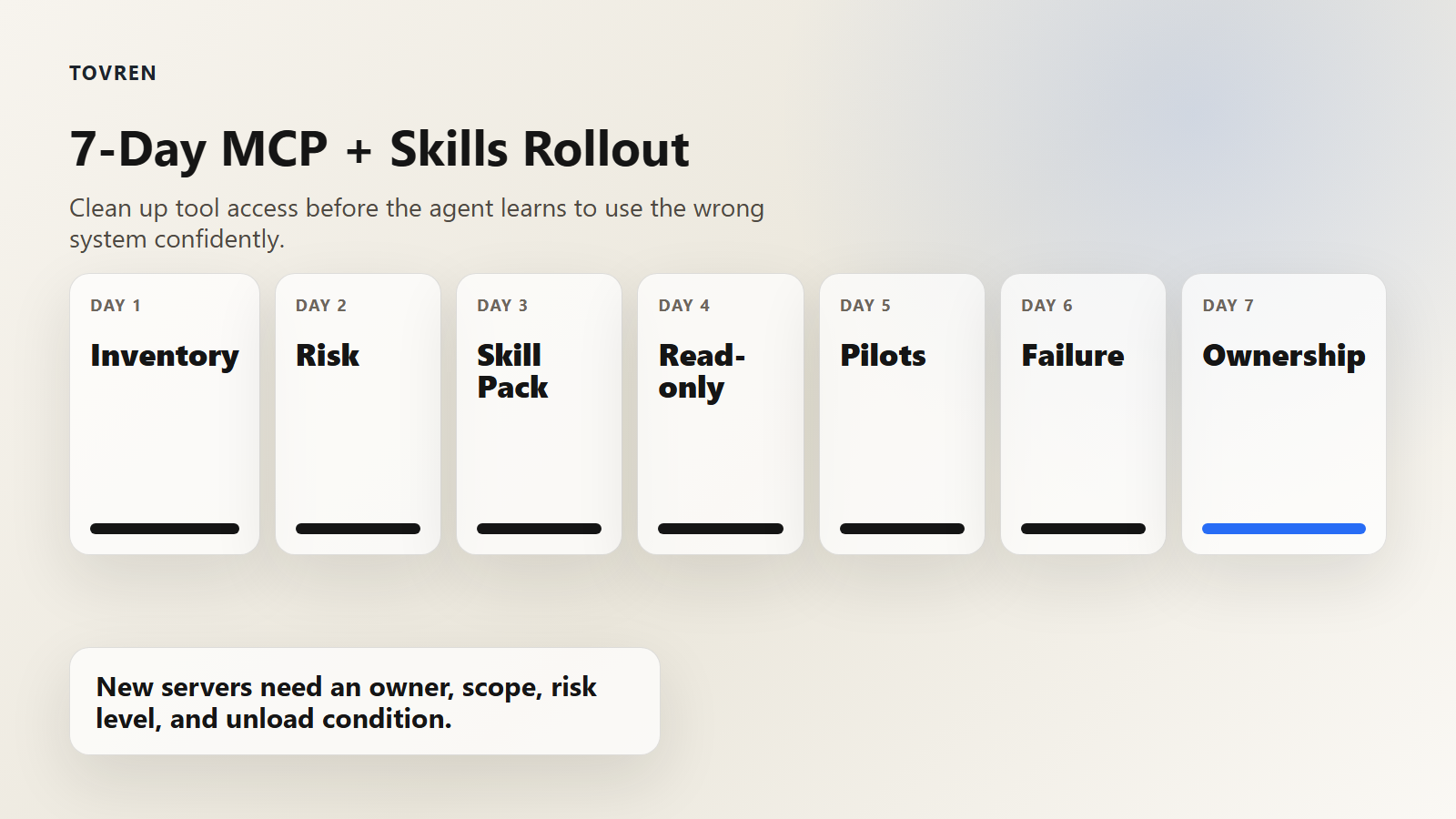
7-day implementation plan
You can put this in place in a week without buying another governance platform. Start with prompts and inventory. Add technical enforcement after you know which behaviors matter.
| Day | Goal | Actions | Done when |
|---|---|---|---|
| Day 1 | Inventory current agent tool access. | List every MCP server, browser tool, plugin, internal API, credential, workspace, and agent client in use. | You have one owner, one purpose, and one risk rating for each server. |
| Day 2 | Separate read and write risk. | Classify tools as metadata read, content read, sensitive read, reversible write, irreversible write, or admin action. | No tool is labeled only as safe or unsafe; each has a permission level. |
| Day 3 | Install the skill pack. | Add the system prompt, permission policy, and loading checklist to the agent environment or team runbook. | The agent states why a server is needed before loading it. |
| Day 4 | Make read-only the path of least resistance. | Create read-only credentials or use managed read-only endpoints where available. Disable production write access for pilot users. | Common diagnostic tasks can be completed without write permissions. |
| Day 5 | Run three realistic pilots. | Test one developer task, one admin task, and one data task. Require the post-run audit every time. | You can reconstruct each run from the audit without asking the user what happened. |
| Day 6 | Simulate failure. | Test wrong environment, unexpected PII, ambiguous approval, partial write failure, and overlapping tools. | The agent stops instead of improvising. |
| Day 7 | Roll out with ownership. | Publish the approved server list, permission ladder, incident stop rules, and audit location. Name the owner for each server. | New MCP servers cannot be added without owner, scope, risk level, and unload condition. |
Rollout checklist
- Every MCP server has an owner.
- Every server has a documented purpose.
- Every server has a maximum permission level.
- Read tools and write tools are separated where possible.
- Production access is disabled by default for pilots.
- Agents must ask before loading non-default servers.
- Agents must ask before sensitive reads.
- Agents must ask before every write.
- Post-run audits are stored where admins can review them.
- Unused servers are removed or disabled.
The winning team will not be the one with the longest MCP server list. It will be the one with the cleanest path from intent to tool to approval to audit.
Source log
Access date: May 28, 2026. Fact-check note: product availability, access models, and feature scope can change. This article uses official vendor pages for product claims and treats community discussion as anecdotal signal only.
| Source | Publisher | Date | Accessed | Used for | Source URL |
|---|---|---|---|---|---|
| AI Tools for Builders – Confluent’s MCP Server and Agent Skills | Confluent | May 19, 2026 | May 28, 2026 | GA status for local MCP server, managed MCP server, and Agent Skills; MCP as connection and skills as knowledge; local read/write support; managed read-only positioning. | https://www.confluent.io/blog/ai-developer-tools-mcp-server-agent-skills-ga/ |
| Confluent Makes It Easier to Build and Secure Real-Time AI at Scale | Confluent | May 19, 2026 | May 28, 2026 | Fully managed MCP server and Agent Skills for streaming operations; PII detection and redaction; Azure Private Link context. | https://www.confluent.io/press-release/build-and-secure-real-time-ai/ |
| Introducing the Data 360 MCP Server – Your Unified Data, Ready for Any Agent | Salesforce | May 26, 2026 | May 28, 2026 | Data 360 MCP Server Developer Preview; MCP clients such as Cursor and Claude Code; Data 360 setup, segmentation, identity resolution, calculated insights, transforms, semantic models, and data Q&A; planned Skills Library. | https://www.salesforce.com/blog/introducing-the-data-360-mcp-server-your-unified-data-ready-for-any-agent/ |
| Introducing the Twilio MCP Server and Skills | Twilio | May 7, 2026 | May 28, 2026 | Twilio MCP Server and Skills public beta; agent training data gap for newer products; MCP as toolbox and Skills as architect; search and retrieve tool framing. | https://www.twilio.com/en-us/blog/developers/introducing-twilio-mcp-skills |
| Zendesk Introduces the Autonomous Service Workforce | Zendesk | May 19, 2026 | May 28, 2026 | Zendesk MCP support including client and server experiences for AI Agents, Agent Copilot, external systems, tickets, knowledge, and governed data access. | https://www.zendesk.com/newsroom/articles/relate-2026/ |
| Tools – Model Context Protocol specification | Model Context Protocol | Version 2025-06-18 | May 28, 2026 | MCP tools concept, tool metadata, model-controlled invocation, and human-in-the-loop confirmation guidance. | https://modelcontextprotocol.io/specification/2025-06-18/server/tools |
| Selected Reddit discussions on MCP tool overload, skills, and permission modes | Reddit communities including r/mcp, r/ClaudeAI, and r/ClaudeCode | Various | May 28, 2026 | Anecdotal community signal only. Not used as proof of product behavior or vendor claims. | https://www.reddit.com/r/mcp/ |