Direct verdict: use Microsoft Foundry Local now if you are building a desktop, edge, Windows, .NET, Python, or agent workflow that needs local inference, offline behavior, low latency, local model caching, or user data staying on the device. Do not treat it as a drop-in replacement for every local AI stack yet. For general local chat, broad model experimentation, or already-working RAG tools, Ollama, llama.cpp, LM Studio, or a simple OpenAI-compatible local server may still be faster to integrate. For frontier quality, managed scale, large context, eval infrastructure, and high availability, cloud inference remains the default.
This Foundry Local setup guide is for builders deciding what to test today, not for teams looking for another vague local AI trend piece. The right first move is a 30-minute pilot: install the CLI or SDK, run a small catalog model, verify GPU/NPU/CPU behavior, test the OpenAI-compatible path, and then try the exact desktop, agent, RAG, or offline workflow you want to ship.
What changed and why Foundry Local matters now
Microsoft announced Foundry Local general availability on April 9, 2026. Microsoft describes it as a cross-platform local AI solution that lets developers bring AI into applications across chat and audio with no cloud dependency, no network latency, and no per-token costs. The important practical detail is that Foundry Local is designed to run on the user’s machine, not as another hosted model endpoint hidden behind a familiar API shape.
The timing matters because Microsoft’s April 2026 Foundry update says Foundry Local is generally available for Windows, macOS on Apple Silicon, and Linux x64, with SDKs for Python, JavaScript, C#, and Rust. The same update points developers toward Microsoft Build 2026 sessions on June 2 and June 3, including local models, developer control, AI runtimes, and edge-to-cloud distributed agentic apps. That makes Foundry Local a timely tool to evaluate before teams lock in their local AI stack for desktop apps, enterprise pilots, offline tools, and agent runtimes.
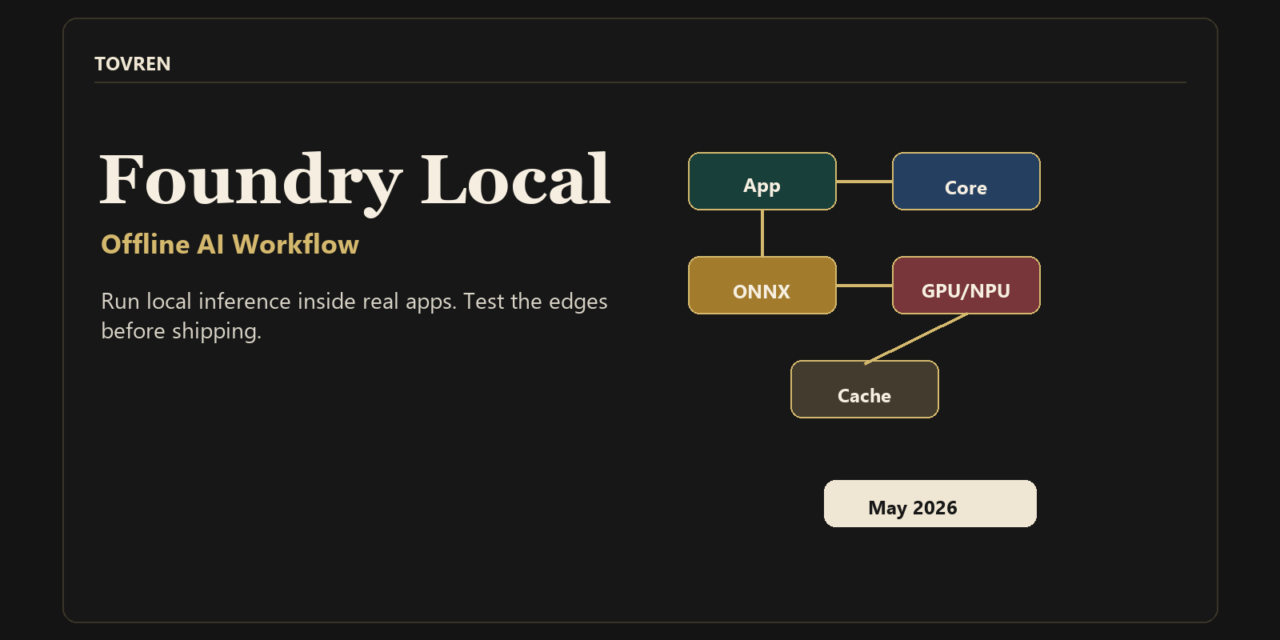
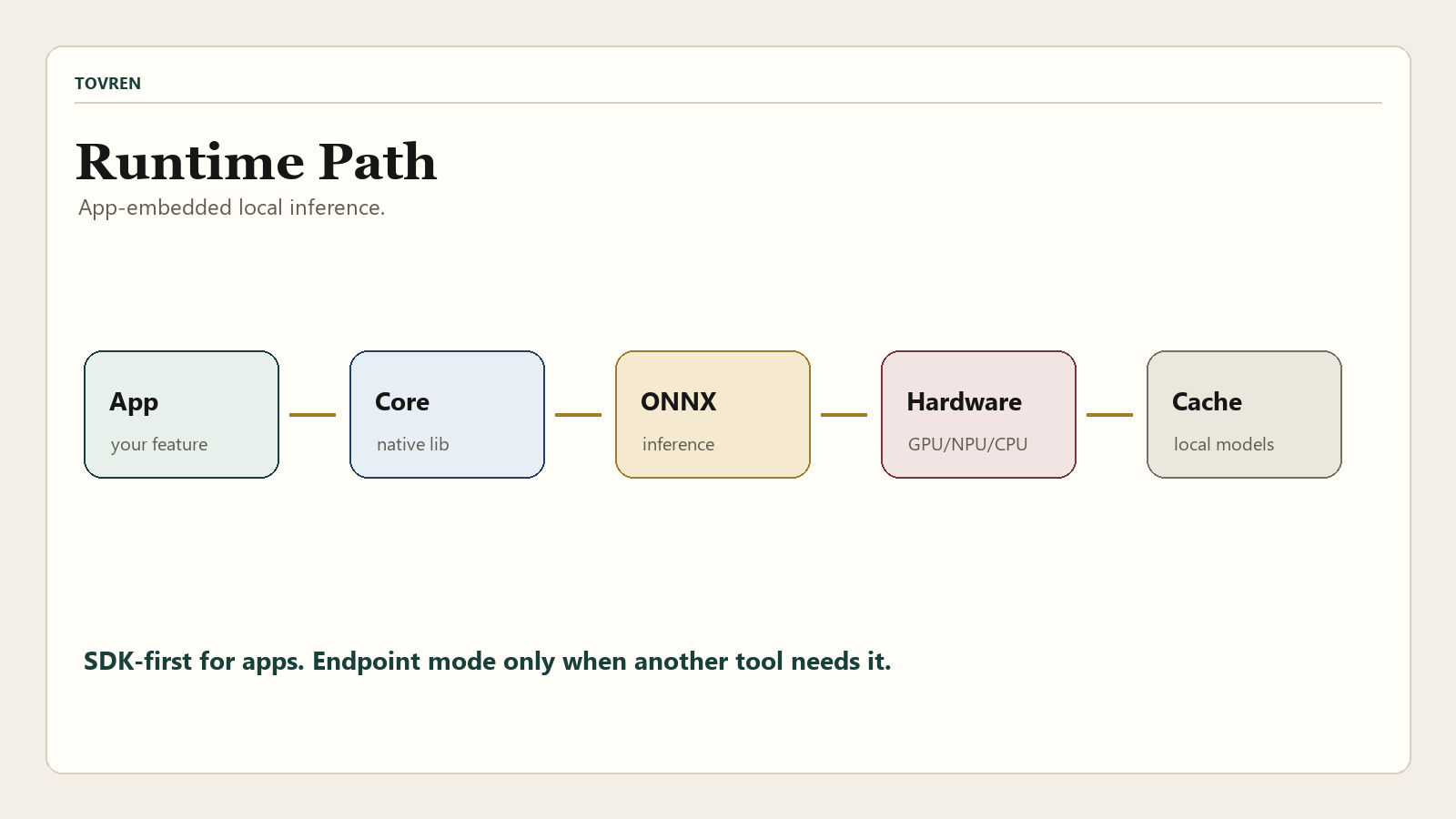
The other reason to pay attention: Foundry Local is not just a chat UI. The current Microsoft architecture docs describe it as a single native library embedded inside an application. Your code calls Foundry Local Core in-process through language SDKs. Core then handles model lifecycle, hardware abstraction, model cache behavior, and session-based inference. Under the hood, ONNX Runtime executes models and can use hardware-specific execution providers with CPU fallback.
What Foundry Local is, in builder terms
Foundry Local is Microsoft’s local AI runtime and SDK stack for shipping AI features inside apps. It is best understood as a local model runtime with catalog-backed model acquisition, hardware acceleration, and language SDKs. The optional CLI and optional OpenAI-compatible HTTP server are useful development and integration paths, but the core product is the app-embedded runtime.
- Runtime: Foundry Local Core is a native library loaded by your application. Microsoft documents the native library as
.dllon Windows,.soon Linux, and.dylibon macOS. - SDKs: Microsoft documents SDK support for C#, JavaScript, Python, and Rust.
- Model lifecycle: Core can download, cache, load, run inference, and unload models.
- Hardware path: ONNX Runtime executes models with execution providers for CPU, GPU, and NPU scenarios, depending on hardware and platform support.
- Windows path: Windows builds can use the WinML package for hardware acceleration and execution provider management.
- macOS path: Microsoft says Apple Silicon acceleration runs through WebGPU and Metal.
- API shape: Foundry Local supports OpenAI request/response formats for chat completions and audio transcription, plus Open Responses API format in Microsoft’s GA post.
- Endpoint option: Use the native SDK path when possible; use the optional OpenAI-compatible HTTP server when another tool expects a local REST endpoint.
The blunt version: Foundry Local is attractive when you want AI to be part of your app, not a separate local daemon your user has to understand. It is less attractive when your whole workflow is already centered on a model server, a GGUF file, a local chat UI, or a tool that only needs a stable http://localhost:PORT/v1 endpoint.
Fast decision table: Foundry Local vs Ollama vs cloud vs local servers
| Use case | Best default | Why | What to verify first |
|---|---|---|---|
| Shipping a desktop or edge app with local AI inside the installer | Foundry Local | SDK-first design, embedded native runtime, local model cache, hardware abstraction, and no required end-user CLI install when using the SDK path. | Installer size, first-run model download UX, cache location, model license, unload behavior, and hardware fallback. |
| Windows app with .NET or Python and hardware acceleration as a priority | Foundry Local | Microsoft provides WinML-specific package paths for Windows and documents execution provider management for Windows hardware. | WinML package install, NPU/GPU detection, driver state, and performance on your exact target devices. |
| General local model experimentation and broad community workflow compatibility | Ollama or LM Studio | Ollama and LM Studio are widely used as local model runners and expose local APIs that many tools already understand. | Model quality, model availability, endpoint compatibility, context length, and tool-calling behavior. |
| Precise control over GGUF models, server flags, quantization, context, parallel decoding, and low-level tuning | llama.cpp | llama.cpp exposes llama-server, supports GGUF workflows, and gives builders low-level runtime control. | Build flags, GPU backend, model file compatibility, prompt format, and OpenAI-compatible endpoint behavior. |
| Highest model quality, long context, managed reliability, enterprise observability, or production scale | Cloud inference | Local models are useful, but cloud inference still wins when the application depends on frontier model quality, managed uptime, and centralized governance. | Latency budget, token cost, data residency, eval scores, fallback behavior, and monitoring. |
| One internal tool that only needs a local OpenAI-compatible endpoint | Simple local server, LM Studio, Ollama, llama.cpp, or Foundry Local endpoint mode | An SDK-first runtime may be more than you need if the app only swaps base_url. | Whether the target tool requires model auto-detection, fixed port, auth behavior, streaming, embeddings, responses, or tool calls. |
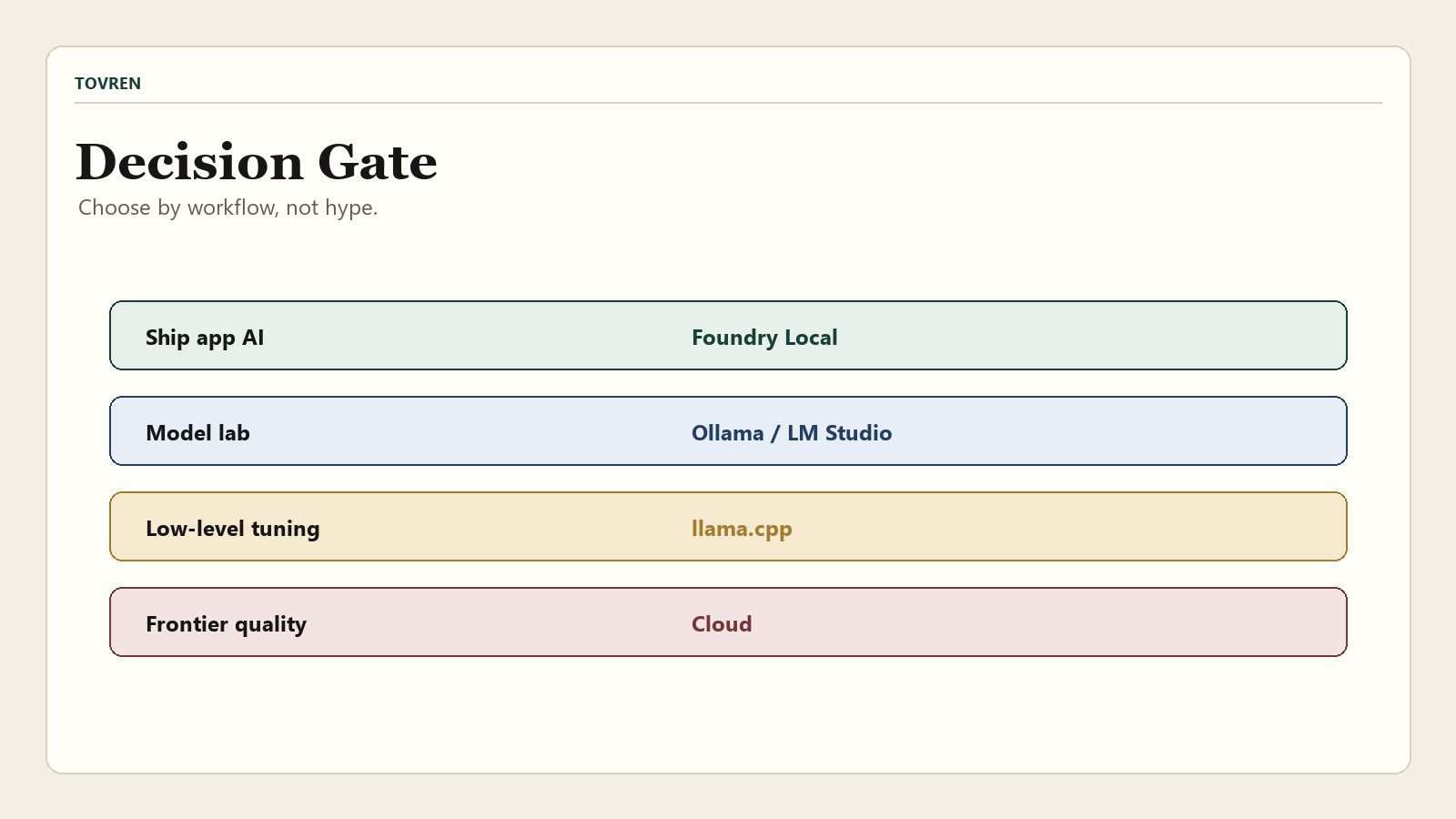
Tovren’s practical recommendation: test Foundry Local when you are building an app experience. Keep Ollama, LM Studio, or llama.cpp in the comparison when you are building a local lab, personal assistant, RAG sandbox, or model-testing workflow. Use cloud inference when correctness, scale, and model capability matter more than offline execution.
Setup path by platform
There are two setup paths: CLI-first and SDK-first. Use CLI-first when you want to browse models, run an interactive prompt, inspect service status, or connect another local UI. Use SDK-first when you are building the actual application because Microsoft’s architecture docs position the SDK and in-process Core API as the main app integration path.
Windows: fastest CLI smoke test
The Microsoft Learn CLI reference gives the Windows install command as:
winget install Microsoft.FoundryLocalThen verify the install and service:
foundry --version foundry --help foundry service statusList models and filter by hardware:
foundry model list foundry model list --filter device=GPU foundry model list --filter device=NPU foundry model list --filter provider=CUDAExecutionProviderRun a small model interactively:
foundry model run qwen2.5-0.5bIf the CLI reports a service connection error, Microsoft’s docs recommend:
foundry service restartWindows: Python SDK path
For a Python app on Windows, Microsoft’s GA post and SDK reference show the WinML package path for hardware acceleration:
python -m venv .venv .venv\Scripts\activate pip install foundry-local-sdk-winml openaiUse this minimal catalog check before you write application logic:
from foundry_local_sdk import Configuration, FoundryLocalManager config = Configuration(app_name="foundry_local_pilot") FoundryLocalManager.initialize(config) manager = FoundryLocalManager.instance models = manager.catalog.list_models() print(f"Models available: {len(models)}")Windows: .NET path
For a C# pilot, Microsoft documents the WinML NuGet package for Windows and the standard package for cross-platform builds. Start with this on Windows:
dotnet new console -n FoundryLocalPilot cd FoundryLocalPilot dotnet add package Microsoft.AI.Foundry.Local.WinML dotnet add package OpenAIFor non-Windows .NET builds, use:
dotnet add package Microsoft.AI.Foundry.Local dotnet add package OpenAImacOS: CLI plus SDK
On macOS, Microsoft’s CLI reference gives the Homebrew path:
brew tap microsoft/foundrylocal brew install foundrylocalVerify and run the same smoke test:
foundry --version foundry service status foundry model run qwen2.5-0.5bFor a Python app on macOS, use the cross-platform package:
python3 -m venv .venv source .venv/bin/activate pip install foundry-local-sdk openaiLinux x64: use the SDK-first path
Microsoft’s April 2026 Foundry update says Foundry Local GA supports Linux x64, and Microsoft’s GA post gives the Linux/macOS Python package as foundry-local-sdk. The current Microsoft Learn CLI reference, however, provides package-manager install commands for Windows and macOS, not a Linux package-manager command. For Linux x64, start with the SDK path and verify current release artifacts before writing user-facing Linux CLI instructions.
python3 -m venv .venv source .venv/bin/activate pip install foundry-local-sdk openaiClone the Microsoft samples when you want source-backed starting points:
git clone https://github.com/microsoft/Foundry-Local.git cd Foundry-Local/samplesFor .NET on Linux x64, use the cross-platform package:
dotnet add package Microsoft.AI.Foundry.Local dotnet add package OpenAIDo not assume every Windows/macOS CLI instruction maps cleanly to Linux. For Linux teams, the first acceptance test should be SDK initialization, catalog access, model download, model load, and inference on the target machine.
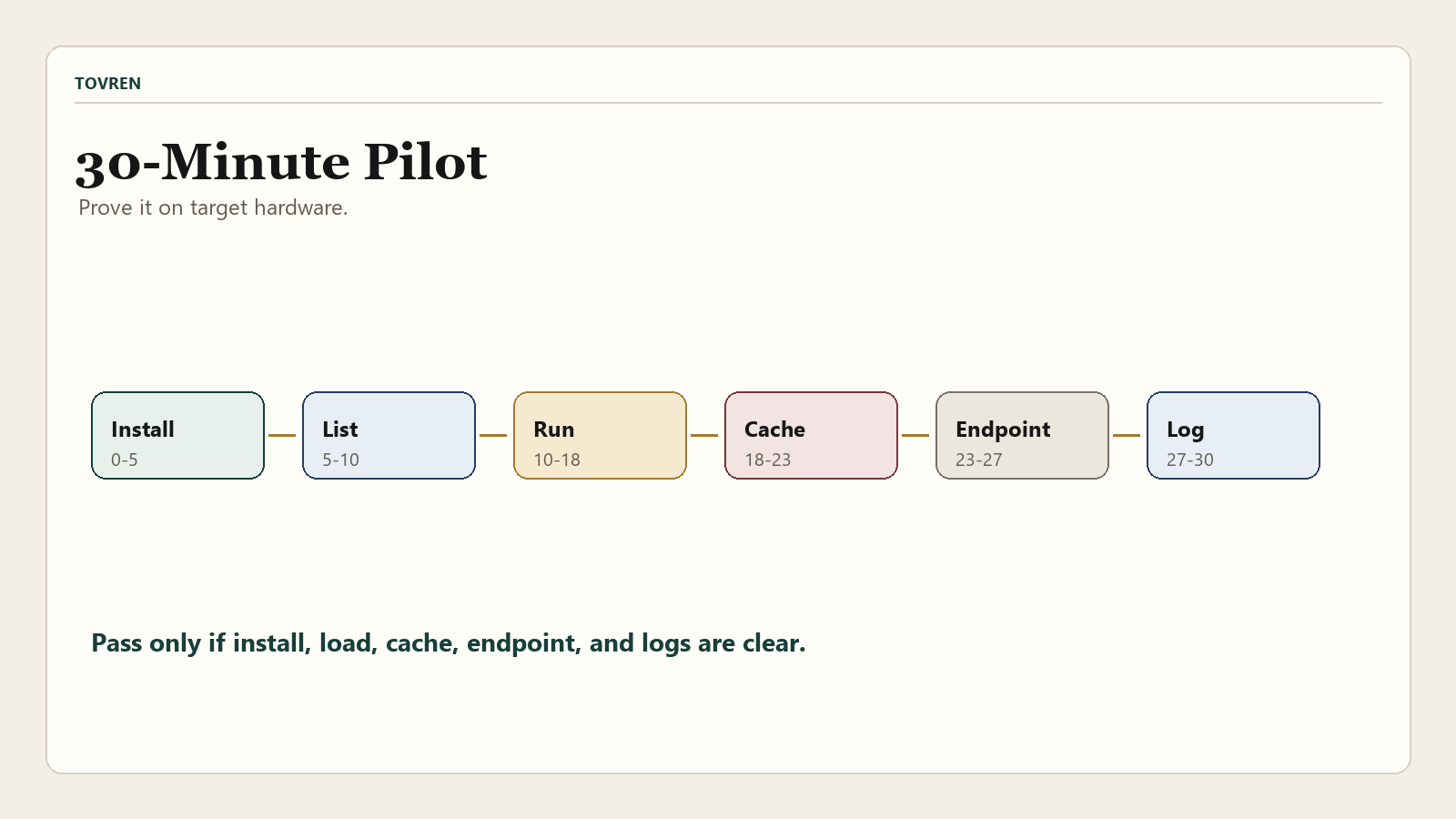
The first 30-minute Foundry Local test plan
Do not start by building an agent. Start by proving that Foundry Local works on your target hardware and integration path. This test plan is deliberately small.
| Time box | Test | Commands or checks | Pass condition |
|---|---|---|---|
| 0-5 minutes | Install and identify runtime | foundry --version, foundry service status, or SDK catalog initialization. | You can identify the installed version and the local runtime responds. |
| 5-10 minutes | Inspect available model and hardware paths | foundry model list, foundry model list --filter device=GPU, foundry model list --filter provider=CUDAExecutionProvider. | You know whether the target machine is using CPU, GPU, or NPU-capable models. |
| 10-18 minutes | Run a small chat model | foundry model run qwen2.5-0.5b or the Python SDK quickstart. | The model downloads, loads, responds, and can be unloaded or exited cleanly. |
| 18-23 minutes | Check local cache and model license | foundry cache list, foundry cache location, foundry model info <model> --license. | You know where files live, which model is cached, and whether the license fits your use case. |
| 23-27 minutes | Test OpenAI-compatible path if another tool needs it | Run foundry service status, copy the endpoint, and test http://localhost:PORT/v1 only after a model is running. | Your target tool can see or call the model without assuming auto-detection. |
| 27-30 minutes | Record failure modes | Capture OS, CPU/GPU/NPU, model alias, execution provider, first-token latency, memory use, and logs. | You have enough evidence to decide whether to continue, switch tools, or stay cloud-first. |
The model alias matters. Microsoft’s CLI reference says aliases can select the best model variant for available hardware, while a full model ID can force a specific variant. For early tests, start with an alias. For production validation, pin the exact model and version behavior you intend to support.
Integration checklist for desktop apps, agents, RAG, and offline tools
Foundry Local is most compelling when it is part of a real app workflow. Use this checklist before moving beyond a prototype.
| Workflow | Use Foundry Local for | Do not skip this test | Tovren note |
|---|---|---|---|
| Desktop assistant | Private local chat, user-side summarization, offline drafting, small tool calls. | First-run download UX, cache permissions, unload behavior, app restart behavior. | Good fit if you own the app shell and can design a clear model-download state. |
| Windows/.NET app | Local AI feature embedded into a Windows application with WinML acceleration. | WinML package path, Windows App SDK constraints, packaging, AppContainer behavior, and target framework. | Read GitHub issues before shipping because several integration edge cases show up there first. |
| Agent workflow | Low-latency local subtasks, privacy-sensitive preprocessing, offline fallback, small local tool calls. | Tool-calling reliability, structured output, cancellation, timeouts, and trace capture. | Pair with an observability plan; see Tovren’s agent observability stack guide. |
| RAG pipeline | Local summarization, local answer drafting, privacy-sensitive document processing, offline demos. | Embedding support, retrieval latency, context size, answer quality, and hallucination checks. | For production RAG design, compare this with Tovren’s production RAG search pipeline guide. |
| Local AI benchmark or model lab | Testing Microsoft’s catalog models and hardware abstraction on target devices. | Same prompt across Foundry Local, Ollama, llama.cpp, and cloud baseline. | If the job is pure model experimentation, keep a broader local stack in the test matrix. |
| Offline enterprise pilot | On-device inference where prompts, audio, and responses must stay local. | Model license, disk encryption, cache policy, update process, and support path. | Offline does not automatically mean compliant. Treat endpoint exposure, logs, and cached model files as governed assets. |
For local model hardware planning, compare Foundry Local with the kind of VRAM-first setup covered in Tovren’s Qwen local AI setup guide. Foundry Local’s value is not that it magically makes every model fast on every laptop. Its value is that it gives app builders a Microsoft-supported runtime path with catalog, cache, SDK, and hardware abstraction.
Common problems and fixes
The most common Foundry Local mistake is assuming that “OpenAI-compatible” means every third-party local AI tool will auto-detect it. That is not how local AI integrations usually fail. They fail on ports, model list behavior, auth assumptions, endpoint paths, streaming differences, tool-call schemas, or the fact that one app expects a daemon while another expects an embedded SDK.
| Problem | Likely cause | Fix | Evidence to capture |
|---|---|---|---|
Request to local service failed | Service connection or port binding issue. | Run foundry service restart, then foundry service status. | CLI output, endpoint URL, OS, install method. |
| No GPU or NPU models appear | Unsupported hardware, missing driver, unsupported execution provider, or model catalog mismatch. | Run foundry model list --filter device=GPU, foundry model list --filter device=NPU, and provider-specific filters. Update relevant drivers. | Hardware model, driver version, provider filter output. |
| Inference is slow | CPU fallback, model too large, memory pressure, or wrong variant. | Use a smaller or more quantized model, verify provider selection, close competing inference sessions, and monitor memory. | Model alias, full model ID, memory use, execution provider. |
| Third-party tool does not detect Foundry Local | Tool expects a specific local server behavior, fixed port, model list shape, or auth setting. | Validate in order: CLI works, model is loaded, service status shows endpoint, direct OpenAI-compatible call works, then tool integration works. | Endpoint URL, model list response, tool settings, local logs. |
| AnythingLLM-style integration confusion | Community reports suggest CLI success does not guarantee simple auto-detection in every local AI UI. | Do not start with auto-detection. Manually verify the endpoint, port, model state, and OpenAI-compatible settings before blaming the model. | Screenshots of connection settings, Foundry service status, loaded model name. |
| Windows machine-scope install fails | Microsoft’s troubleshooting docs say Winget can block MSIX machine-scope installs in some configurations. | Follow Microsoft’s documented Add-AppxProvisionedPackage workaround only if you need all-user installation. | Winget error text, install scope, PowerShell command output. |
| Linux instructions feel incomplete | GA support includes Linux x64, but current Microsoft CLI install docs are clearer for Windows and macOS. | Use the SDK-first path on Linux and verify current GitHub release artifacts before writing team-wide setup docs. | Distribution, CPU/GPU, Python version, SDK version, sample output. |
Production readiness gate
Foundry Local may be generally available, but your application is not production-ready just because the runtime is. Use this gate before putting it behind a customer-facing feature.
| Gate | Minimum requirement | Why it matters |
|---|---|---|
| Supported platform matrix | Document the exact OS, CPU, GPU, NPU, driver, package, and model combinations you support. | Local AI bugs are often hardware-specific, not prompt-specific. |
| Model license review | Run foundry model info <model> --license and store the reviewed license in your release notes. | Local distribution can create different obligations than cloud API calls. |
| Cache policy | Define cache location, disk budget, deletion behavior, update behavior, and encryption expectations. | Models and generated artifacts can become unmanaged local assets. |
| Offline behavior | Test first run online, second run offline, corrupted cache, interrupted download, and network loss during setup. | “Works offline” is only useful after the required model and execution provider files exist locally. |
| Quality baseline | Compare Foundry Local output against your current cloud model, Ollama model, and llama.cpp candidate on the same prompt set. | Local privacy and latency do not compensate for unacceptable answer quality. |
| Latency and memory budget | Measure cold start, first token, full response, peak RAM/VRAM, and unload behavior. | Desktop and edge apps fail quickly if the AI feature makes the app feel heavy. |
| Endpoint exposure | If using the optional HTTP server, bind intentionally, avoid accidental network exposure, and document auth assumptions. | Localhost services can become security liabilities if exposed carelessly. |
| Observability and support | Capture version, model alias, model ID, provider, logs, and error class without collecting sensitive prompts by default. | Support teams need enough debugging context without violating the local-privacy promise. |
| Agent safety | For agents, test tool calls, timeouts, retries, prompt injection resistance, and local/cloud fallback routing. | Local execution reduces network dependency but does not remove agent failure modes. |
If your application uses agents that improve over time or route between local and cloud models, connect this pilot to a production learning loop. Tovren’s continuous agent improvement guide is a useful companion for teams deciding how local runtime tests become production feedback loops. For Microsoft workflow automation context, also see Tovren’s Copilot Studio workflow automation pilot guide.
So, should developers use Foundry Local now?
Yes, but with a narrow default: use it now for a pilot if you are building a real app that benefits from on-device inference. The strongest cases are desktop assistants, offline-capable enterprise tools, privacy-sensitive preprocessing, local audio transcription, Windows/.NET apps, edge prototypes, and agent workflows that need a local execution tier.
Do not use Foundry Local as a generic replacement for every local AI workflow. Ollama remains a strong default for many local model experiments and tool integrations. llama.cpp remains the better default when you need deep control over GGUF, server flags, quantization, and low-level runtime behavior. LM Studio or another simple local OpenAI-compatible server may be enough when the only job is to give an app a local base_url. Cloud inference remains the better default when model quality, scale, uptime, context length, and centralized governance matter most.
The practical move is not ideological. Run the 30-minute pilot, compare it against your current local and cloud path, and only then decide whether Foundry Local belongs in your app architecture.
Source log
| Source | Publisher | Date | Access date | Claims supported | URL |
|---|---|---|---|---|---|
| Foundry Local is now Generally Available | Microsoft Foundry Blog | April 9, 2026 | May 30, 2026 | GA announcement; cross-platform positioning; no cloud dependency, network latency, or per-token costs; SDK package names; Core and ONNX Runtime bundling; model lifecycle; catalog cache; WinML; Apple Silicon Metal path; OpenAI-compatible formats; optional HTTP endpoint; catalog model families. | Link |
| Foundry Local architecture overview | Microsoft Learn | Last updated April 9, 2026 | May 30, 2026 | Single native library; no separate service or daemon for SDK path; in-process Core API; SDK languages; self-contained app; ONNX Runtime; execution providers; CPU fallback; quantized models; thread-safe session-based inference. | Link |
| Foundry Local CLI reference | Microsoft Learn | Last updated April 9, 2026 | May 30, 2026 | CLI preview status; Windows and macOS install commands; service status; model commands; model list filters; device and provider filters; execution provider names; cache commands; Open WebUI connection pattern; upgrade and uninstall commands. | Link |
| Foundry Local SDK reference | Microsoft Learn | Last updated April 9, 2026 | May 30, 2026 | C#, JavaScript, Python, and Rust SDK package names; Windows WinML packages; cross-platform packages; SDK catalog quickstarts; web service configuration; model download/load/unload methods; audio transcription methods. | Link |
| Best practices and troubleshooting guide for Foundry Local | Microsoft Learn | Last updated May 28, 2026 | May 30, 2026 | Security best practices; model license command; performance guidance; production deployment scope; service restart fix; driver-related troubleshooting; Winget machine-scope install workaround. | Link |
| What’s new in Microsoft Foundry | April 2026 | Microsoft Foundry Blog | May 12, 2026 | May 30, 2026 | GA support for Windows, macOS on Apple Silicon, and Linux x64; agent-builder use case; Python, JavaScript, C#, and Rust SDKs; Microsoft Build 2026 sessions on local models, developer control, and distributed agentic apps. | Link |
| microsoft/Foundry-Local | GitHub | Repository current as of access date | May 30, 2026 | Repository and samples presence; SDK-first positioning; optional server and CLI as development workflows; release cadence and issue-surface signal. | Link |
| Foundry Local releases | GitHub | v1.2.0 listed May 28, 2026 | May 30, 2026 | Release cadence; v1.2.0 notes on SDK usability, runtime stability, platform support, execution provider download experience, cancellation, multilingual ASR, WinML 2.0, and Linux ARM64/aarch64 support. | Link |
| AnythingLLM and Foundry Local | Reddit r/LocalLLM | May 2026 | May 30, 2026 | Community pain signal only: a user reported Foundry Local working from CLI while AnythingLLM auto-detection/OpenAI-compatible configuration was not straightforward. | Link |
| OpenAI compatibility | Ollama Docs | Current docs as of access date | May 30, 2026 | Ollama OpenAI-compatible API support, model pull requirement, Responses API notes, and context-size caveat. | Link |
| llama.cpp | ggml-org GitHub | Repository current as of access date | May 30, 2026 | llama-server OpenAI-compatible HTTP server, default port example, chat completions endpoint, parallel decoding, embeddings, reranking, and grammar controls. | Link |
| LM Studio as a Local LLM API Server | LM Studio Docs | Current docs as of access date | May 30, 2026 | Local API server, localhost/network serving, REST API, OpenAI-compatible and Anthropic-compatible endpoints, and CLI server start command. | Link |
FAQ
Is Foundry Local production-ready?
Microsoft announced Foundry Local general availability in April 2026, but production readiness still depends on your application. The runtime may be GA while your model choice, target hardware, installer, cache policy, license review, endpoint exposure, and support process remain untested.
Is Foundry Local the same as Ollama?
No. Ollama is a popular local model runner with API compatibility that many local tools already support. Foundry Local is more SDK-first and app-embedded, with Microsoft’s model catalog, Core runtime, ONNX Runtime path, and hardware abstraction. Test both if your goal is a local AI product rather than a quick demo.
Does Foundry Local work offline?
Yes, for the actual local inference path after required models and execution providers are downloaded and cached. Your first run usually needs internet access for model and execution-provider downloads. Test first-run online, second-run offline, interrupted download, and cache corruption before promising offline behavior to users.
Should I use the Foundry Local CLI or SDK?
Use the CLI for exploration, model listing, smoke tests, cache inspection, and quick local prompts. Use the SDK for application integration. Microsoft’s architecture docs describe the core SDK path as an in-process native library inside your application rather than a separate service or daemon.
Can Foundry Local replace cloud inference?
Only for workloads where local model quality, context, latency, and hardware capacity are good enough. Keep cloud inference for frontier model quality, large-scale serving, centralized monitoring, high availability, and long-context tasks. A strong architecture may use Foundry Local for local private subtasks and cloud models for harder work.
Why does a third-party tool not detect my Foundry Local model?
OpenAI-compatible does not guarantee auto-detection. Validate the chain in order: Foundry CLI or SDK works, model is downloaded and loaded, service status shows the endpoint, the endpoint answers a direct request, and only then the third-party tool can be configured. Watch for dynamic ports, auth assumptions, model-list behavior, and endpoint path differences.