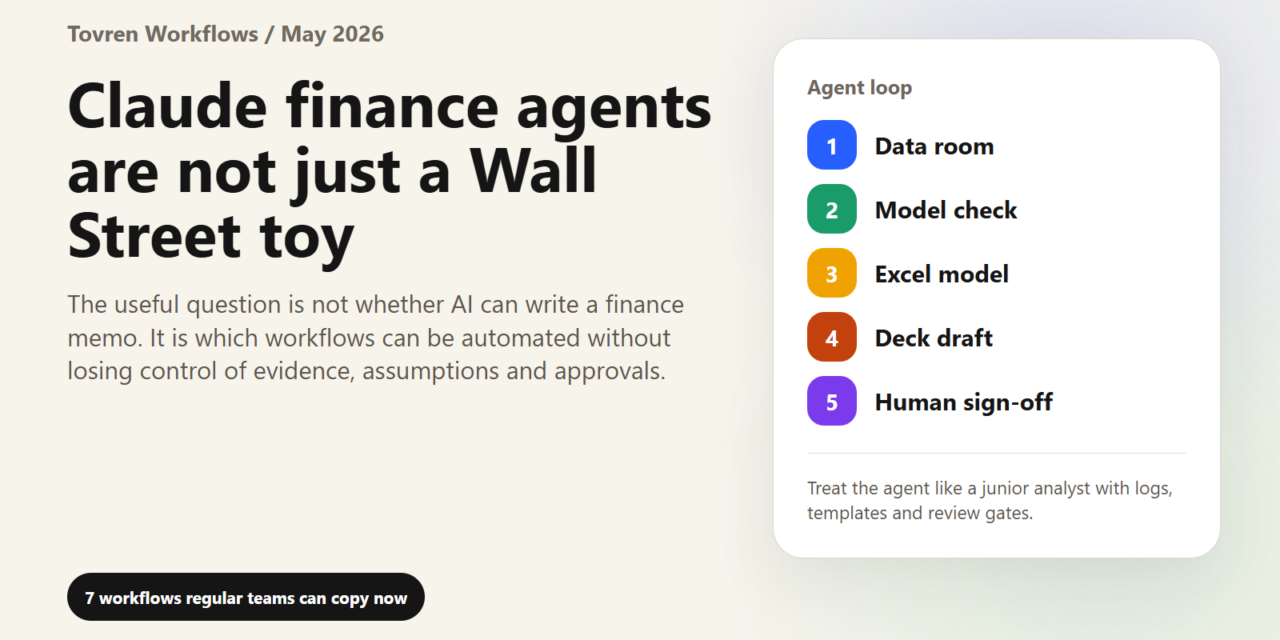
Short answer: Finance teams should use Claude agents for repeatable review and analysis tasks, not unsupervised financial decisions. Start with reconciliations, variance explanations, invoice triage, and report drafting under human approval.
Verdict: Anthropic’s May 2026 finance-agent launch is not important only because banks can now ask Claude to build pitchbooks. It matters because the work pattern is becoming clear: vertical AI agents are moving from chat windows into spreadsheets, decks, diligence files, inboxes, close checklists, and reporting loops.
That is useful even if you are not a bank. A founder can copy the investor-update workflow. A RevOps team can copy the account-diligence workflow. A consultant can copy the pitch-builder workflow. A small finance team can copy the month-end narrative workflow. The point is not “buy whatever Anthropic is selling.” The point is to stop treating AI as a clever answer box and start treating it as a supervised work cell.
Anthropic announced ten ready-to-run finance agent templates on May 5, 2026, covering work such as pitchbooks, KYC screening, earnings review, model building, valuation review, general ledger reconciliation, month-end close, statement audit, and market research. It also said Claude now works across Excel, PowerPoint, and Word through Microsoft 365 add-ins, with Outlook coming soon. The practical shift is simple: work can begin in a spreadsheet, move into a deck, become a memo, and still carry context across the workflow.
Confirmed facts vs. Tovren analysis
| Confirmed fact | Tovren analysis |
|---|---|
| Anthropic released ten finance-focused agent templates. | The templates are less interesting as “finance products” than as examples of reusable operating patterns: brief, analyze, reconcile, draft, review, escalate. |
| Each template combines skills, connectors, and subagents. | The real lesson is that useful agents need narrow instructions, trusted data access, and smaller specialist steps, not one giant prompt. |
| Claude add-ins are available for Excel, PowerPoint, and Word; Outlook is described as coming soon. | The valuable workflow is cross-app continuity: update a model, draft the deck, prepare the memo, then send for approval. |
| Anthropic says users stay in the loop before work goes to a client, filing, or action. | Regular teams should copy that control model. AI can prepare work; humans approve assumptions, judgments, and external communication. |
| Opus 4.7 is generally available, with API pricing listed at $5 per million input tokens and $25 per million output tokens. | Use expensive frontier models for high-value review, synthesis, and multi-step workflows. Do not point them at every minor spreadsheet task. |
| Anthropic’s launch page says Opus 4.7 led Vals AI’s Finance Agent benchmark at 64.37% at launch, while Vals’ live public page has since updated. | Treat benchmark numbers as time-stamped signals, not procurement decisions. Test on your own files, your own risks, and your own approval standard. |
| A Reddit thread reports some users finding Opus 4.7 more aggressive or costly in productivity workflows. | That is not proof of broad model failure, but it is a useful warning: stronger agents can create more work if they lack permission gates and stop conditions. |
The copyable idea: build agents around work outputs, not chat prompts
A weak AI workflow starts with “ask the chatbot.” A strong workflow starts with an output: a board deck, close report, account brief, pricing memo, customer-risk packet, or weekly operating review. Then it defines the source files, the allowed actions, the review owner, the failure conditions, and the final approval step.
That is why the Anthropic release is worth watching. The announced finance agents are packaged around real deliverables: pitchbooks, models, reconciliations, KYC files, valuation checks, statements, and market updates. Those may sound like Wall Street tasks, but the underlying work appears in almost every company: gather messy inputs, compare them against rules, produce a structured artifact, and make a human decision easier.
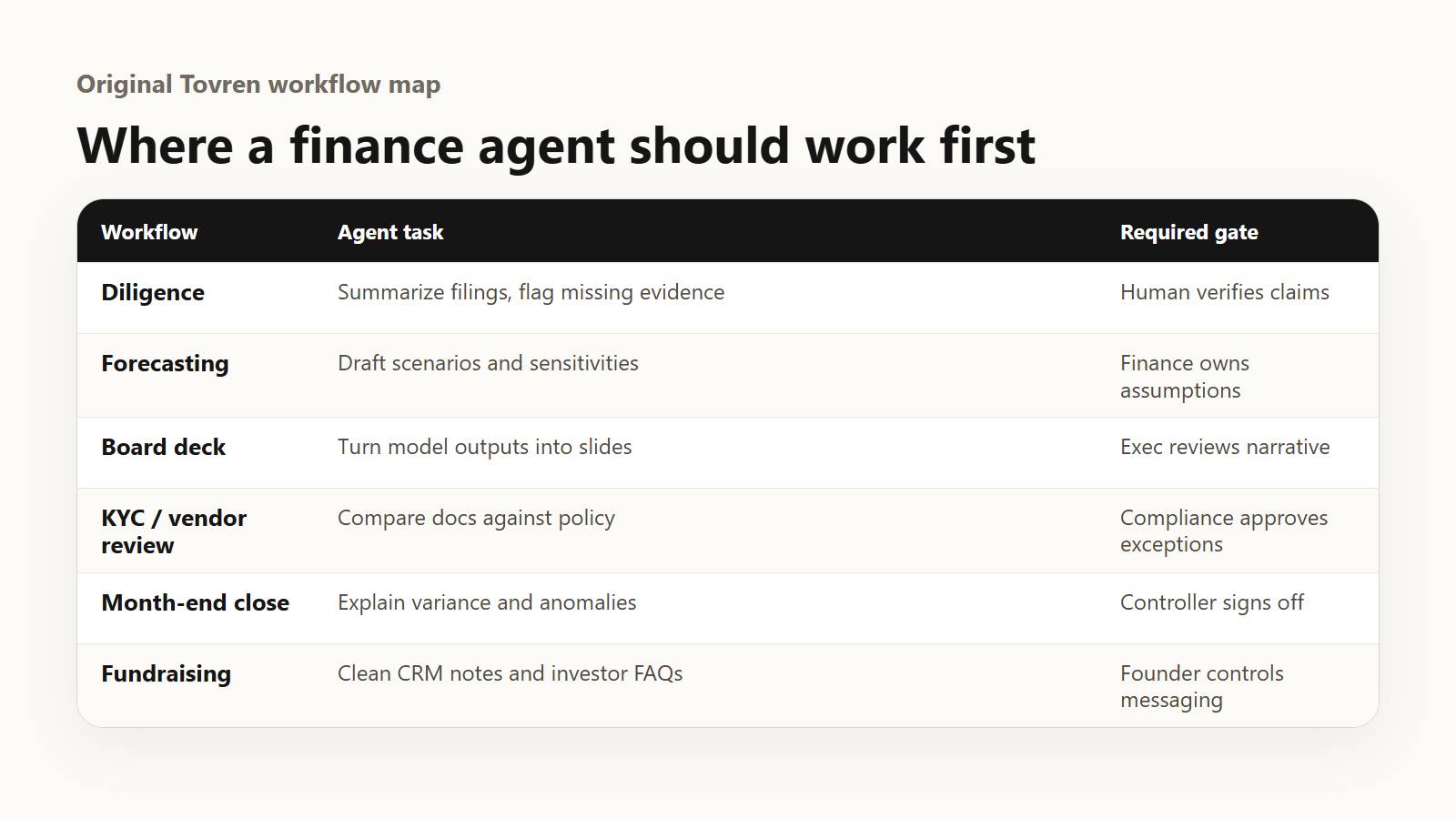
7 workflows regular teams can copy now
| Workflow | Who can use it | Inputs | AI agent job | Human approval |
|---|---|---|---|---|
| 1. Spreadsheet model refresh | Finance ops, founders, analysts | Forecast workbook, actuals, assumptions, prior model notes | Update tabs, flag formula breaks, create sensitivity scenarios, summarize changes. | CFO or owner approves assumptions and final forecast. |
| 2. Investor or board update deck | Founders, chiefs of staff, RevOps | KPIs, pipeline, cash, hiring, customer wins, risks | Turn spreadsheet changes into slides, draft speaker notes, highlight anomalies. | CEO reviews narrative, risk framing, and claims. |
| 3. Account diligence brief | Sales, customer success, consultants | CRM record, emails, website, support tickets, usage data | Prepare a meeting brief with stakeholders, risks, expansion signals, and next-best questions. | Account owner confirms sensitive details and next steps. |
| 4. Month-end variance narrative | Small finance teams, ops leads | General ledger export, budget, prior month, department notes | Find variances, draft explanations, request missing context, prepare close summary. | Controller approves accounting treatment and final close packet. |
| 5. Vendor and partner screening packet | Procurement, agencies, founders | Vendor docs, contract, security questionnaire, public company info | Assemble a risk packet, flag missing documents, summarize commercial and compliance issues. | Legal, security, or finance approves the vendor decision. |
| 6. Proposal and pitch builder | Consultants, agencies, B2B teams | Client brief, past proposals, pricing sheet, case studies | Create target list, draft proposal deck, tailor proof points, prepare cover email. | Partner or sales lead approves pricing and claims. |
| 7. Weekly market and competitor watch | Product, strategy, marketing, investors | News, filings, pricing pages, changelogs, analyst notes | Summarize changes, rank importance, connect signals to open decisions. | Strategy owner decides whether to act or ignore. |
How to build the first workflow without overengineering it
Pick one workflow where the output already exists every week or month. Do not start with a vague “AI agent strategy.” Start with a painful artifact: the weekly revenue review, the founder update, the close report, the sales-call prep brief, or the customer renewal packet.
Define five things before using any model. First, list the source files the AI may read. Second, describe the finished artifact in plain English. Third, write the review checklist a human will use. Fourth, set hard limits on what the AI may not do, such as sending emails, changing accounting entries, approving discounts, or contacting customers. Fifth, measure the baseline: how long the task takes today, how often it contains errors, and how much review it requires.
The best early pilot is not the most glamorous task. It is the task with repeatable inputs, visible output quality, and a reviewer who already understands the work. A messy process with no owner will not become clean because an agent touched it. It will become a faster mess.
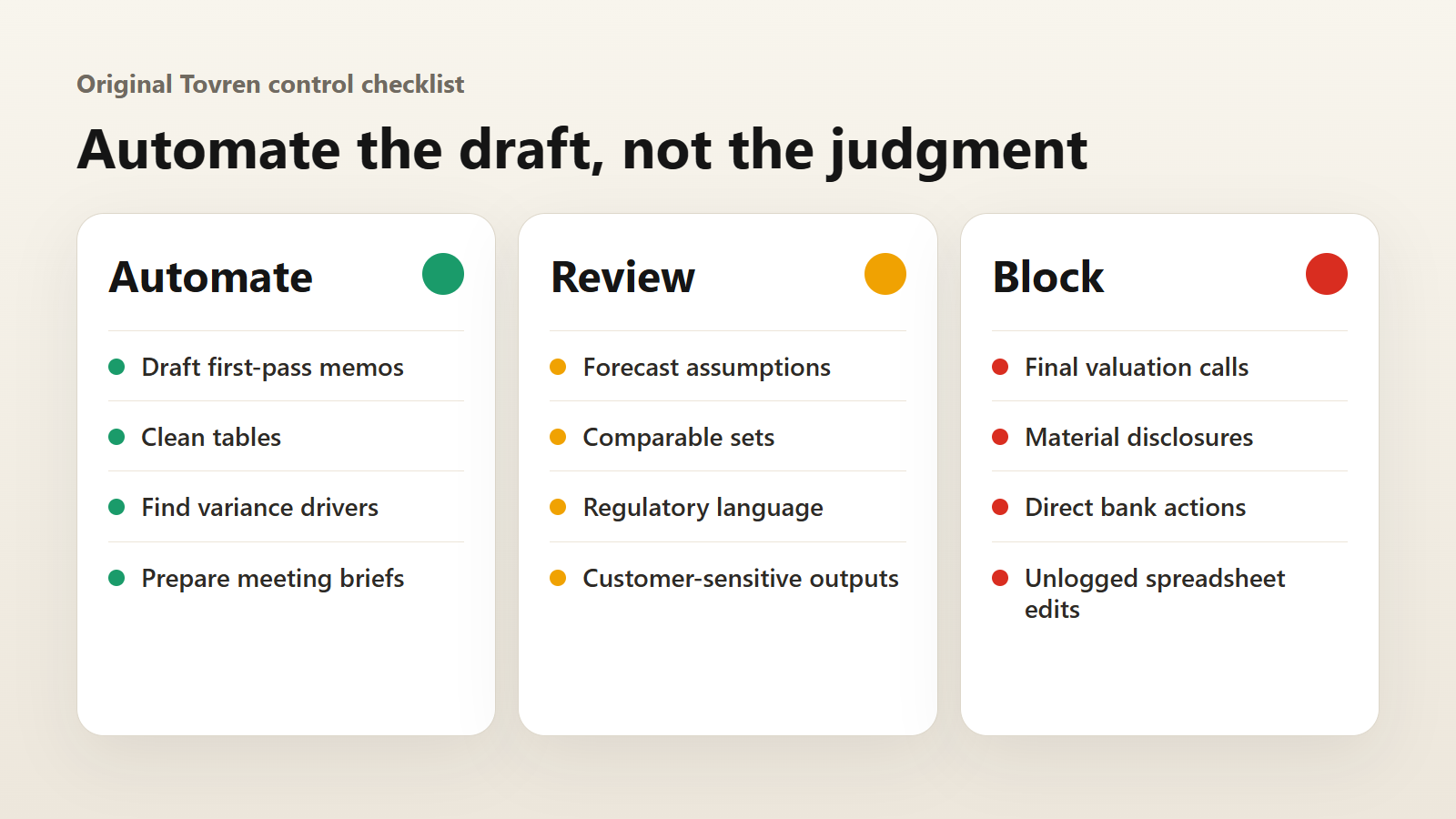
What to automate vs. what to keep human
| Good candidates for automation | Keep human |
|---|---|
| Drafting first-pass decks, memos, briefs, and variance explanations. | Final external messaging, legal positions, board-level claims, and investor statements. |
| Comparing files, finding formula issues, flagging missing documents, and summarizing changes. | Materiality thresholds, accounting judgments, pricing approvals, and risk acceptance. |
| Converting spreadsheets into charts, slide outlines, and narrative summaries. | Strategic interpretation, customer commitments, and sensitive personnel decisions. |
| Preparing diligence packets from approved sources. | Approving vendors, onboarding customers, escalating compliance cases, or rejecting counterparties. |
Risk checklist before you let an agent near real work
- Data access: Limit the agent to the files and systems needed for the workflow. Do not give broad workspace access by default.
- Source discipline: Require file names, cell references, document sections, or links for important claims.
- Permission gates: Block autonomous sending, filing, customer contact, accounting entries, or contract changes.
- Cost controls: Set task budgets, stop conditions, and review points, especially with high-effort models.
- Prompt-injection defense: Treat emails, web pages, and third-party documents as untrusted inputs.
- Review burden: Measure whether the agent reduces work or merely creates more checking.
- Auditability: Preserve prompts, files used, tool calls, output versions, and final approver.
- Benchmark realism: Public benchmarks are useful signals, but your own files are the real test.
A 14-day pilot plan
| Day | Action | Output |
|---|---|---|
| 1 | Choose one workflow and one owner. | Pilot charter with success metric. |
| 2 | Collect source files and define access limits. | Approved input folder or workspace. |
| 3 | Write the workflow prompt, review checklist, and “do not do” list. | Reusable agent instruction pack. |
| 4 | Run the current manual process and record baseline time/errors. | Baseline scorecard. |
| 5–6 | Run the AI-assisted version on the same or comparable inputs. | Draft artifact plus logged issues. |
| 7 | Human reviewer compares AI output to manual output. | Go/no-go decision for week two. |
| 8–10 | Tighten instructions, add missing source rules, and repeat on new inputs. | Version-two workflow. |
| 11 | Run risk review: privacy, permissions, cost, and approval path. | Risk signoff checklist. |
| 12 | Create a handoff template for reviewers. | Reviewer guide and escalation rules. |
| 13 | Train two backup users. | Repeatable team process. |
| 14 | Decide whether to scale, pause, or kill the workflow. | Final pilot memo with time saved, errors caught, and risks found. |
The practical takeaway
The boring interpretation of Anthropic’s finance-agent launch is that Claude wants more Wall Street customers. The useful interpretation is bigger: AI agents are being packaged around actual business artifacts. The interface is no longer only a chat box. It is the spreadsheet, the deck, the memo, the diligence folder, the close checklist, and the approval queue.
Regular teams should not copy the bank budget. They should copy the operating model: narrow workflow, governed data, clear output, visible citations, human approval, and a short pilot. That is how vertical agents become useful before they become expensive theater.
FAQ
Are Claude’s finance agents only useful for banks?
No. The templates are aimed at financial services, but the underlying patterns apply to many teams: spreadsheet refreshes, pitch decks, diligence briefs, close reports, and risk packets.
Do I need Claude Managed Agents to copy these workflows?
No. Managed Agents may matter for programmatic, governed, multi-step work. A small team can start with a supervised workflow inside existing tools, as long as access, review, and approval are clearly defined.
Should an AI agent send client emails or approve financial decisions?
Not in an early pilot. Let the agent draft, summarize, compare, and flag. Keep sending, approval, accounting judgment, legal judgment, and customer commitments with humans.
What is the best first workflow to test?
Choose a recurring workflow with stable inputs and an obvious reviewer: weekly KPI deck, board update, sales-account brief, variance report, or vendor screening packet.
How should teams think about benchmarks?
Use benchmarks as directional signals. They do not replace a pilot on your own files, with your own approval standards and cost constraints.
What can go wrong?
The agent can use stale data, overstep instructions, burn tokens, create polished but wrong narratives, or increase review burden. That is why the pilot needs source checks, permission gates, and stop conditions.
Source Log
Last verified: May 21, 2026. Article package generated through the Tovren Editorial OS project in GPT Pro Extended mode, then cleaned, image-QA checked and published through WordPress.
- Anthropic: Agents for financial services – May 5, 2026 announcement of ten ready-to-run finance agent templates and Microsoft 365 add-ins.
- Anthropic: Claude Opus 4.7 – April 2026 model update relevant to financial task performance and agentic workflows.
- Axios: Anthropic targets Wall Street – May 5, 2026 coverage of Anthropic financial-services positioning and Wall Street demos.
- TechRadar: Anthropic finance agents coverage – May 6, 2026 coverage of finance agents and Microsoft 365 workflow angle.
- Vals AI benchmarks – Public benchmark context for finance-agent claims and shifting leaderboard results.
- Reddit: Anthropic community caveat – Community caveat on Opus 4.7 agent aggressiveness and review burden.
Related Tovren Hubs
For follow-up reading, browse Workflows, Business AI, AI Tools, and Automation & Agents.