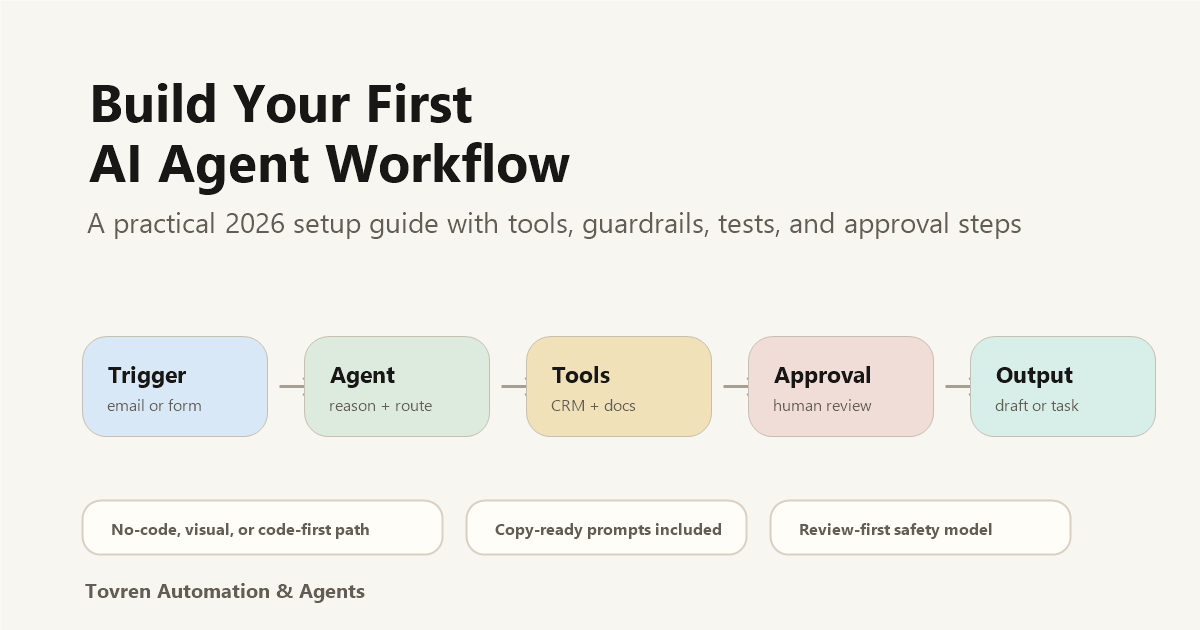
Short answer: Your first AI agent workflow should be narrow, reversible, and measurable. Pick one repeatable task, give the agent limited tool access, log every action, and require human approval before it changes files, sends messages, or touches customer data.
Updated May 11, 2026. The safest way to build your first AI agent is not to start with a fully autonomous system. Start with one narrow workflow: a trigger, one agent instruction, one tool, one approval step, and one measurable output. For most teams, use Zapier Agents if the work lives in business apps, n8n if you want a visual workflow you can control, and OpenAI Agents SDK if you are building a product-grade agent in code.
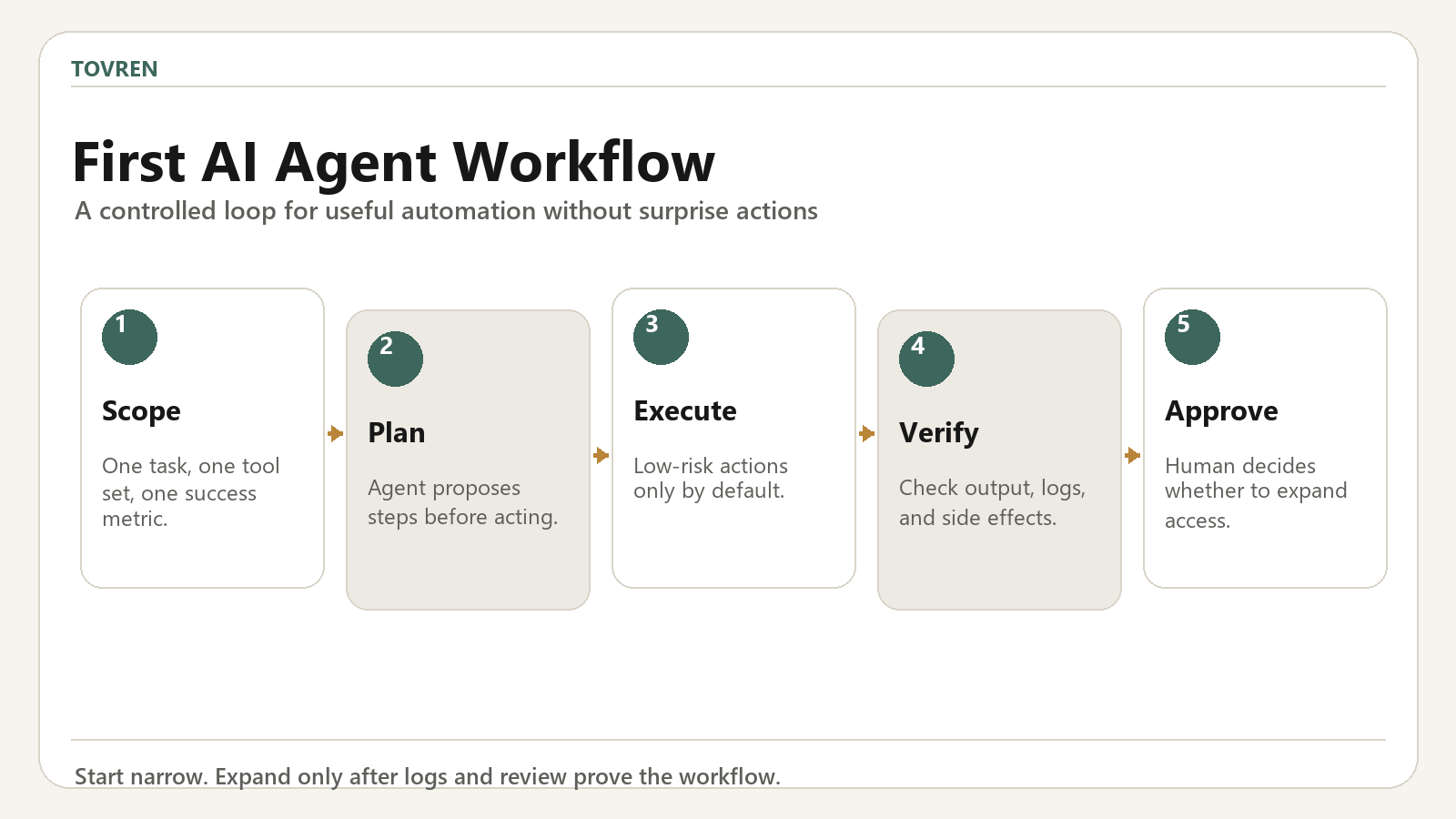
This guide shows a practical first build you can complete in about an hour: an agent that receives a request, checks one source or app, drafts a result, and waits for human approval before taking any high-impact action.
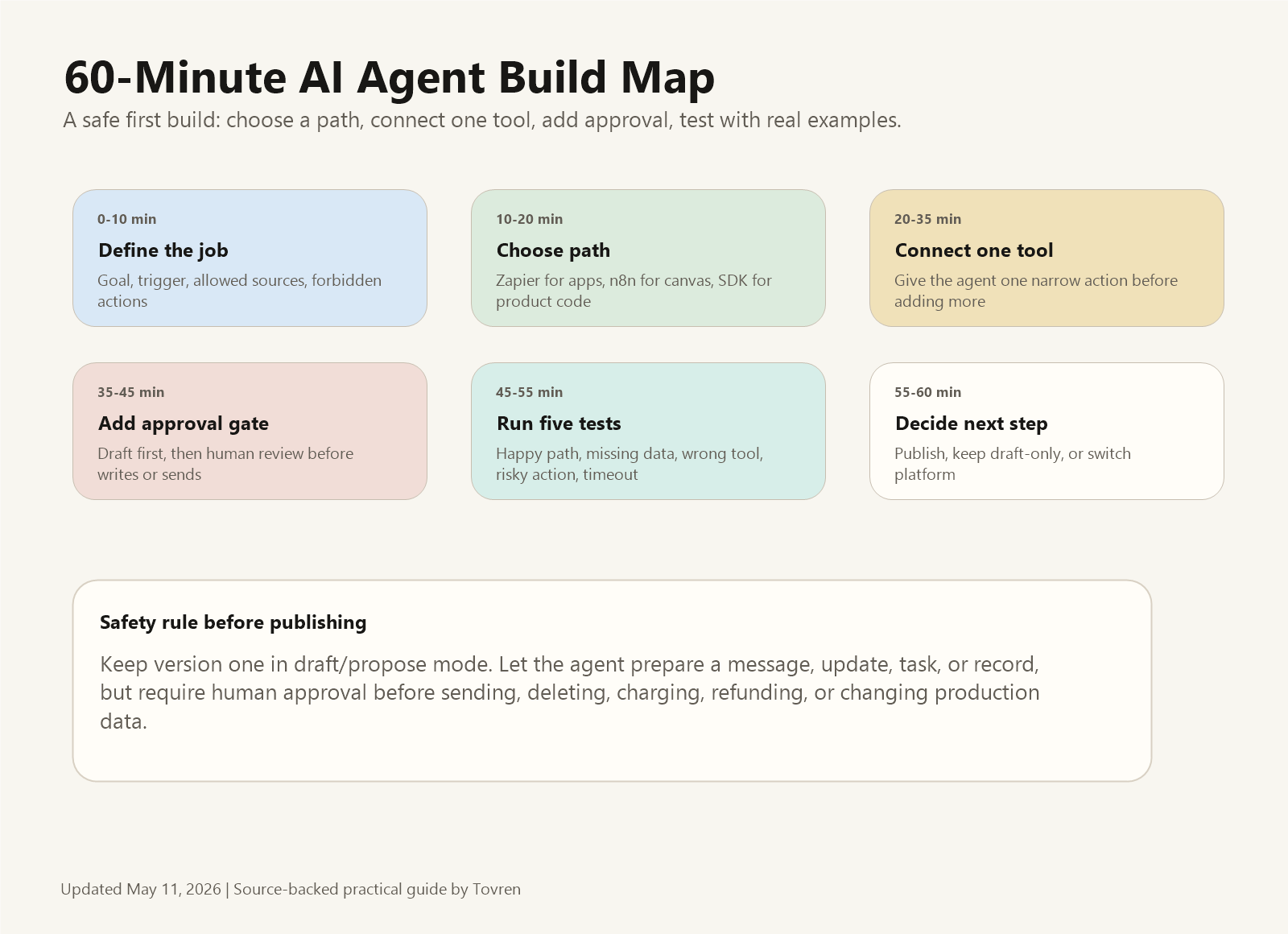
What You Will Build
The first version should be boring on purpose. It should not send messages, delete data, issue refunds, publish content, or change production records without review.
| Part | What it does | Safe first version |
|---|---|---|
| Trigger | Starts the workflow | Form submission, new email label, scheduled check, or manual button |
| Agent | Interprets the request and decides whether a tool is needed | One focused instruction with a fixed output format |
| Tool | Retrieves or updates external information | Read-only search, CRM lookup, docs lookup, or spreadsheet read |
| Approval | Stops risky actions until a human reviews | Draft/propose mode before any send, write, delete, refund, or publish action |
| Output | Gives the reader a useful result | Draft message, research summary, task recommendation, or review queue |
Choose Your Build Path
Use the lightest platform that solves the workflow. Do not start with a framework if a no-code agent can prove the use case.
| If your workflow is… | Start with | Why |
|---|---|---|
| Inside Gmail, Slack, Sheets, HubSpot, Salesforce, forms, or other connected apps | Zapier Agents | Zapier documents an agent setup flow with instructions, app connections, triggers, actions, knowledge sources, testing, and publishing. |
| A visible automation with custom APIs, tool nodes, and logic you want to inspect | n8n AI Agent | n8n’s AI Agent node uses tools and APIs, and the docs say it must connect to at least one tool sub-node. |
| A product feature, internal app, or developer-owned workflow | OpenAI Agents SDK | OpenAI’s 2026 SDK update adds model-native agent infrastructure, tools, MCP, file work, and native sandbox execution. |
The 7-Step Build
1. Write the Job in One Sentence
Bad: “Make an agent for customer support.” Good: “When a support ticket is tagged billing, look up the customer plan, draft a reply using the refund policy, and ask a human to approve before sending.”
2. Define Allowed Sources
List exactly where the agent can look: one help center, one CRM object, one Google Drive folder, one database table, or one approved web source list. More sources usually means more failure paths.
3. Give the Agent One Tool
The first build should connect one tool only. For Zapier, that might be a CRM lookup. For n8n, it might be an HTTP Request or database tool node. For OpenAI Agents SDK, it might be a function tool or hosted retrieval tool.
4. Force a Fixed Output Format
Do not let the agent freestyle. Require a small structured output:
Summary:
Recommended action:
Source used:
Confidence: High / Medium / Low
Needs human approval: Yes / No
Draft output:
5. Add an Approval Gate
Keep version one in draft mode. The agent can prepare a message, task, CRM update, or content brief, but a person should approve before anything leaves the system or changes important data.
6. Test Five Real Cases
- Happy path: normal request with all data present.
- Missing data: important field or source is unavailable.
- Wrong tool temptation: the agent tries to use a tool outside scope.
- Risky action: user asks it to send, delete, refund, charge, or publish.
- Timeout or failure: the tool returns an error.
7. Publish Only After Failures Are Boring
When failure cases reliably become “needs review” instead of wrong actions, you can publish a limited version. Expand tools only after the first workflow is stable.
Path A: Build It in Zapier Agents
Zapier Agents is the fastest route when your workflow is mostly app automation. Zapier’s official guide says you can start from a custom agent or template, describe the trigger, tasks, and apps, connect the apps it identifies, configure the trigger and tools, test the agent, and publish it.
Starter Prompt
Create an agent that runs when [trigger] happens.
It should use [app/tool] to retrieve [data].
It should draft [output] for human review.
It must not send, delete, refund, charge, or publish anything without approval.
If required data is missing, stop and explain what is missing.
Best first workflow: inbound lead enrichment, sales follow-up drafts, support triage, weekly app-data summary, or CRM cleanup proposals.
Path B: Build It in n8n
n8n is better when you want to see and control the workflow. The official AI Agent node documentation says the agent uses external tools and APIs, and that you must connect at least one tool sub-node. That makes it a good fit when you want visible logic, tool boundaries, and approval nodes.
Starter Workflow
- Add a trigger: webhook, schedule, form, or app event.
- Add the AI Agent node.
- Connect a chat model.
- Connect one tool sub-node, such as a docs lookup, HTTP request, spreadsheet read, or CRM lookup.
- Add a review step before any action node that writes or sends.
- Log the run output and errors so you can improve the prompt.
Best first workflow: competitor monitoring, support ticket classification, invoice review queue, internal document Q&A with escalation, or daily operations digest.
Path C: Build It with OpenAI Agents SDK
Use OpenAI Agents SDK when the agent is part of a product, developer-owned workflow, or internal system that needs stricter engineering. OpenAI’s 2026 SDK update describes standardized agent infrastructure, a model-native harness, MCP, skills, file and tool work, and native sandbox execution. OpenAI’s practical guide also emphasizes guardrails and human intervention for high-risk actions.
Starter Architecture
- Define the agent’s instruction and output schema.
- Add one tool with narrow permissions.
- Turn on tracing from the beginning.
- Add guardrails for unsafe input, unsupported output, and risky tool use.
- Use sandbox execution for file, shell, browser, or code work.
- Require human approval for irreversible actions.
Best first workflow: support draft assistant, internal research agent, code-review helper, policy lookup agent, or controlled operations assistant.
Guardrails Before You Publish
| Risk | Guardrail | Example rule |
|---|---|---|
| Wrong source | Source whitelist | Use only approved docs, CRM fields, or URLs. |
| Unauthorized action | Permission boundary | The agent can draft but cannot send or delete. |
| Bad confidence | Stop condition | If confidence is medium or low, ask for review. |
| Tool loop | Retry budget | Stop after two failed tool calls. |
| Customer impact | Human approval | Require review before refunds, charges, messages, or account changes. |
Copy-Ready Agent Instruction
You are an AI workflow assistant for [team].
Goal: [specific job].
Allowed sources: [sources].
Allowed tools: [tools].
Forbidden actions: send, delete, refund, charge, publish, or change production data without approval.
Required output:
1. Summary
2. Source used
3. Recommended action
4. Confidence
5. Draft output
6. Approval needed: yes/no
If data is missing or confidence is below 80%, stop and ask for review.
Common Problems and Fixes
| Problem | Why it happens | Fix |
|---|---|---|
| The agent invents details. | Sources are too broad or not required in the output. | Require “source used” and stop if no approved source supports the answer. |
| The agent chooses the wrong tool. | Too many tools are connected too early. | Start with one tool, then add tools one at a time. |
| The workflow is hard to debug. | Outputs are unstructured. | Use a fixed output schema and keep run logs. |
| The agent acts too aggressively. | No approval gate. | Keep first version in draft/propose mode. |
| Costs or usage spike. | The trigger runs too often or the task is too broad. | Batch low-value tasks and reserve agent runs for ambiguous work. |
FAQ
What is the easiest way to build a first AI agent?
Use Zapier Agents if the workflow is mostly business apps and you want the fastest no-code path. Use n8n if you want more visible workflow control. Use OpenAI Agents SDK if you are building a product or developer-owned internal tool.
Should my first agent be autonomous?
No. The first version should draft, recommend, classify, or prepare actions for review. Add autonomy only after you have run real failure cases and added guardrails.
How many tools should a first agent have?
One. More tools create more ways to fail. Add a second tool only after the first workflow is reliable and easy to debug.
What is a good first agent project?
Pick a workflow with repeated inputs, clear success criteria, and low downside: support triage, lead research, meeting follow-up drafts, weekly monitoring, or internal document lookup.
Source Log
- Zapier: Build an agent in Zapier Agents – used for Zapier setup steps, triggers, actions, knowledge sources, testing, publishing, usage notes, and limits.
- n8n: AI Agent node documentation – used for tool sub-node requirements, Tools Agent behavior, and external tools/API notes.
- n8n: What’s an agent in AI? – used for the distinction between chains and agents, and agent action/evaluation loop explanation.
- OpenAI: The next evolution of the Agents SDK – used for 2026 SDK updates, tools, MCP, skills, file work, and sandbox execution.
- OpenAI: A practical guide to building agents – used for guardrails, human intervention, handoffs, and high-risk action guidance.